

Most of Your Audience Never Hears You
Verizon Media and Publicis Media found that 69% of people surveyed say they watch video without sound in public places, and 80% say they are more likely to finish a video when captions are available. That study is from 2019, and we have found no newer published measurement, but autoplay-muted feeds have only become more common since. The figure you will often see instead, that 85% of Facebook video is watched without sound, comes from a 2016 Digiday report on a few publishers' own data; it and the other popular caption numbers are traced in our fact-check of popular video statistics.
So the caption layer isn't an accessibility checkbox bolted on at the end. On short-form especially, it is the audio track. Burned-in captions come standard on our edits, and our content localization work adds caption files and translations. A badly timed caption line is harder to forgive than a rough cut: viewers forgive a rough transition, but not reading a sentence that arrives a beat after it was spoken.
1. Burned-In vs. Closed Captions — The Actual Decision
Creators treat this as a style preference. It's a distribution decision, and the two options solve different problems.
Burned-in (open captions) are rendered into the pixels. They can't be turned off, can't be restyled, can't be translated by the platform, and can't be read by a search crawler. They also always show up, in the exact typeface and position you designed, on every platform including the ones with no caption support.
Closed captions ship as a separate sidecar file (.srt, .vtt, .sbv) attached to the video. The viewer can toggle them, the platform can translate them, and — this is the part creators miss — the text becomes machine-readable metadata.
| Burned-in | Closed captions | |
|---|---|---|
| Viewer can disable | No | Yes |
| Machine-readable for search / AI | No | Yes |
| Survives re-upload & repost | Yes | No — file must be re-attached |
| Auto-translatable by platform | No | Yes |
| Design control | Total | Platform-styled |
| Accessibility compliance | Partial | Full |
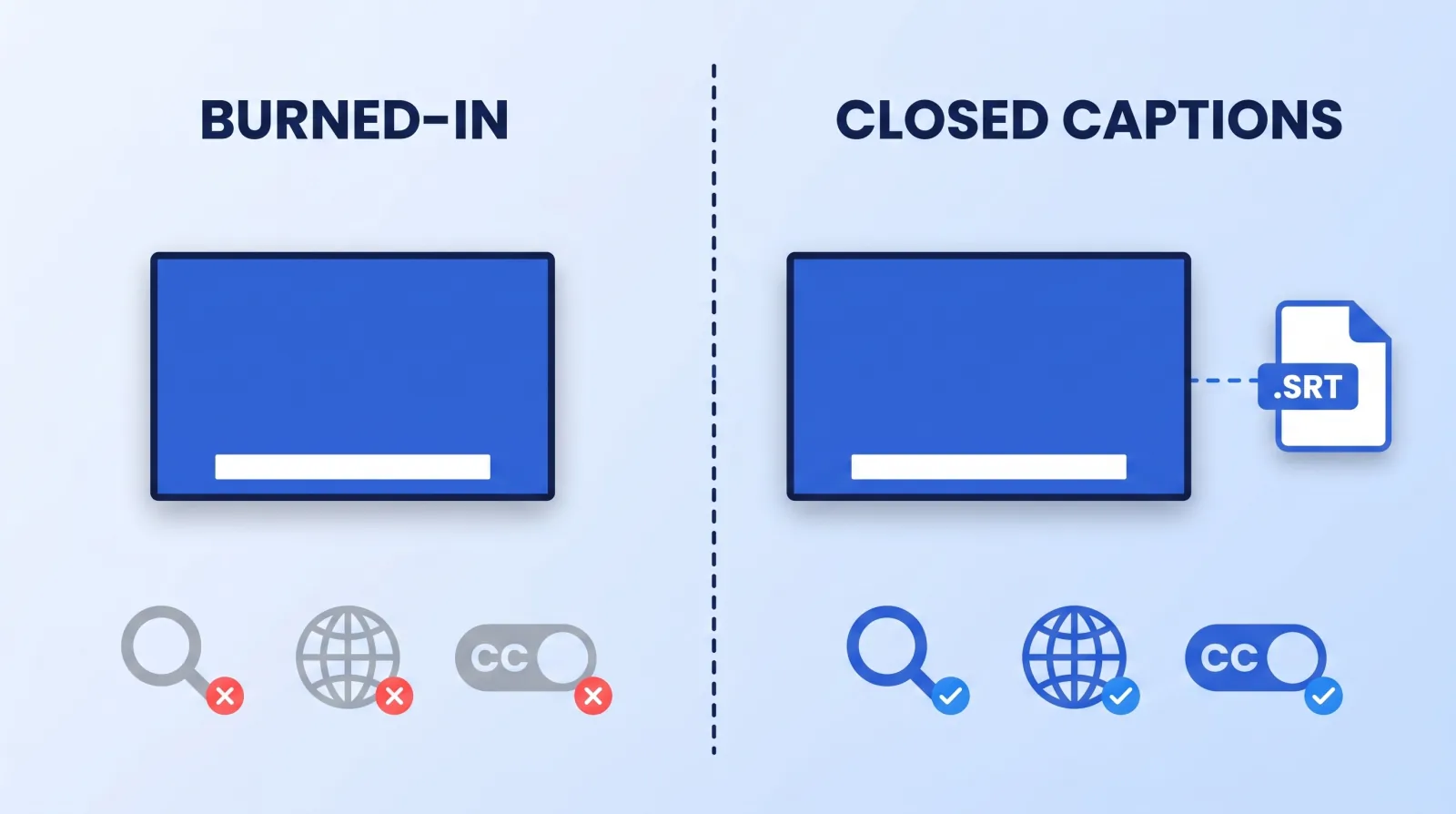
.srt is all three.The answer for almost every creator is both, split by format:
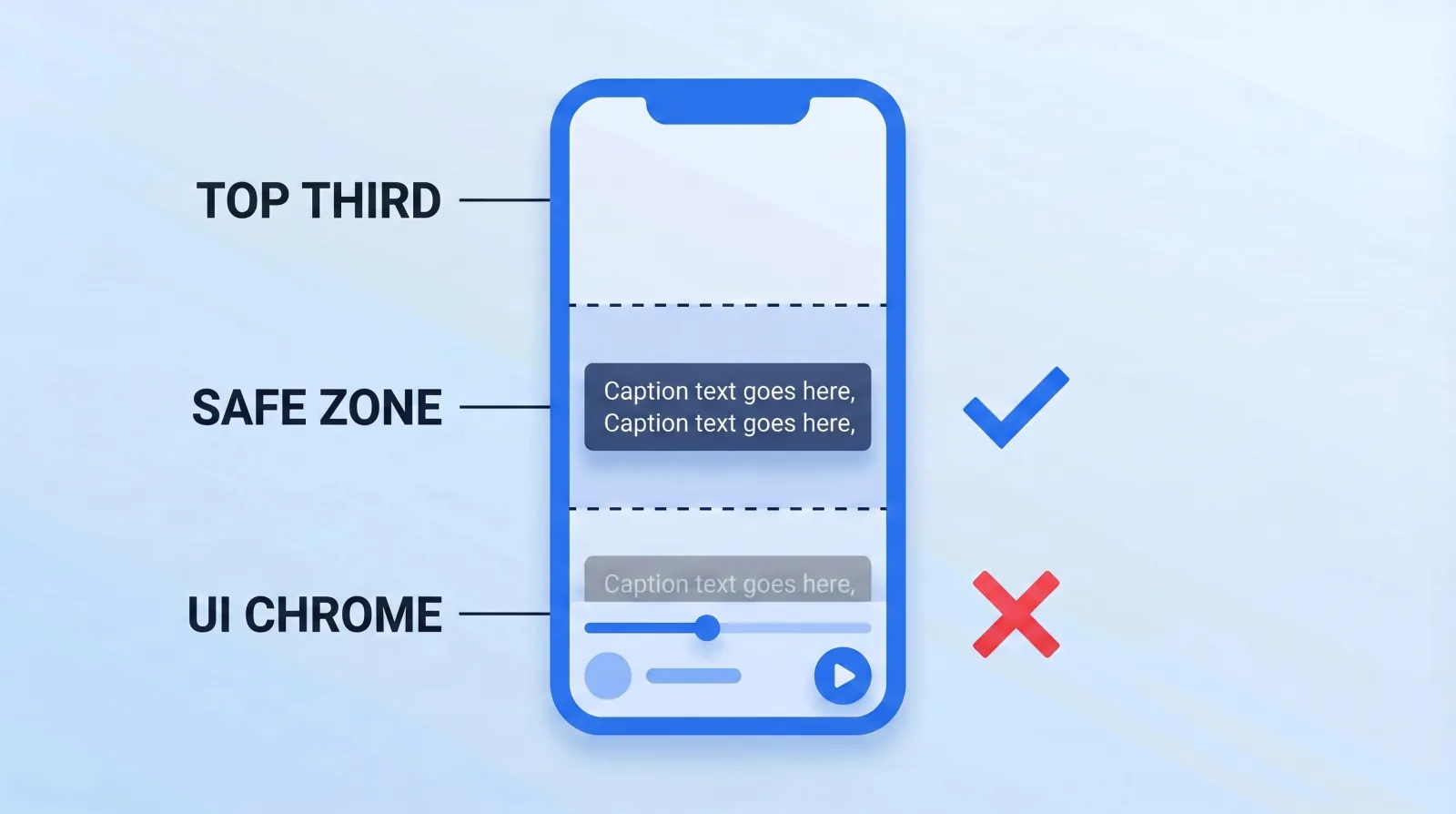
- Short-form (Shorts, Reels, TikTok): burned-in, always. The clip gets reposted, downloaded, and re-uploaded across accounts, and a sidecar file does not travel with it. Position the text in the middle third, not the bottom — platform UI chrome eats the lower 15% of the frame.
- Long-form YouTube: closed captions as the primary layer, burned-in only for stylized emphasis (a single punched-in word, a translated line of foreign dialogue, an on-screen quote). Uploading a real
.srtis a five-minute job that pays for itself; the supported caption file formats list covers everything an editor's export will produce. - Client and brand deliverables: both, plus a clean
.srthanded over as a separate asset. The sponsor will re-cut your video for their own paid placements, and they need the text file.
2. The Caption Spec We Hand Every Editor
Every caption job at Mark Studios works from the same caption spec. It's part of the same handoff discipline we cover in how to brief a video editor — a caption style that drifts between videos reads as amateur faster than almost anything else.
| Parameter | Short-form | Long-form |
|---|---|---|
| Max characters per line | 24–28 | 38–42 |
| Max lines on screen | 2 | 2 |
| Minimum duration per cue | 0.7s | 1.0s |
| Reading rate ceiling | ~17 chars/sec | ~17 chars/sec |
| Vertical position | Middle third | Lower third, above UI |
| Stroke / background | 4–6px stroke or 60% plate | Platform default |
| Font | Channel brand font, 700+ weight | N/A (platform-styled) |
Two rules that aren't in the table and matter more than anything in it:
- Break lines on grammar, not on width. "We shipped it / on Tuesday" reads clean. "We shipped / it on Tuesday" makes the viewer re-parse the sentence. Auto-caption tools break on width every time.
- Never let a cue outlive its sentence. A caption still sitting on screen after the speaker has moved on is one of the easiest revision notes to avoid.
Font weight and color should come out of the channel's existing type system, not be picked per video. If you don't have one yet, that's covered in our guide to building a channel branding and visual identity system.
3. The Pre-Flight Caption Gate
This is the checklist that runs on every deliverable before it leaves our pipeline. It takes about four minutes on a ten-minute video.
- ✅ Every proper noun, brand name, and product name spelled correctly — auto-captioning gets these wrong roughly every time.
- ✅ No caption sitting under platform UI (progress bar, handle, CTA button, Shorts "Subscribe" chip).
- ✅ Numbers rendered as digits, not words — "$4,200" not "forty-two hundred dollars."
- ✅ No cue shorter than 0.7s or longer than ~6s.
- ✅ Line breaks land on clause boundaries.
- ✅ Captions read correctly at 60% device brightness, outdoors, on a phone. Test it on a phone, not on the edit monitor.
- ✅ When a caption file is part of the order (it's a paid add-on), the sidecar
.srtis exported and attached separately, even when captions are also burned in. - ✅ Profanity and sponsor-sensitive language matches what's actually in the audio — a mismatched caption is a demonetization flag on some brand deals.
Point 4, plus reading speed and line length, can be checked by machine: paste the .srt into our free caption and subtitle checker and it lists every cue that runs too fast, too long or too short against Netflix, BBC or DCMP limits.
4. Where Auto-Captions Still Fail
YouTube's automatic captioning and the on-device generators in CapCut, Premiere, and Descript are all good enough now that starting from scratch is a waste of time. Start from the machine pass, then fix the four things it reliably breaks:
- Proper nouns and jargon. Brand names, product SKUs, niche terminology, and anybody's surname. Build a running glossary per channel and search-replace it.
- Overlapping speakers. Multi-cam interviews and podcasts produce interleaved garbage. If two people talk over each other, caption the one who carries the point and drop the other.
- Non-speech audio that carries meaning. A laugh, a beat drop, a door slam. For compliance-grade captions these need bracketed cues —
[laughs],[music swells]. - Emphasis and pacing. The machine gives you a flat wall of text. A caption that punches one word up in size at the moment it's stressed is doing the job of a sound cue for the muted viewer — the same principle as the mix decisions in our sound design and music selection guide.
5. Captions Are an SEO and GEO Asset
The part that gets ignored: a real caption track is the only full-text version of your video that a machine can read.
Google indexes uploaded caption tracks. So do the AI answer engines — when ChatGPT, Perplexity, or an AI Overview cites a video, it is typically working from the video's text (title, description, transcript), not the pixels. A video with burned-in-only captions is, to every one of those systems, a silent file with a title attached. That's a wasted asset, and it's the exact opposite of what we argue for in our YouTube SEO guide.
Three moves that compound:
- Upload the
.srton every long-form video via YouTube Studio's subtitle tools. Five minutes, permanent. - Publish the cleaned transcript as a blog post or description-linked page. One video becomes an indexable text page that AI engines can quote.
- Translate the caption file before you translate the audio. A translated
.srtcosts a few dollars and opens a language market; when a market proves out, that's the signal to invest in AI dubbing and multi-language audio.
There's a floor requirement underneath all of this too: captions for prerecorded video are WCAG Success Criterion 1.2.2, Level A — the baseline conformance level, not an advanced one. If you produce video for a brand, an institution, or anything public-sector-adjacent, expect to be asked for a caption file, and check which accessibility rules apply to the publisher.
The Bottom Line
Burn captions into short-form because the clip travels without you; attach a real caption file to long-form because the text is the only part a machine can read. Doing only one of the two means either your reposted Reels are silent to half their audience, or your best long-form video is invisible to every AI search engine that would otherwise cite it.
Get the spec written down once, hand it to whoever edits, and run the eight-point gate before anything ships. It's four minutes a video, and it's the cheapest retention and reach work available.


