

The Camera Body Is the Least Consequential Purchase on Your List
YouTube's recommended upload encoding settings specify about a dozen things: container, codec, profile, chroma subsampling, GOP length, bitrate, colour space, audio sample rate. Not one of them is a camera brand. The platform does not know, and cannot tell, what you shot on.
Neither can your audience. But your editor can — and not in the way most creators assume. Across 10,000+ edited projects and 100M+ views, the footage that arrives at our edit bay unusable almost never fails because the sensor was too small. It fails because the room was dark and the ISO went to 12800, because the mic was clipped into distortion, because the whole shoot is one flat 8-bit file that falls apart the moment anyone touches the shadows.
Gear guides are written by people who unbox cameras. This one is written by people who open the files afterwards. The ranking changes completely.
Spend the Budget in the Order the Edit Notices
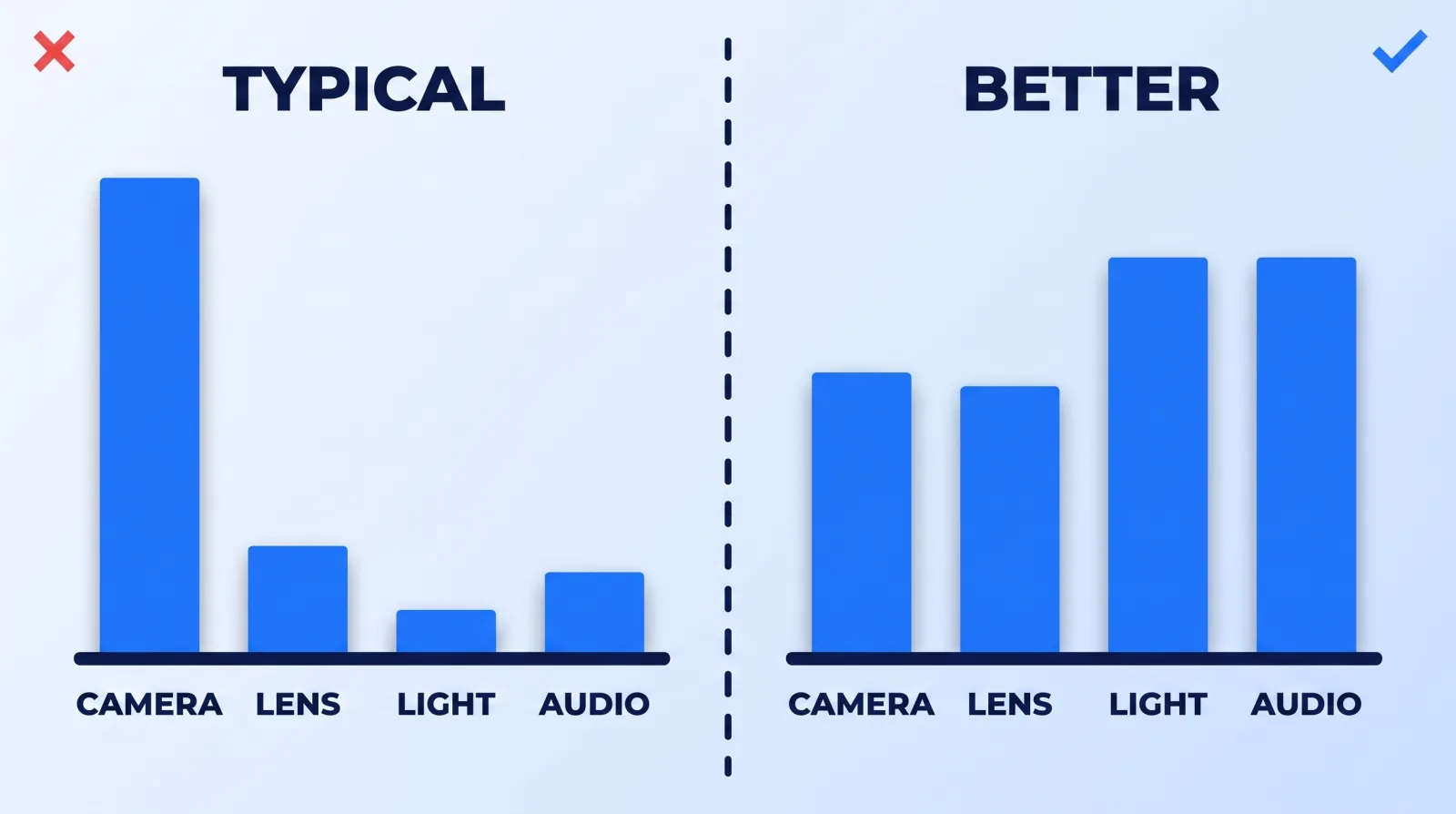
Here is the honest hierarchy, ordered by how much each purchase changes the finished video per dollar:
| Priority | What it buys you | What happens in post if you skip it |
|---|---|---|
| 1. Light | Clean shadows, low ISO, separation from the background | Noise reduction that smears skin; grading has no latitude |
| 2. Audio | Intelligible, close, non-distorted voice | Nothing. Clipped audio is permanently gone |
| 3. Lens | Subject separation, sharpness, low-light headroom | The "cinematic" look never appears no matter what LUT lands on it |
| 4. Media & storage | Fast offload, safe archive, proxy workflow | Days lost to transfers; one drive failure ends the project |
| 5. Camera body | Codec, bit depth, frame rate options, autofocus | Bad footage, faster |
Notice the body is not last because bodies do not matter. It is last because in 2026 the floor is genuinely high — a five-year-old mirrorless camera and a current one both record clean, sharp, well-exposed images when the light is right. Bodies stopped being the bottleneck. Light never did.
Light Is the Cheapest Upgrade Nobody Buys
A $200 lighting kit will improve your channel more than a $2,000 camera upgrade, and it is not close. Light is what lets you shoot at base ISO, which is what gives the grade something to work with — and what keeps you out of AI noise reduction that softens skin while it cleans grain — which is the entire reason colour grading works on some footage and does nothing on other footage.
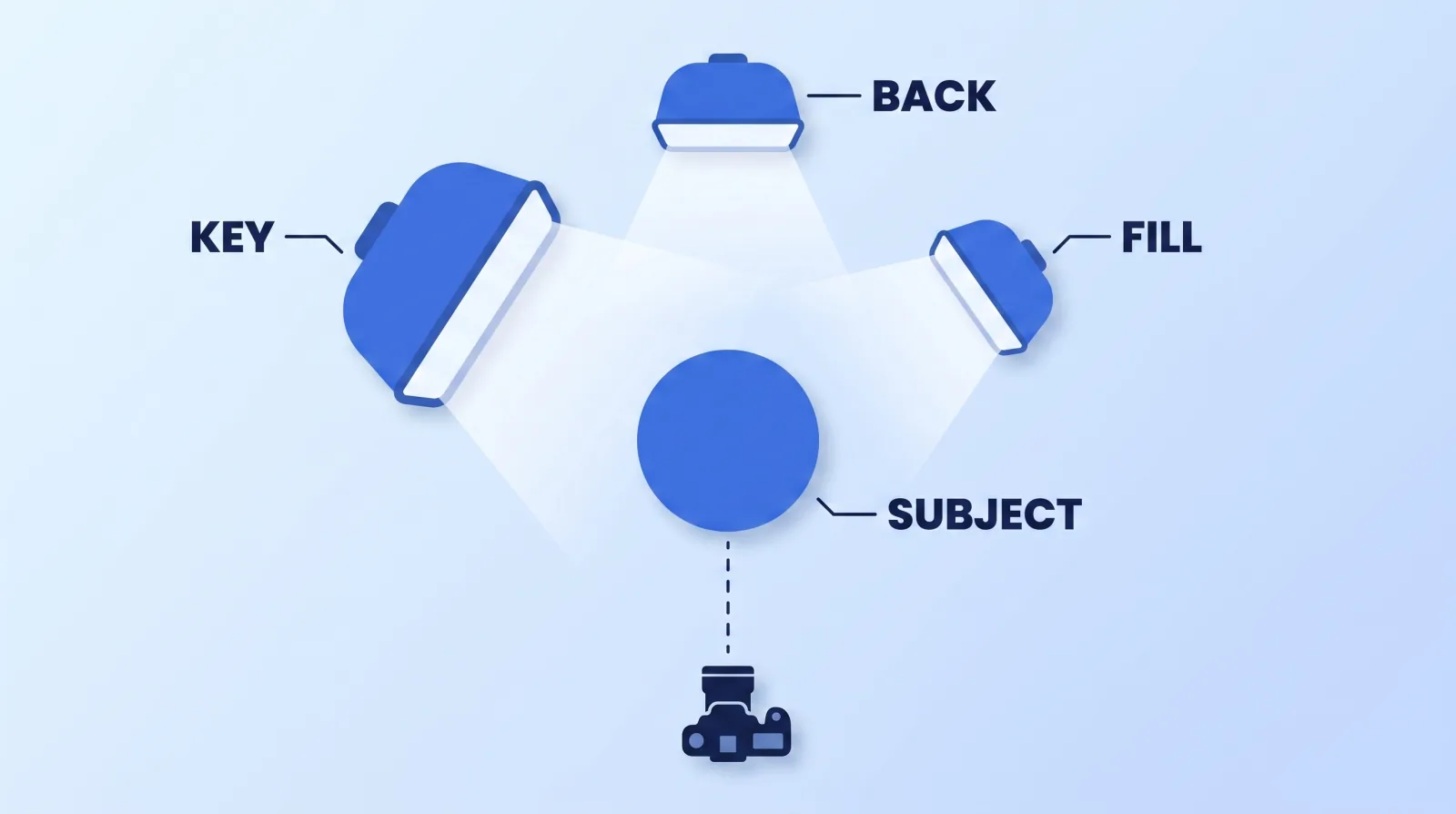
Three lights, in buying order:
- Key. One large, soft source, roughly 45 degrees off the camera axis and slightly above eye line. Bigger and closer is softer. A cheap panel through a $30 diffusion frame beats an expensive bare panel.
- Fill. Anything that lifts the shadow side. This does not need to be a light — a white foam board reflecting the key is free and works.
- Back. A small light behind and above, edging the shoulders and hair. This is the one that reads as "produced" on camera, and it is the one most creators never add.
If you buy only one thing, buy the key and a diffuser. If you have a window, the window is the key and you have already spent nothing.
The Recording Settings That Cost More Than the Body
Two cameras at the same price can hand the edit completely different amounts of room, based on menu settings that cost nothing to change.
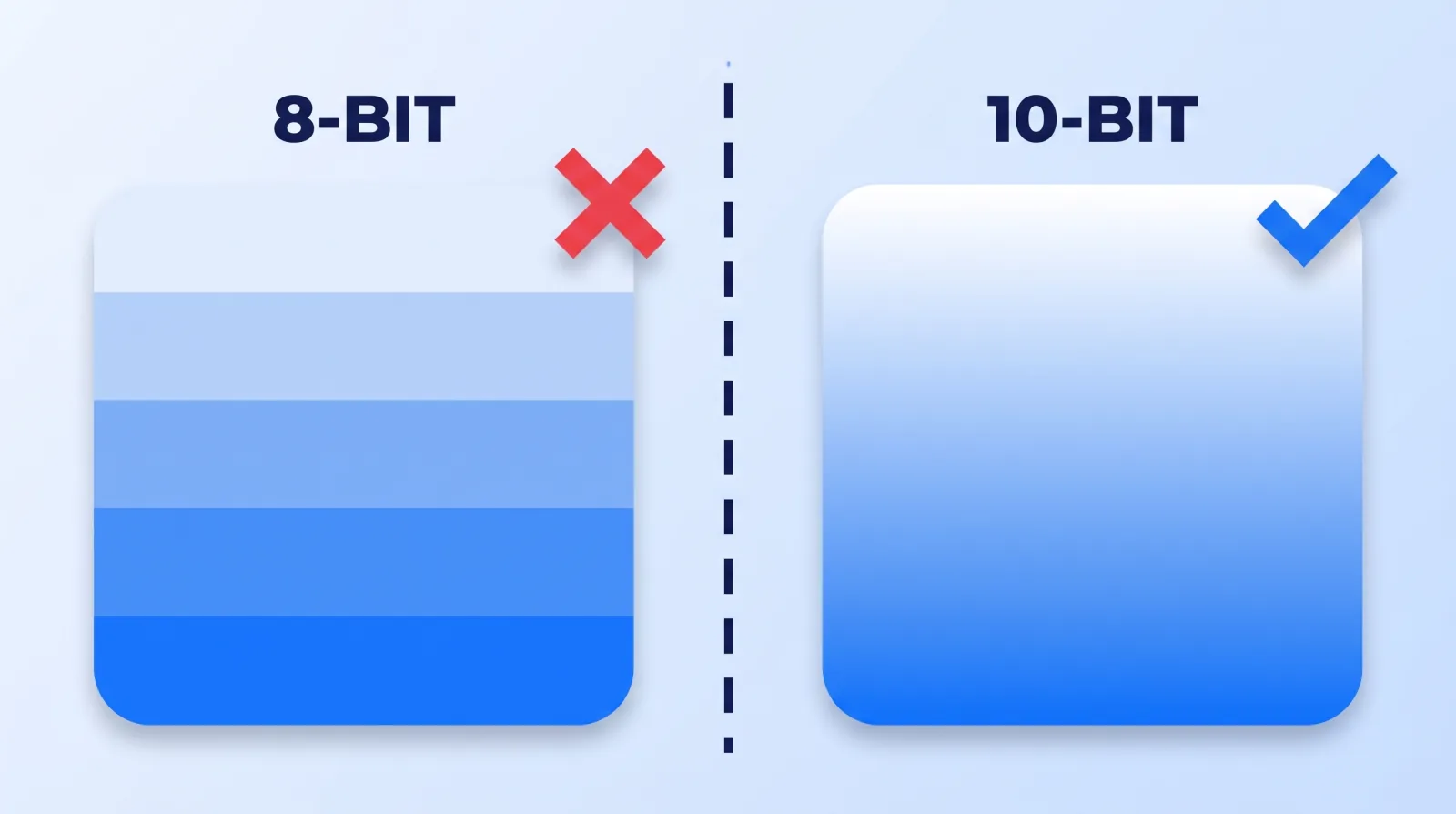
Bit depth. 8-bit gives you 256 values per channel; 10-bit gives you 1,024. On a flat wall, a sky, or a soft-lit face, 8-bit is where banding appears the moment you push contrast. If your camera offers 10-bit, use it — the file is bigger and nothing else about your life changes.
Log vs. standard profile. Log preserves highlight and shadow detail but requires grading. Shoot log if the video is going to be graded. If it is going straight out with no colour work, a standard profile exposed correctly beats a flat log file nobody grades.
Frame rate. Shoot 24 or 30 for talking-head video. Shoot 60 only if you intend to slow it down, or you are shooting motion. Everything else is storage you pay for and never use — and it does not survive YouTube's resolution and aspect-ratio handling any better.
Resolution. Shoot 4K, deliver 1080p, and you get a free reframe on every shot — a crop-in for a second angle, a stabilisation margin, a fix for a badly framed take. This is the single most useful thing you can hand an editor. It also feeds cleanly into your export settings at the end of the chain.
Codec. Long-GOP H.264/H.265 is small and slow to edit. All-Intra and ProRes are large and fast. Either is fine if you run a proxy workflow; if you do not, the codec choice is why your timeline stutters. Both DaVinci Resolve and Premiere Pro handle proxies natively, so this is a workflow decision, not a purchase.
Three Kits That Actually Work
| Starter (~$800) | Working creator (~$2,500) | Studio (~$7,000+) | |
|---|---|---|---|
| Camera | Current-gen phone, or used APS-C mirrorless | Full-frame or APS-C mirrorless, 10-bit internal | Two matched bodies, 10-bit, clean HDMI |
| Lens | Kit zoom | One fast prime (35mm or 50mm equivalent) | Fast prime set, or one fast zoom |
| Light | One panel + diffusion, or a window | Key + fill + hair light, all dimmable and bi-colour | Softboxes on stands, practicals, background wash |
| Audio | Wireless lavalier | Wireless lav plus a backup recorder | Broadcast dynamic or boomed shotgun into an interface |
| Support | Tripod that does not creep | Fluid head tripod | Tripod, slider, second-angle stand |
| Media | Two cards, one SSD | Two cards, working SSD + archive SSD | Card rotation, RAID archive, offsite copy |
The starter column is not a compromise column. A phone in good light with a lav mic beats a full-frame camera in a dark room with built-in audio, every single time, and we can prove it from the files.
The Pre-Purchase Gate
Before any gear purchase, run these eight. If you cannot answer them, the purchase is not the fix.
- What did the last five videos actually fail on? Check the footage, not your memory. If it was audio, buying a lens is procrastination.
- Is the room the real problem? Dark walls, one overhead bulb and a hard floor will beat any camera you buy.
- Does it change the file, or just the experience? Better autofocus changes your shoot day. 10-bit changes the deliverable. Both are valid — know which one you are buying.
- Can your computer edit it? A camera that outputs a codec your machine chokes on costs you a proxy workflow you did not budget for.
- What is the total system cost? Bodies need cards, batteries, a cage, a lens, storage. Multiply the sticker price by about 1.6.
- Is there a used version? Video bodies depreciate hard and get very light use. Buy last generation, spend the difference on light.
- Does it survive contact with your actual cadence? Gear that adds twenty minutes of setup gets left in the bag by week three.
- What would your editor ask for? Ask them. The answer is almost always "more light and a second audio source," never "a newer sensor."
The Bottom Line
The gear that changes your videos is the gear that changes what arrives on the timeline: light, sound, a fast lens, and a recording format with enough latitude to grade. Camera bodies stopped being the constraint years ago — which is why every honest gear guide written from the edit side ranks them near the bottom.
Buy light first, audio second, glass third, and put whatever is left toward the body. Then spend nothing at all until you can name the specific defect the next purchase removes. If you want to know what is genuinely fixable after the fact and what is not, we wrote that down too: what editors can actually salvage in 2026.


