

How Do You Search Inside a Video?
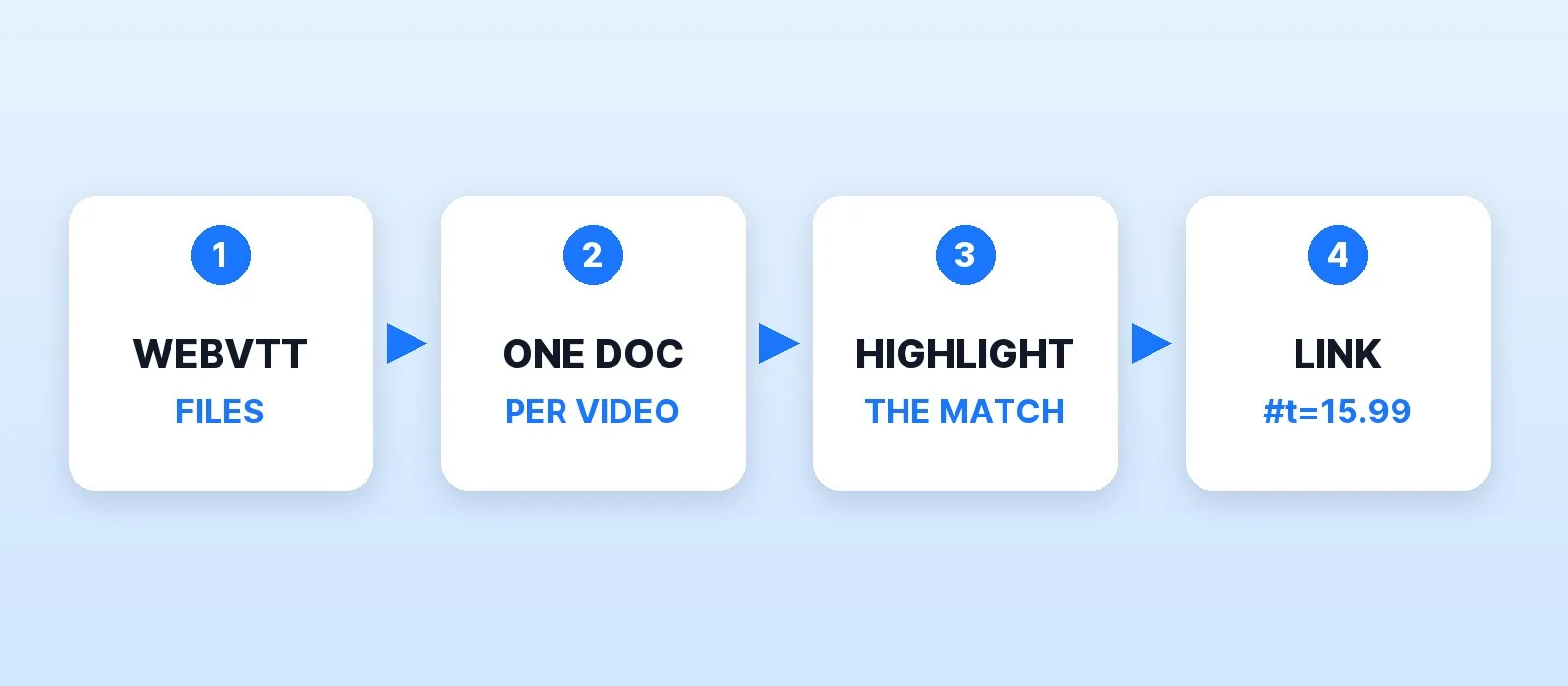
To search inside your videos, index their caption files. Every cue in a WebVTT file carries a line of text and the time it's spoken, so a search engine like Apache Solr can find a phrase and send the viewer to the exact second. The one design choice that matters: index each video as one document with its whole transcript, and keep each cue's start time beside it.
That's the difference between a search box that finds "touch saturation and usually less" and one that finds nothing. In my tests, a one-document-per-cue index returned 0 hits for that phrase, because it runs across two cues. The one-document-per-video index found it and linked to 0:15.99.
This post walks through the whole setup with code I ran against Solr 10.1.0: reading WebVTT, indexing transcripts, and turning a highlighted match into a timestamped link. If you run a course library, a podcast archive or a long-running channel, this is how viewers find the moment they remember.
Why One Document Per Video, Not Per Cue
The obvious design is one Solr document per caption cue, with its start time. It falls apart as soon as someone searches a phrase, because captions break lines where the speaker breathes, not where the idea ends:
00:00:15.986 --> 00:00:18.522
Only after that do you touch saturation,

00:00:18.772 --> 00:00:20.718
and usually less than you think.
A phrase query for "touch saturation and usually less" needs both cues in one field, so per-cue documents can never match it.
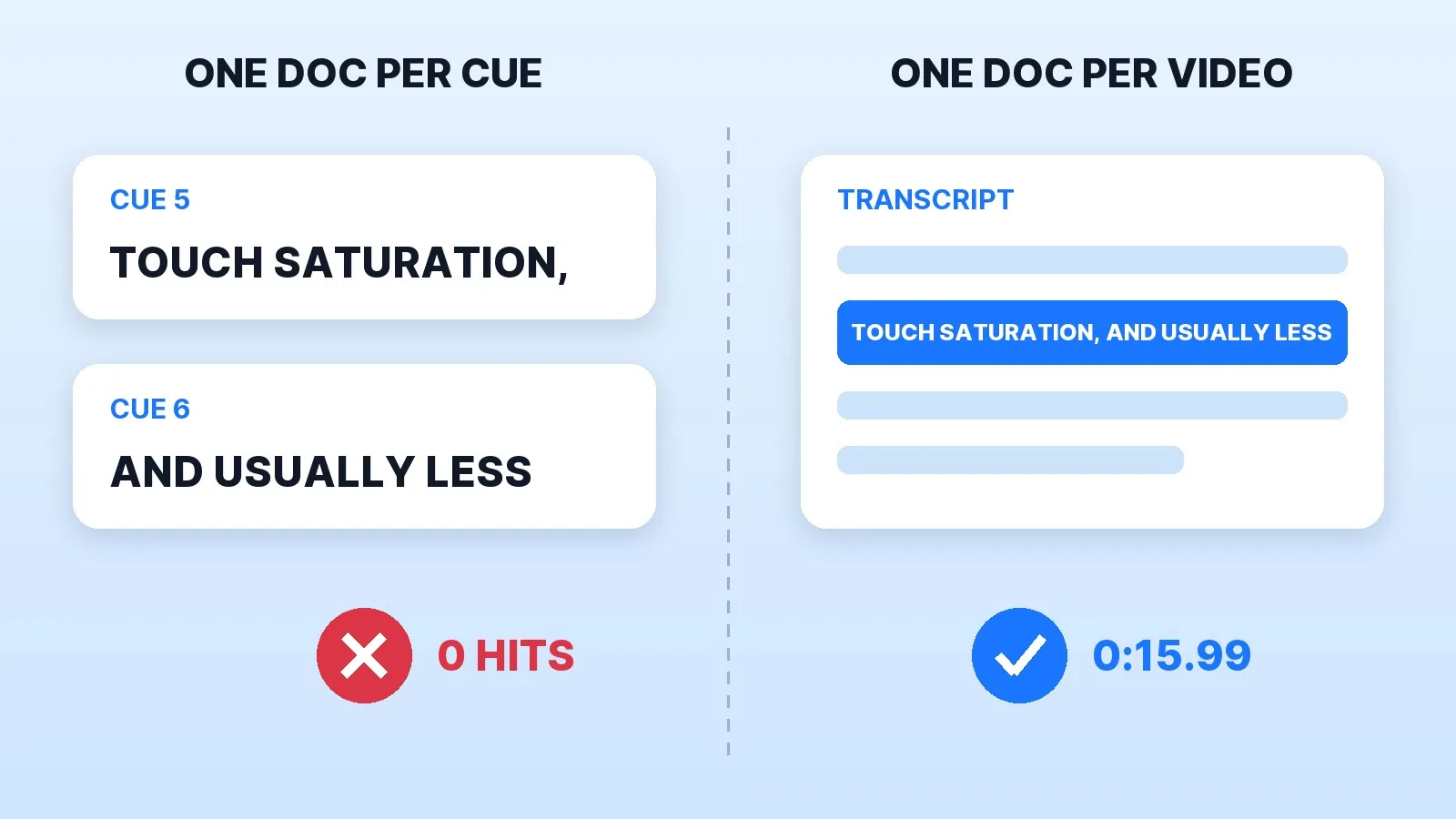
So each video becomes one document: the transcript as one text field, plus two stored lists, where each cue starts in the transcript (a character offset) and where it starts in the video (seconds). Search matches the transcript, and the offsets turn a match back into a time.
Setting Up Solr for Captions
Solr runs in one Docker command, and solr-precreate makes the core (Solr in Docker):
docker run -d -p 127.0.0.1:8983:8983 --name solr solr:10.1.0 solr-precreate captionsThen define the fields through the Schema API rather than letting Solr guess types from the first document:
{"add-field": [
  {"name": "title", "type": "text_en", "stored": true},
  {"name": "transcript", "type": "text_en", "stored": true},
  {"name": "url", "type": "string", "stored": true, "indexed": false},
  {"name": "cue_offsets", "type": "pint", "multiValued": true, "stored": true, "indexed": false, "docValues": false},
  {"name": "cue_starts", "type": "pfloat", "multiValued": true, "stored": true, "indexed": false, "docValues": false}
]}
text_en stems words, so a search for "tone" also finds "tones". The transcript has to be stored, because the highlighter works on the stored text. The cue lists are stored only, never searched, and stored values come back in the order you wrote them, which the timestamp lookup depends on.
Reading WebVTT Without Losing Text
Real caption files carry more than text: a STYLE block, NOTE comments, cue identifiers, position settings, voice spans like <v Mark>, italics, class spans and character references like &. A parser that only strips the timing line leaves <v Mark> in your search results. This reader handles all of them:
TIMING = re.compile(r"(?:(\d+):)?(\d{2}):(\d{2})\.(\d{3})\s+-->\s+(?:(\d+):)?(\d{2}):(\d{2})\.(\d{3})")
TAG = re.compile(r"<[^>]*>")  # <v Name>, <i>, <c.class>, and inline <00:00:01.000> timestamps

def seconds(h, m, s, ms):
    return int(h or 0) * 3600 + int(m) * 60 + int(s) + int(ms) / 1000

def read_vtt(text):
    blocks = re.split(r"\n\s*\n", text.replace("\r\n", "\n").strip())
    cues = []
    for block in blocks[1:]:
        lines = block.split("\n")
        if lines[0].startswith(("NOTE", "STYLE", "REGION")):
            continue
        i = 0 if "-->" in lines[0] else 1          # optional cue identifier
        m = TIMING.match(lines[i].strip()) if i < len(lines) else None
        if m:
            text = " ".join(html.unescape(TAG.sub("", " ".join(lines[i + 1:]))).split())
            cues.append((seconds(*m.group(1, 2, 3, 4)), text))
    return cues
Each video's document then joins the cue texts with spaces and records where each cue starts:
text, offsets, starts = "", [], []
for start, cue in read_vtt(vtt):
    if text:
        text += " "
    offsets.append(len(text))
    starts.append(start)
    text += cue
doc = {"id": slug, "title": title, "transcript": text, "url": f"/videos/{slug}.mp4",
       "cue_offsets": offsets, "cue_starts": starts}
POST the list of documents to /solr/captions/update?commit=true and the library is searchable. If your captions came from an editor or a tool, run them through a caption checker first: broken timings index without complaint and then link to the wrong second.
Turning a Match into a Timestamp
Solr's unified highlighter does the hard part. With hl.fragsize=0 it returns the whole transcript with every match marked, and it highlights a phrase as one span rather than word by word. Use marker characters that can't appear in captions, then count characters:
params = {
    "q": query, "defType": "edismax", "qf": "transcript title^2",
    "hl": "true", "hl.method": "unified", "hl.fl": "transcript",
    "hl.fragsize": "0", "hl.maxAnalyzedChars": "10000000",
    "hl.tag.pre": "\x02", "hl.tag.post": "\x03",
}
# For each \x02 in the highlighted transcript, its offset in the plain text
# (markers removed) looked up in cue_offsets gives the cue and its start time:
cue = bisect.bisect_right(offsets, plain_offset) - 1
link = f"{url}#t={starts[cue]:.2f}"
The #t= suffix is a Media Fragments time, which HTML5 video players honour, so the link opens the video at that moment. On YouTube the same idea is &t=15s.
One parameter is easy to miss. hl.maxAnalyzedChars defaults to 51,200 characters, and the highlighter stops looking after that. On a 66,891-character test transcript with the match near the end, Solr still returned the document, but with no highlight, so there was no timestamp to link to. At the speaking rate in my test files, 51,200 characters is roughly an hour of speech, which a long podcast or webinar passes easily. Raise the limit, as above.
Pre-Flight Checklist Before You Ship Search
- Validate every caption file before indexing; a cue that ends before it starts still indexes.
- One document per video, with cue offsets and start times stored beside the transcript.
- Explicit schema, so
cue_startsis a float list and not whatever Solr guessed. - Store the transcript and highlight with
hl.method=unifiedandhl.fragsize=0. - Raise
hl.maxAnalyzedCharsabove your longest transcript. - Test a phrase that crosses two cues and confirm the link opens at the right second.
The free caption checker handles step 1 in the browser.
Where Captions Come From
All of this assumes accurate, well-timed captions, and that's where most libraries fall short. Mark Studios has delivered 8,000+ orders for 4,500+ clients, holds a 4.9★ rating and Top Rated status on Fiverr, delivers 99% on time and has edited work behind 100M+ views. Caption files in SRT or WebVTT are a paid add-on with any edit, and they're the same files this search reads. If your library is a course, the course creator setup pairs edits with a lesson library workflow. For choosing between burned-in and closed captions, only closed caption files can be searched like this. What they cost is in our caption pricing guide.
The Bottom Line
Searching inside video comes down to captions and one design choice: index each video as a whole transcript, keep every cue's start time beside it, and let Solr's highlighter show where the match is. Raise the highlighter's character limit, test a phrase that crosses two cues, and viewers land on the second they were looking for.


