

The Short Answer: How to Send Large Video Files to an Editor
Send large video files to an editor as a shared cloud folder link, on Google Drive, Dropbox or Frame.io, with the original camera files inside. Don't attach them to an email or a chat. Gmail caps attachments at 25 MB on personal accounts and turns anything bigger into a Drive link anyway. For a shoot of several hundred gigabytes, work out the upload time first, because a shipped drive can arrive sooner.
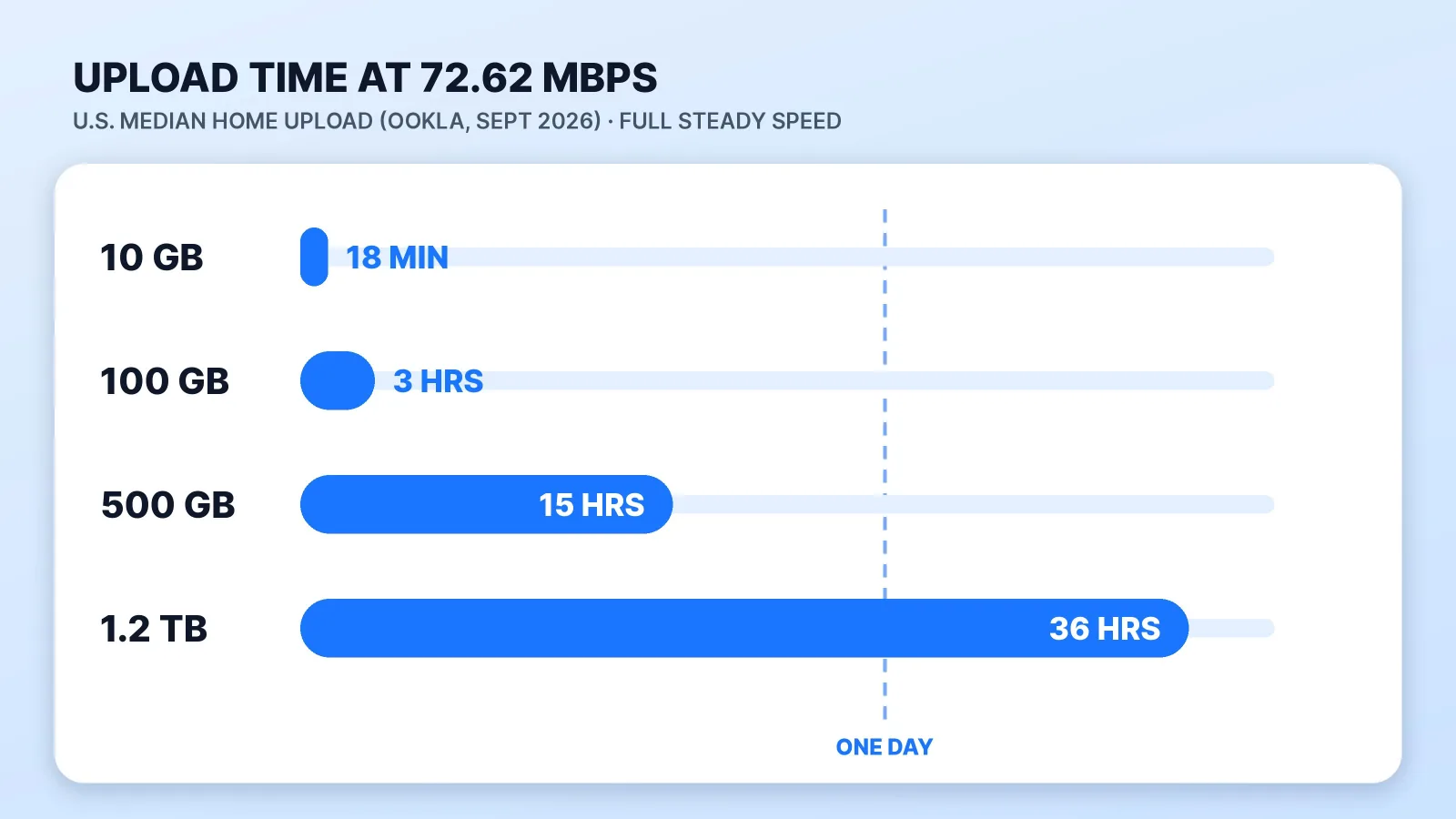
The upload is the slow part. Ookla's Speedtest Global Index put the median U.S. fixed broadband upload at 72.62 Mbps in September 2026, and the median mobile upload at 9.70 Mbps. At 72.62 Mbps, 100 GB takes about three hours at full speed. A 90-minute podcast filmed on three 4K cameras in ProRes 422 comes to about 1.2 TB by Apple's published data rates, and that's roughly 36 hours of uploading.
Every limit and price below comes from each company's own page, read October 27, 2026.
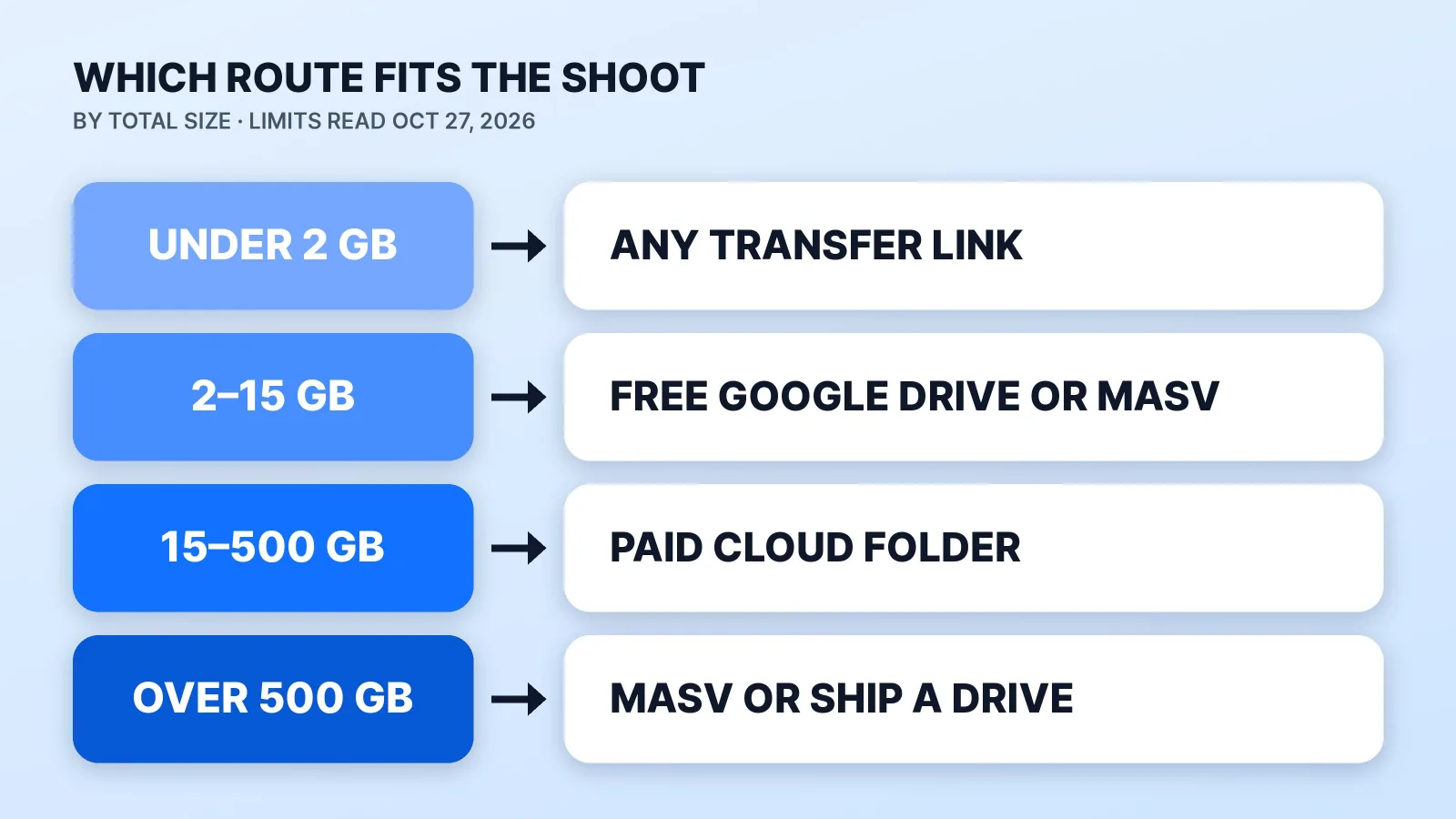
Which Way to Send Footage: Limits by Route
| Route | Free tier | Paid plans | How long the link lasts |
|---|---|---|---|
| Google Drive | 15 GB of storage, shared with Gmail and Photos | Files up to 5 TB; Workspace accounts upload up to 750 GB per 24 hours | Until you unshare or delete it |
| Dropbox Transfer | 2 GB per transfer (Basic) | 50 GB (Plus, Family), 100 GB (Standard, Business), 250 GB (Business Plus, Enterprise) | 7 days on Basic, Plus and Family |
| WeTransfer | 3 GB a month across 10 transfers, non-commercial use only | $10 a month for 300 GB; $25 a month with no transfer size limit | Up to 3 days on Free |
| Smash | 2 GB per transfer gets priority; bigger transfers wait in a queue | Pro: no transfer size limit | Up to 7 days on Free |
| Frame.io | 2 GB of storage, 2 projects | $15 a member a month with 2 TB | Until you remove it; Pro can set an expiry |
| MASV | 15 GB a month | $0.25 per GB after that, with no size limit | 5 days of free storage per file |
Two details catch people out. WeTransfer says its Free plan is meant strictly for non-commercial use, and footage you're paying an editor to cut is professional work. And a three-day or seven-day link that expires before the editor starts downloading means uploading the whole shoot again.
If your editor sends you a Dropbox file request instead, it takes files up to 2 GB when they're on a Basic, Plus or Family account and up to 250 GB on Professional and business plans.
How Long the Upload Takes
Divide the size by your upload speed before you start, not halfway through the night:
| Shoot size | At 72.62 Mbps (median home upload) | At 9.70 Mbps (median mobile upload) |
|---|---|---|
| 10 GB | About 18 minutes | About 2.3 hours |
| 100 GB | About 3 hours | About 23 hours |
| 500 GB | About 15 hours | About 4.8 days |
| 1.2 TB | About 36 hours | More than 11 days |
These are estimates at full, steady speed from Ookla's medians, and a busy connection runs slower. Our free upload time calculator does the same math for your own file size and connection.
Size depends on what the camera records. One hour of 4K at 30 fps in ProRes 422 is about 265 GB on Apple's data-rate table, roughly eight hours of upload on its own. Apple also notes that ProRes files are up to 30 times larger than HEVC files, the High Efficiency format an iPhone can record by default. So send what the camera recorded, and don't convert phone footage to ProRes first to "help" the editor. Multi-camera shoots multiply fast: three cameras triple the upload. If you record a video podcast, our page for podcasters covers how multi-cam episodes get edited.
What to Put in the Folder Before You Send the Link
Check the folder against this list before you share it. It's what an editor needs to start without a round of questions:
- The original camera files. Not an export, a screen recording or a copy saved from a chat app. Don't send proxies alone either: Apple describes its ProRes 422 Proxy format as intended for offline workflows, at about 45 Mbps against 220 Mbps for ProRes 422 HQ at 1080p. Your editor can make proxies from the originals, but can't export a sharp final from proxies.
- Every separate audio track. Lav mics, a recorder, a Zoom track, named to match the camera they go with.
- One folder per shoot date, one subfolder per camera.
- The brief, script and reference links. Our free video editing brief template lists what to include, and our guide on how to brief a video editor covers the handoff itself.
- Brand files and licensed music. Logo, fonts, and any track with its license.
- A check that it all arrived. Compare the file count and total size in the cloud folder with your drive before you send the link.
- Sharing set to the editor's account, and your own copy kept. For unreleased or client footage, see who sees your raw footage; for the backup side, see our guide to video file management.
A folder laid out like this lets the editor start on day one:
2026-10-27_founder-interview/
├── 01_A-cam/
├── 02_B-cam/
├── 03_audio/     lav + recorder, named to match each camera
├── 04_brief/     brief, script, reference links
└── 05_brand/     logo, fonts, licensed music
When Shipping a Drive Beats Uploading
Past about a terabyte, compare the upload with a courier. At the median home upload, a 1.2 TB shoot needs about 36 hours, and Google Workspace accounts can upload only 750 GB to Drive per 24 hours, so on a Workspace account the upload spills into a second day however fast the line is. MASV has no size limit, but after the free 15 GB it bills $0.25 per GB, about $294 for 1.2 TB, and it still can't send faster than your connection allows.
A drive sent by overnight courier arrives the next business day whatever is on it. Ship a copy, never your only one, and label it with your name and the project. The editor's side is rarely the bottleneck: Ookla's median U.S. download was 314.35 Mbps, more than four times the median upload.
Where Mark Studios Fits
You can upload raw files through the intake on our platform, or paste a Google Drive, Dropbox or Frame.io link, as our process page explains. The turnaround starts when your files land, and the first cut arrives within 5–7 business days. If you're in Palm Beach County, there may be nothing to upload at all: we can film it on location and edit the footage in-house.
Mark Studios has completed 8,000+ orders for 4,500+ clients, with a 4.9★ average, 99% delivered on time and Top Rated status on Fiverr. Hiring a marketplace freelancer instead? Ask how they want the files before you upload; our freelance marketplace comparison covers the other trade-offs.
The Bottom Line
Send a shared folder link with the original camera files, the separate audio and the brief inside, never an email attachment or a free transfer that expires in three days. Work out the upload time before you start: at the U.S. median upload, 100 GB takes about three hours and a terabyte shoot more than a day, which is when MASV or a shipped drive wins.


