AI Video Editor or a Human Editor: The Short Answer
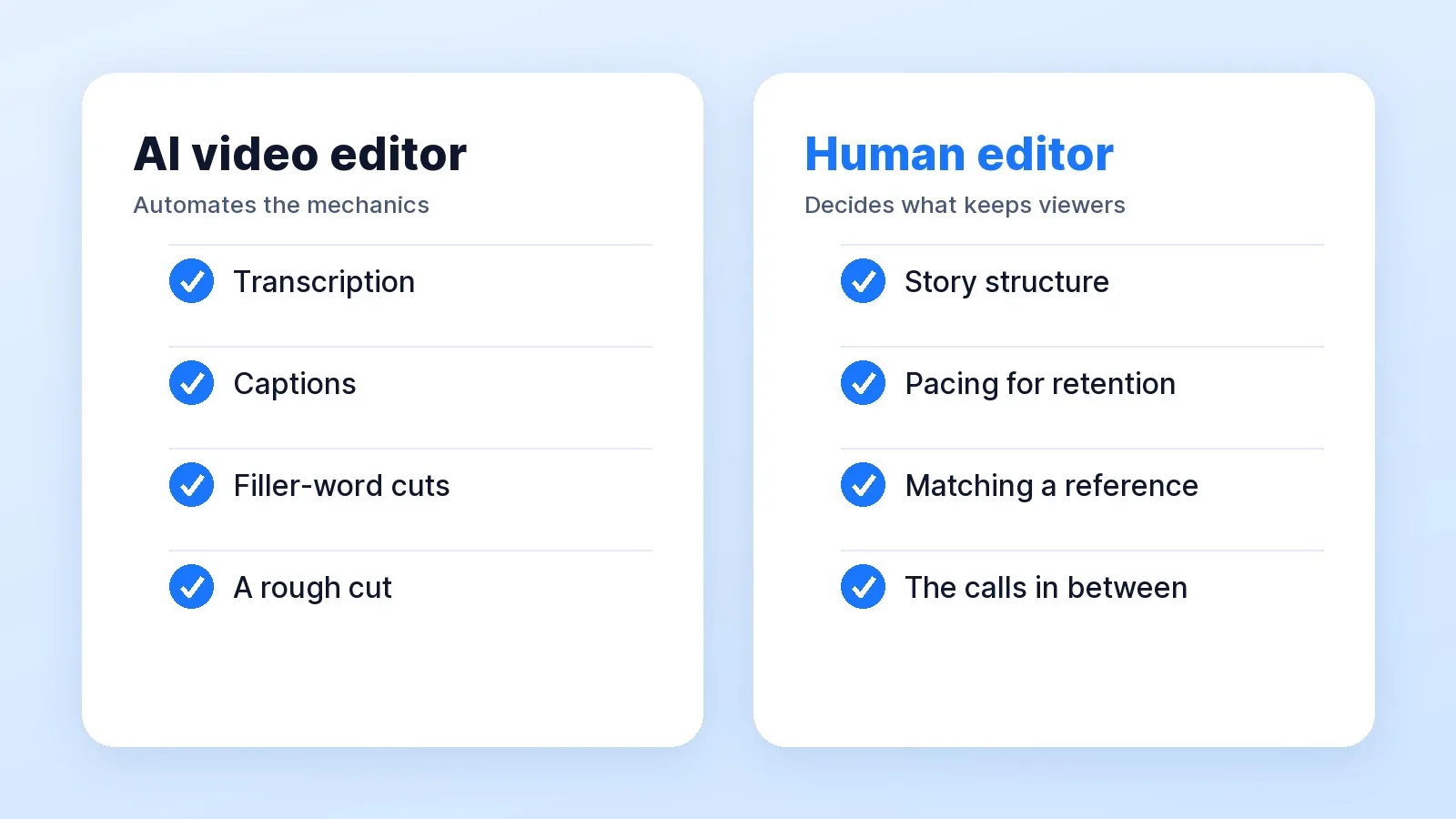
An AI video editor like CapCut or Descript handles the mechanical half of a YouTube edit: transcription, captions, cutting filler words and a first rough cut. A human editor handles the half that decides whether people keep watching: story structure, pacing for retention and matching the look you're aiming for. Can AI replace a video editor? For the rough cut, increasingly yes. For a finished long-form video, not yet.
Creators who use these tools say the same. In Adobe's 2026 Creators' Toolkit Report, 57% of creators said their creative AI output typically needs moderate or extensive editing before it's ready to share; the sample and date are on our AI video editing statistics page. The question isn't whether to use AI. It's who does the editing that comes after it.
What AI Video Editors Do Well
Here's what the two most-asked-about tools say they automate, from their own pages, checked October 7, 2026:
| Tool | What it automates | Price |
|---|---|---|
| Descript | Editing by editing the transcript, Remove Filler Words, Studio Sound, and Underlord, an "AI video co-editor" | Creator plan $24 a month billed annually ($35 monthly), 30 media hours |
| CapCut | Auto captions that "automatically recognize the video's language", styled caption templates, and script-to-video with AI voiceover in its AI video editor | Auto captions free, per its captions page |
That's real time saved. Transcribing, captioning and stripping "um"s out of a 40-minute talking-head recording used to take hours. Descript's Underlord page shows the direction: you type requests like "Edit this down to 2 minutes" or "Hide my jumpcuts by adding zooms" and it carries them out.
Read those examples closely, though. Every one is an instruction. The tool does what you ask. Deciding what to ask is still the edit.
What AI Editors Miss: Structure, Pacing and Reference
Story structure. Which point opens the video, which one pays it off, and which ten minutes you cut entirely even though they're clean. A transcript doesn't know your argument. Neither does a model that's reading one.
Pacing for retention. YouTube's audience retention report shows where viewers leave: dips "mean that viewers are abandoning or skipping at that specific part", and the intro measures how many are still there after 30 seconds. YouTube's advice is to check whether "the content in the first 30 seconds matched the viewer's expectation." Cutting silences evenly doesn't fix a dip. Restructuring the minute before it does, and that takes someone who has read your last ten retention curves.
Matching a reference. More than half of buyers who message us, 384 of 698 first messages, include a link or a "like this". Matching one means matching its pacing, its graphics density, its music and the way B-roll lands on a line. That's judgement, not a setting.
The calls in between. Which joke stays, where the music drops out, when a cutaway proves a point and when it distracts. None of these is a feature. All of them are why one 10-minute video holds and another loses half its audience at minute two.
Which to Use, by Channel Stage
YouTube's Partner Program needs "1,000 subscribers with 4,000 qualified watch hours in the last 12 months" for ad revenue. That line is a reasonable place for the decision to change:
| Your channel | Use | Why |
|---|---|---|
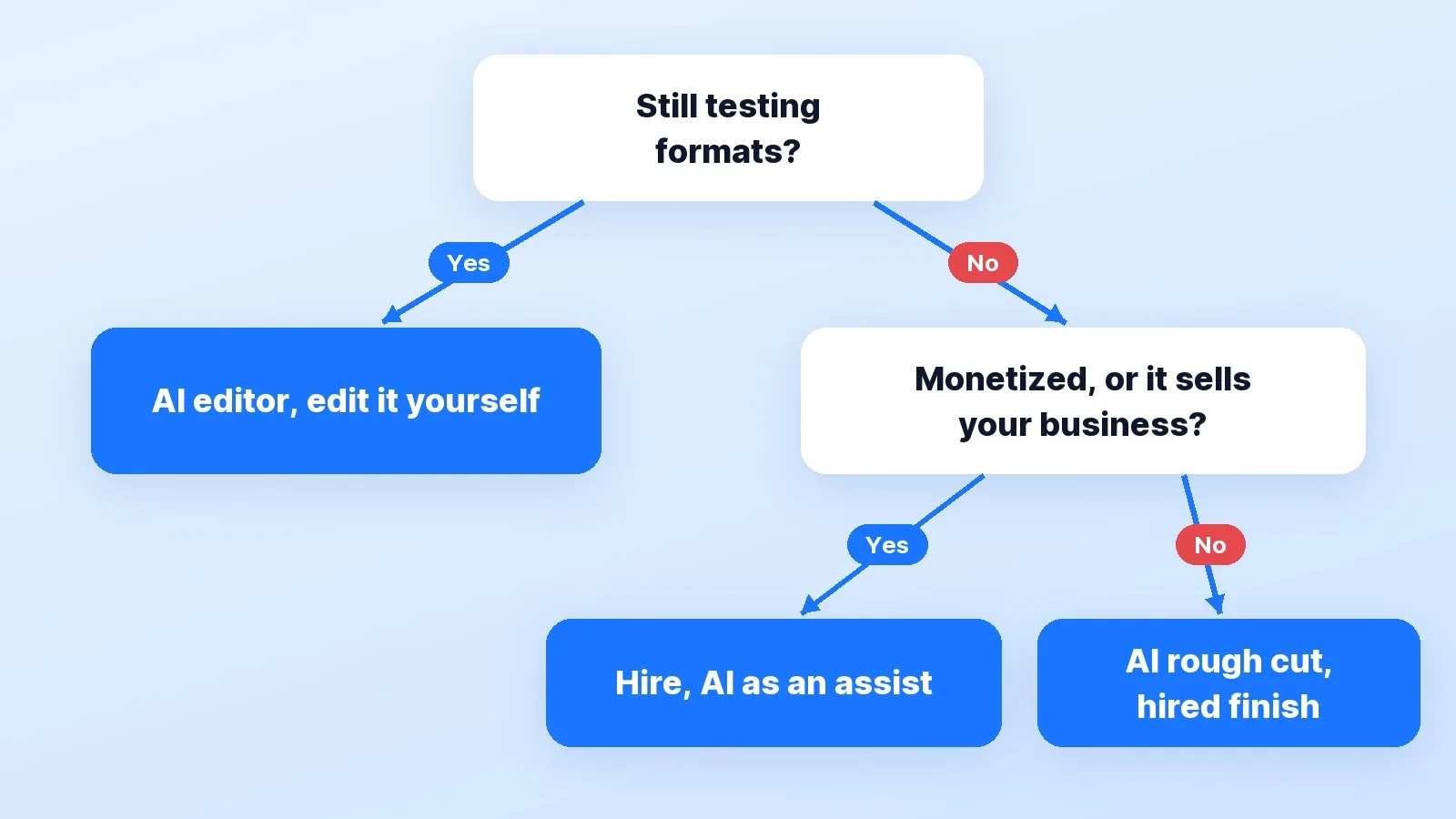
| Testing formats, a few uploads in | AI editor, edit it yourself | You're still learning what your videos are. Cheap tools and your own hours are the right spend. |
| Weekly schedule, editing eats a day of yours | AI rough cut, then hire the finish | The tool saves the mechanical hours; a human fixes structure and pacing. |
| In the Partner Program or close to it | Hire an editor, who uses AI as an assist | Retention is now revenue. A weak minute two costs you money every upload. |
| The channel sells your business | Hire, and keep the outline yourself | The video is a sales asset. See video editing for founders. |
The cost side of that table is in how much a YouTube video editor costs, and the hours you'd spend instead are in the real hours behind a 10-minute video. An AI editor is cheap per month, but you still sit at the timeline. The subscription buys speed, not your time back.
Before You Decide: A Five-Question Check
- What does your retention curve do at minute two? If it drops off a cliff, you have a structure problem, and no AI cleanup fixes it.
- How many hours a week does editing take you now? Count them honestly, including re-exports.
- Is there a reference channel you're trying to match? If yes, that's a human brief.
- Does the channel earn money or bring in clients? Then a weak edit has a price per upload.
- Who checks the AI's work? Someone has to watch every cut. If that's you, you haven't outsourced the edit.
If you answered yes to 3 or 4, hire. If you're still testing formats, edit with AI and revisit this when the schedule gets heavy.
How I Use AI in the Edit
I use AI the same way: for the first pass. Our AI editing stack lists what earns a place and what doesn't, and my answer on AI is the same for every client: AI-assisted tools where they save time, such as captions, but the hook, the pacing and the story are decided for your audience, not by an auto-edit button. For short clips, the same split is covered in AI clippers vs a human editor.
Buyers ask about it directly. Across 704 buyer conversations in our inbox, 35 (5.0%) raised tools, software or AI, with questions like "Is this something we can ask AI to generate?". We've delivered 10,000+ projects for 4,500+ clients at a 4.9★ rating, and YouTube long-form was the second most-requested service in buyers' first messages, 189 of 698 (27%).
If you're weighing a freelancer or an in-house hire instead, agency vs freelancer vs in-house lays out the trade-offs, and our comparison of freelance marketplaces covers the gig route.
The Bottom Line
Use an AI video editor for the work a machine can check: transcripts, captions, filler words and a rough cut. Hire a person for the work only an audience can grade: structure, pacing and the look you're chasing. The moment your channel earns money or sells your business, the second half is the part worth paying for.
That's how our YouTube video editing service works: AI on the first pass, and every structural call made for your audience.