

The Short Answer: How to Hire a Podcast Editor
To hire a podcast editor, decide first whether you need audio only or a full video edit with clips, then shortlist three editors who already cut shows like yours. Pay your top two to edit the same real episode, check the result against each platform's specs, and put the deliverables, turnaround, music and rights in writing before the first month.
Podcast edits came up in 18 of the 698 first messages from buyers that we analysed. What a podcast editor costs per episode by route is in our separate guide to podcast editing cost. This guide covers choosing the person and setting up the work.
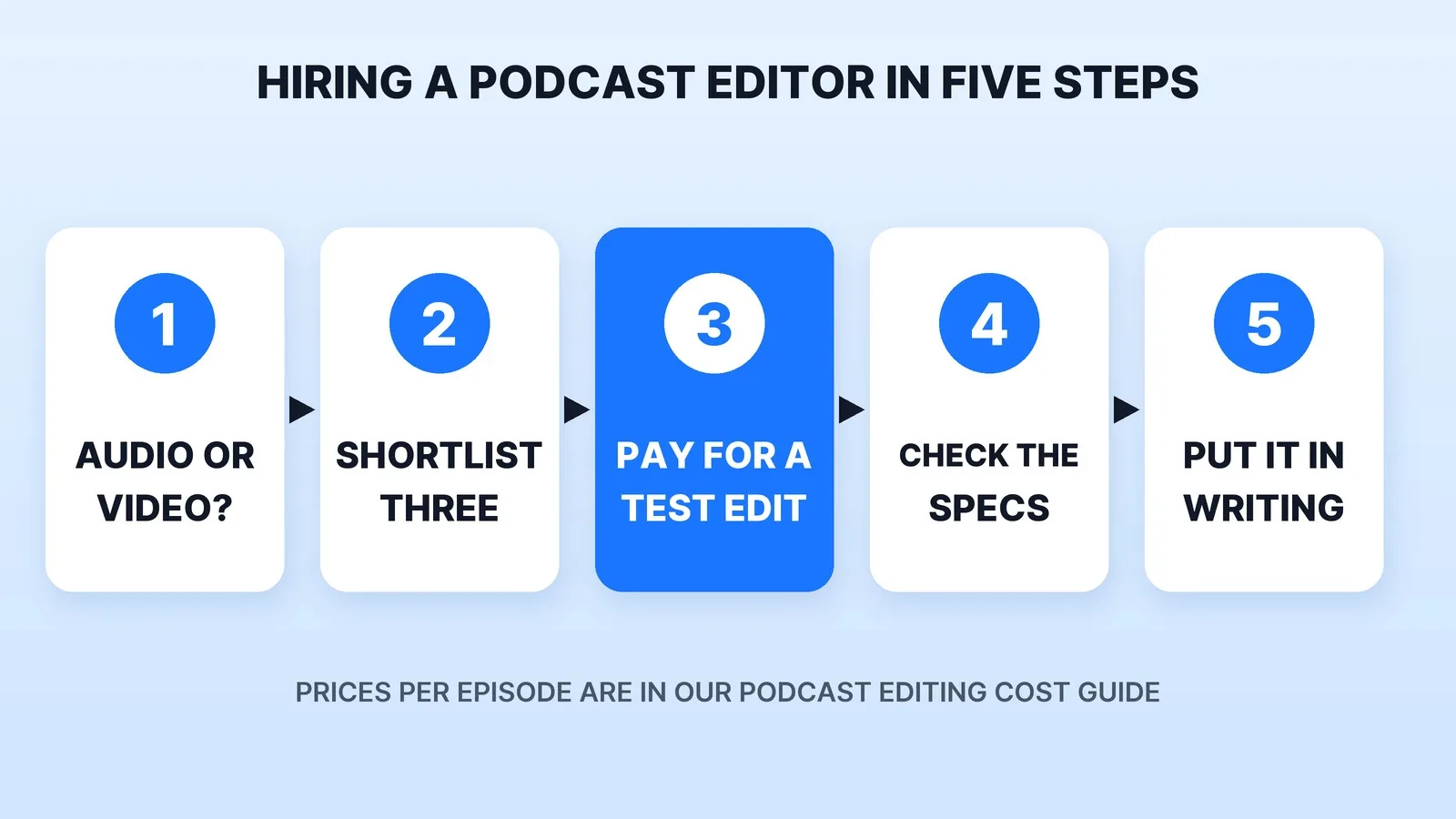
Step 1: Decide Audio-Only or Video
This one choice changes who you hire. An audio editor cleans up and levels the voices. A video podcast editor also syncs every camera, cuts to whoever is talking, and usually cuts the short clips too.
If you upload an audio-only show to YouTube through your RSS feed, YouTube's own RSS podcast help page says it builds a static-image video from your show art for each episode. That's fine for being listed on YouTube, but it isn't a video podcast. If you want people watching, you need a video edit. Our guide to whether your podcast should publish video sets out the audience data either way.
Write down:
- Audio, video, or both, and how many cameras you record.
- Episode length and how many episodes a month.
- Clips: how many per episode, for which apps. Our guide to how many clips per podcast episode helps you pick a number.
- Where it publishes: Apple Podcasts, Spotify, YouTube, or all of them.
Step 2: Shortlist Three Who Edit Shows Like Yours
Look on freelance marketplaces, ask hosts in your niche who edits their show, and check the credits of podcasts you admire. Our list of the best podcast video editing services compares providers side by side, and our freelance marketplaces comparison lays out the trade-offs between a marketplace seller and a managed service.
Listen to two full episodes each candidate edited, not a highlight reel. Check that the levels stay even between hosts and guests, that the cuts don't clip the start or end of words, and on video that the camera switches follow the conversation. A sample built from the best five minutes hides exactly the problems you'll live with every week.
Step 3: Pay Your Top Two for the Same Test Episode
Send both finalists the same real raw episode, with the camera files, the separate audio tracks and a short brief: what to cut, your intro and outro, and any sponsor read that must stay word for word. Pay both. Then compare:
- Did they follow the brief without asking you to repeat it?
- Is the edit tight but natural? Over-cutting a conversation makes hosts sound robotic.
- Did the files arrive in the right formats for every platform you named?
- How did they handle your notes on the first round?
Raw podcast files are large. Our guide on how to send large video files to an editor covers the transfer options.
Step 4: Check the Test Against the Specs
A few numbers separate a professional edit from a hobby one, and you can check them yourself:
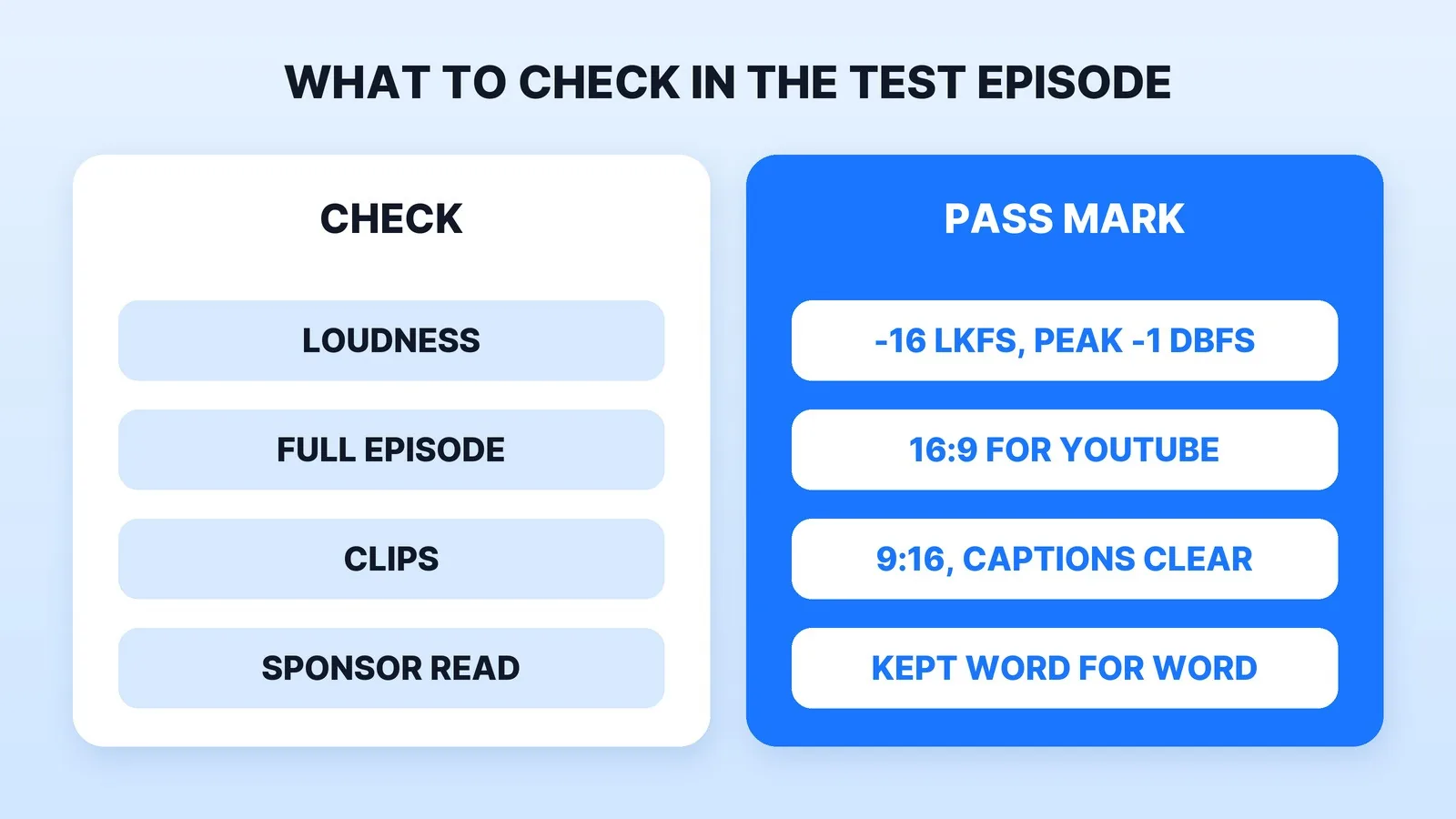
- Loudness. Apple's audio requirements for Apple Podcasts recommend an overall loudness of around -16 dB LKFS, within 1 dB either way, with true peaks no higher than -1 dB FS. Ask your editor what their master measures. A free loudness meter will tell you if they don't know.
- Video shape. The full episode in 16:9 for YouTube, and clips in 9:16 with captions placed clear of each app's buttons.
- Sponsor reads. If an episode carries a host-read promotion, YouTube's branded content rules require you to tick the paid promotion box, which adds a disclosure label. Your editor should flag every sponsored episode so the label isn't missed.
- Music. YouTube's Content ID scans every upload against files submitted by copyright owners, and a match can get your episode claimed. Ask where every music bed and sound effect comes from, and whether the licence covers YouTube.
Step 5: Put It in Writing
Before the first paid month, agree on:
- Deliverables per episode: the full episode in each format, the number of clips, thumbnails and any caption files.
- Turnaround, counted from when you upload the raw files, and how many rounds of notes are included.
- The project files, if you'll ever want to change editors without losing your templates and intro.
- Ownership. Under the U.S. Copyright Office's work-made-for-hire rules, commissioned work counts as made for hire only in nine listed categories, one of which is a part of "a motion picture or other audiovisual work", and only with a written agreement signed by both sides. A video episode can fit; an audio-only edit isn't obviously one of the nine. Either way, ask for a written transfer of copyright in the edits you pay for.
- Access without passwords. Share files through a folder link and add the editor to your hosting or YouTube channel with a limited role, never your login.
Where Mark Studios Fits
Mark Studios edits video podcasts: every camera synced to the audio and switched to whoever is speaking, each voice levelled, the full 16:9 episode for YouTube and Spotify, and 9:16 clips with captions cut from the same timeline. Each episode gets a fixed price up front from its length, the number of cameras and the clips you want. Our podcasters page shows the work for shows. Mark Studios has completed 8,000+ orders with 4,500+ reviews, 99% on time, with work behind 100M+ views, and is Top Rated on Fiverr with a 4.9★ rating. Our podcasts on YouTube study has the wider data.
The Bottom Line
Decide audio-only or video first, shortlist three editors who cut shows like yours, and pay your top two to edit the same real episode. Check the test for loudness, formats, sponsor disclosures and licensed music, then get deliverables, turnaround, project files and copyright in writing before the first month.


