Online Course Video Editing

Online course video editing for coaches and course creators: modules and lessons cut to one template, screen recordings and slides timed to your explanation, captions, and the promo video that sells the course.

  • Top Rated on Fiverr
  • 4.9 average rating
  • 8,000+ orders
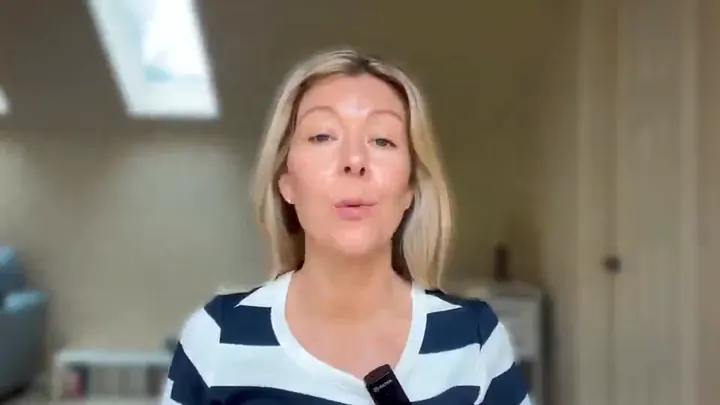
Still from the English to Excel educational talking-head video we edited
English to Excel Educational talking-head video · from our portfolio
What's included

What's included in Mark Studios course & training video editing?

Mark Studios edits online courses for coaches and course creators, from module lessons to the promo video that launches them. You work directly with Mark Santos: he designs one template for the course, then edits lessons in batches of five, syncing screen recordings and slides to your camera, cleaning audio, adding captions and exporting MP4 files your course platform accepts. Each batch takes 5–7 business days. Send your lesson list to the instant quote for a fixed price.

Module and lesson edits, delivered five lessons per batch
One course template: intro, outro, lower thirds, section cards and grade
Screen recording and camera cut as split-screen or picture-in-picture
Slides and on-screen terms placed as you explain them
Retakes, false starts and long pauses removed from every lesson
Audio cleaned and levelled across lessons recorded on different days
Captions burned in or as SRT, plus a transcript per lesson
MP4 exports for Teachable, Kajabi, Thinkific and Podia
Course promo, sales-page preview and launch video from the same footage
Lesson library

How we edit a whole course: the lesson-library workflow

  1. Build the template first. Intro, outro, lower-thirds, section cards and the color grade are designed before the first lesson is cut, so lessons recorded on different days still look like one course.
  2. Upload the whole library at once. Name files by module and lesson (M1-L3), include slides and screen recordings, and flag any lesson that must not change. The clock starts once your files and the brief land.
  3. Edit in batches of five. Standard turnaround is 5–7 business days per batch of 5 lessons, staged so you review early modules while later ones are still in post.
  4. Captions and transcripts per lesson. Burned in or as SRT files, plus a plain-text transcript for each lesson if you want one.
  5. Export for your platform. Presets for Teachable, Kajabi, Thinkific, Podia and others; H.264 or H.265 MP4 at 1080p by default.
  6. Update lessons later. We keep source files for 24 months, so re-cutting a single lesson when your material changes doesn't mean starting over.

For the market behind course video (enrollment, completion and what learners expect from video) see our online course video statistics, and for the step-by-step outsourcing guide read how to outsource course video editing. Course creators who also sell with video should see promo & sales video editing. Comparing services first? See our list of the best online course video editing services, or for company onboarding and compliance, the training video production companies.

The process

How does outsourced course video editing work with Mark Studios?

Lesson library handoff

Shared folder · Files named M1-L1

Put the whole course in one shared folder, organized by module: camera files, screen recordings kept as separate files, slide decks, your outline and logo. Name lessons M1-L1, M1-L2 and so on, and mark any lesson that has to stay exactly as recorded.

2 Step 02

A fixed price per batch

Instant quote · No hourly rate

The instant quote prices a batch from your lesson count and average length, and that price is fixed before work starts. Nothing is billed by the hour, and a larger course is simply quoted as more batches of the same size.

3 Step 03

Template and the first five lessons

5–7 business days per batch

Mark builds the template and edits the first five lessons in it, so you approve the look on real lessons before the rest of the library is cut. Later batches follow while you review, module by module.

4 Step 04

Lesson-by-lesson notes

3 rounds · 24–72h · Notes per lesson

Leave timestamped notes on each lesson in the review tool. Course feedback is usually small and exact: a wrong slide, a term to spell out, a retake to swap in. Notes on the template carry into every later batch, and each of the 3 rounds returns in 24–72 hours.

5 Step 05

Upload-ready lessons

MP4 per lesson · Captions · Kept 24 months

Each lesson arrives as its own H.264 MP4 at 1080p (4K on request), named to your outline, with captions burned in or as SRT and transcripts if ordered. Sources are kept for 24 months for later re-cuts; project files of your own are available on request.

Why Mark Studios

Why hire Mark Studios for course & training video editing?

10,000+Projects delivered
4,500+Reviews
100M+Views generated
99%On-time delivery

Lessons, intros and outros in the portfolio

The samples above show the parts a course needs: taught-to-camera lessons for English to Excel and Samantha B's training videos, an education intro for Real Professors, an outro for Miss Giggles, an Apprentix education edit and an Assemble Skills short of the kind that promotes a course.

The course and its sales video, one studio

Most courses need a promo or VSL as well as lessons. Mark edits both, so the launch video carries the lesson template's look and can reuse its footage. The VSL and sales video page shows that work, including a course offer for Wido.

Works for camera-shy teachers too

Not every course creator wants to be on camera for every lesson. In our voiceover brand video series case study, a consultant's series was built from his voiceover alone, with the look locked on one video first. Lessons can be produced the same way.

“His new thumbnails are breathing life into my YouTube videos again. Views are up, revenue is up, watch time is up — and the only thing I have changed is changing to Mark’s thumbnail and titles.”
Carolyn, Homesteading Family · 900K subscribers on YouTube. One client’s results; yours will vary. Read the case study
FAQ

Course video editing questions

Yes. Coaches and course creators send the recorded modules and the raw footage for any promo, and Mark Studios returns finished lessons in one template plus the promo, trailer or sales-page video that sells the course. You work with Mark Santos directly, and the same look runs from the free preview lesson to the final module.

Course editing is priced by the batch. What moves the price: number of lessons, raw minutes per lesson, how much screen recording and slide work each one needs, captions and transcripts, template design and rush delivery. The instant quote gives a fixed price per batch before work starts. Per-lesson market rates are in our guide to outsourcing course video editing, and plans are on pricing.

The biggest saving is in what you send. The quote is based on your raw footage, so delete false starts and send one good take per lesson. Keep graphics to the shared course template rather than asking for custom visuals in each lesson. And start with one batch of five lessons to test the fit before you commit the whole library.

Each batch of five lessons takes 5–7 business days, and batches overlap, so you review module one while later modules are in the edit. A 40-lesson course therefore lands in stages over several weeks. For a launch that also needs a sales video and pre-launch content, allow at least six weeks; rush is possible when capacity allows.

Your course outline, camera files and screen recordings as separate files, slide decks, your logo, brand colors and fonts, and the name of the platform you sell on. Name files by module and lesson so nothing lands in the wrong place. If there is a lesson whose look you like, from your course or someone else's, include it as the reference.

Camera and screen are lined up on the audio, then cut as picture-in-picture, split-screen or full-screen depending on what you are showing at that moment: full screen for a menu click, the camera back for the explanation. Both audio sources are cleaned and matched so the switch can't be heard. Record screen and camera as separate files, not one combined capture.

Yes. Captions come burned into the video or as SRT files your course platform can load, and a plain-text transcript per lesson is available. Translated subtitles in 40+ languages run through our content localization service, which helps if you sell the course outside English-speaking markets.

Lessons export as MP4 files that Teachable, Kajabi, Thinkific, Podia and most other platforms accept, at 1080p by default or 4K on request. The subject doesn't change the workflow: software walkthroughs, workout programs, cooking and restaurant training, language lessons and coaching curricula all start with the template and run in batches.

Yes. We keep the source files for 24 months, so when a price, a screen or a policy changes, one lesson can be re-cut with the new section dropped in, without re-editing the module around it. Send the new recording with the lesson name. Editable project files of your own can be added when you order.

Start your online course video editing project

Tell us about your course footage and platform — we'll scope every lesson within 1 business day.

Lessons talk fast: in our caption reading-speed study of 248 MIT OpenCourseWare lectures, the median ran at 151 words a minute on screen, and 87 of them (35%) averaged more than DCMP’s 160-word ceiling for upper-level educational media.

Not a fit if you need the course itself designed (outcomes, modules, quizzes). An instructional designer fits that better; Mark edits the lessons you have recorded.

Prefer to talk first? Book a free 15-minute call with Mark.

  • Founder-led US company
  • NDAs by default
  • Stripe & PayPal payments
  • Top Rated on Fiverr