

How Much It Costs to Start a Podcast: The Short Answer
Starting a podcast costs anywhere from $0 to a few thousand dollars in the first year. You can launch for nothing: Spotify for Creators promises to "host for free, distribute everywhere," and YouTube will turn an audio feed into videos for you. A solo audio show with a $209 USB microphone and a paid host runs about $389 for the first year. A two-host video show with its own gear and recording software is about $1,186. Hire an editor for a weekly show and editing becomes the biggest line: about $2,700 to $11,800 in year one.
Those are other companies' published prices, read November 11, 2026, and our own arithmetic on them. They aren't Mark Studios prices; Mark edits podcasts and quotes each show, so there's no Mark Studios price on this page.
Want your own number? Get an exact price for your project in about two minutes, with no sales call.
The Free Route: What $0 Gets You
A phone, a quiet room and free hosting will publish a real show. Three pieces make it work:
- Hosting. Spotify for Creators offers "unlimited hosting," distribution "across all major podcast apps," and a path into the Spotify Partner Program, which lets shows hosted there "earn via ad revenue share." Buzzsprout's free plan gives 2 hours of uploads a month, but it keeps each episode for only 90 days and doesn't include video distribution.
- YouTube. Through RSS delivery, YouTube "will use your podcast's show art to create a static-image video" for each episode. It is available in select countries only, and the episodes appear only on YouTube and YouTube Music.
- Recording and editing software. Riverside and Descript both have free plans.
The catch is quality, not price. Free plans carry limits on upload hours, export quality and features, and a phone in an echoing room sounds like one. If you plan to keep going, budget for at least a microphone.
What Each Piece Costs
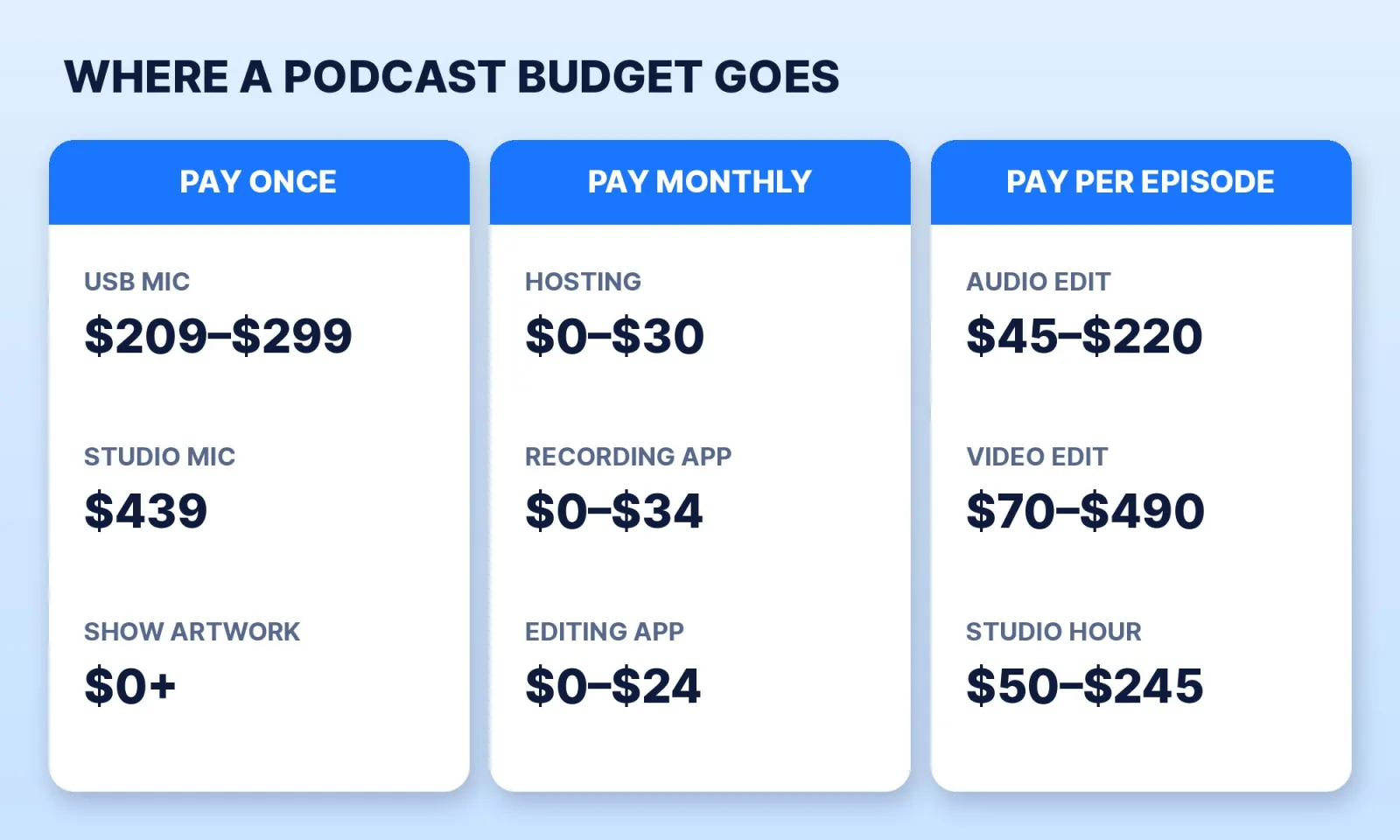
| Item | Published price | How often |
|---|---|---|
| USB microphone (RØDE PodMic USB) | $209 | Once |
| Hybrid USB/XLR microphone (Shure MV7+) | $299 list | Once |
| Studio microphone (Shure SM7B) + interface (Shure MVX2U Gen 2) | $439 + $139 list | Once |
| Hosting, audio | $0 (Spotify for Creators) to $15–$19 a month | Monthly |
| Hosting, audio + video | $25 a month (Buzzsprout, billed yearly) | Monthly |
| Remote recording (Riverside) | $0, $24 or $34 a month, billed yearly | Monthly |
| Editing software (Descript) | $0, $16 or $24 a month, billed yearly | Monthly |
| Editing by a freelancer or service | $45–$220 audio, $70–$490 video | Per episode |
| Studio rental, South Florida | $50–$245 an hour | Per session |
Microphone prices come from RØDE and Shure's 2026 holiday gift guide, which lists the MV7+ at $299 (on sale for $255) and the SM7B at $439 (on sale for $369). The SM7B is an XLR microphone, so it needs an interface; Shure's MVX2U Gen 2 interface lists at $139 (on sale for $119).
Hosting plans climb with your downloads and hours. Transistor charges $19, $49 or $99 a month. Captivate charges $17, $44 or $90 a month paid yearly, by download tier. Podbean charges $12 a month yearly ($17 monthly) for unlimited audio and $29 ($39) for audio plus video. Buzzsprout's paid plans are $15 for audio, $25 for audio plus video and $30 for multiple shows, billed annually, with a $5 Archive plan that keeps a finished show live.
The editing figures come from our podcast editing cost guide, which compares published per-episode prices from freelancers and services.
Four Starting Budgets for a Weekly Show
Here is what a weekly show, 52 episodes, costs in its first year on each route. This is our arithmetic on the prices above, not a quote:
| Route | What you buy | First year |
|---|---|---|
| Free | Phone, Spotify for Creators, YouTube RSS, free software | $0 |
| Solo audio, self-edited | PodMic USB ($209) + Buzzsprout Audio ($15 × 12) | $389 |
| Two-host video, self-edited | Two MV7+ ($598) + Riverside Pro ($288 a year) + Buzzsprout Audio + Video ($25 × 12) | $1,186 |
| Solo audio, hired editor | The $389 setup + 52 edits at $45–$220 | $2,729–$11,829 |
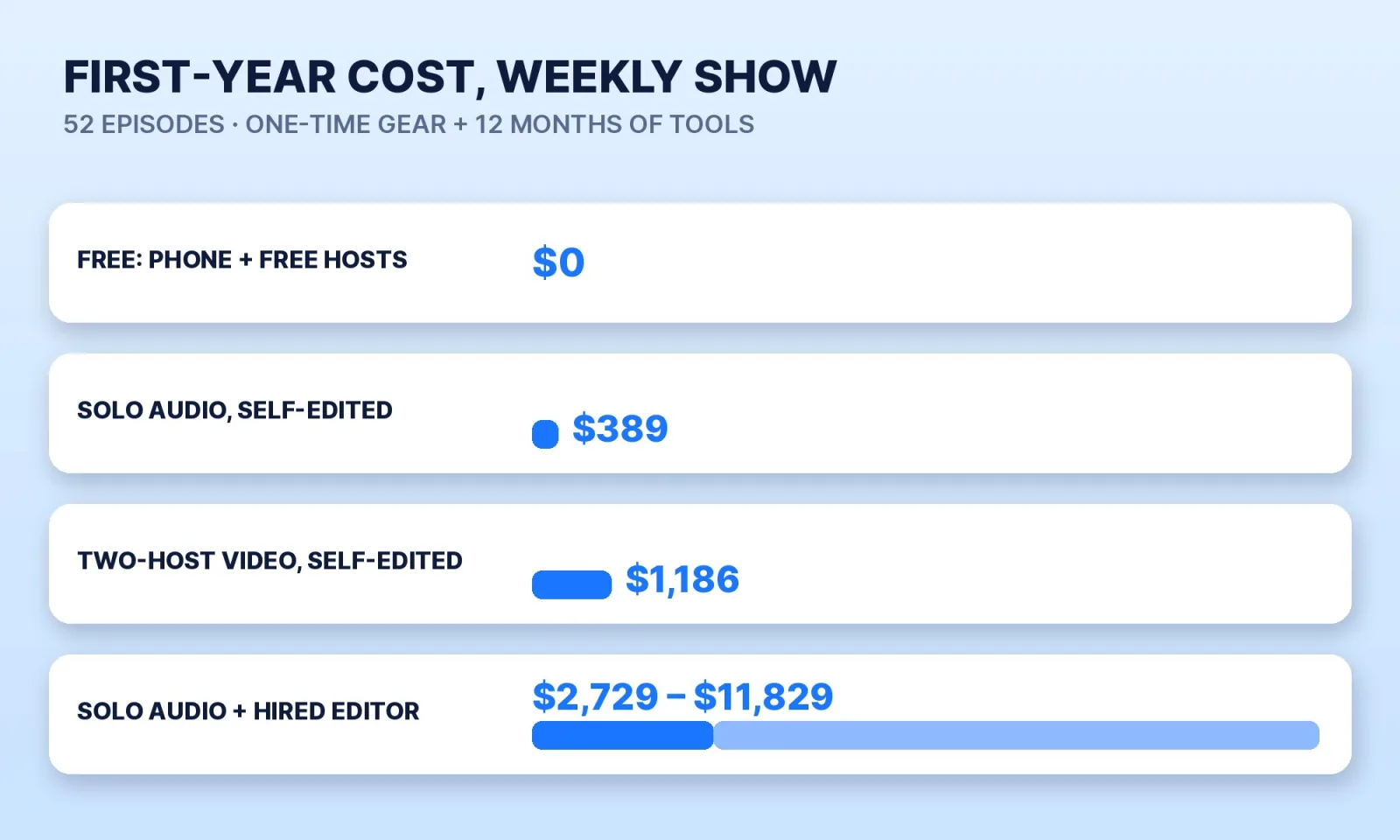
The gear is a one-time cost. Editing is paid every week, so it overtakes everything else within a couple of months. At $45 an episode, the editing passes the price of the microphone in the fifth week.
A rented studio swaps the gear bill for an hourly one. In West Palm Beach, the Space Connect podcast room lists at $50 an hour. Animatic Media in Pompano Beach charges $85 to $140 an hour for audio and $155 to $245 an hour for one to three cameras, with a 2-hour minimum for video. Two hours on two cameras is $400 before editing, so a video episode recorded there and edited by someone else runs about $470 to $890.
Audio or Video First?
Video costs more at every step: a second microphone, a camera or webcam, a recording app that keeps separate tracks, a host that carries video, and an edit that takes longer. It also puts the show on YouTube as a real video rather than a still image, and gives you vertical clips to post. Our post on whether your podcast should publish video walks through the audience data, and how many clips to cut per episode covers the short-form side.
If you start audio-only, keep the door open: record on a host and app that can add video later, so you don't migrate your feed in year two.
Before You Spend Money on a Podcast
- Record three test episodes on what you already own. If you don't finish three, no microphone will fix it.
- Pick a host that can carry video, even if you start with audio.
- Buy one good microphone per voice, not a camera first. Spend on sound before picture.
- Make show art that meets the directories' specs. Our free podcast cover art checker tests the sizes Apple, Spotify and YouTube ask for.
- Decide who edits before episode one. Price 52 episodes, not one. If you hire, compare Fiverr, Upwork and an agency on our marketplace comparison.
- Batch-record. Two or three episodes per session cut studio hours and setup time.
When to Hire an Editor
Editing is the cost that comes back every episode. Mark edits podcasts for audio and video shows: multi-camera cuts, cleaned audio, and vertical clips for Shorts, Reels and TikTok. The podcast video editing page shows the formats with real samples. If you're in South Florida and would rather not rent a room at all, Mark also films on site in Palm Beach, Broward and Martin counties. Mark Studios has delivered 8,000+ orders for 4,500+ clients and is Top Rated on Fiverr with a 4.9★ rating; whoever edits your show, agree the per-episode price and turnaround before you publish episode one.
The Bottom Line
You can start a podcast for $0, and a solid solo audio show costs under $400 in its first year. The gear is the small bill. Editing, paid every episode, is the large one, so price a full season before you choose a route.


