

How Much a Twitch Overlay Costs: The Short Answer
A custom Twitch overlay package costs about $60 to $1,500 from designers who publish their prices, and single pieces such as a webcam frame or an alert pack run $25 to $225 each. The template route is cheaper: Streamlabs Ultra starts at $15.75 a month and includes a library of overlay and widget themes.
These are other designers' published prices, read November 14, 2026, not ours. Mark designs animated overlays, emotes and badges for streamers and quotes each set, so there is no Mark Studios price on this page.
Want your own number? Get a quote from Mark: tell him about the project and he emails you a written price, with no sales call.
What a Full Stream Package Costs
A full package usually means the same set of pieces: a logo, scenes for starting soon, be right back and ending, an offline screen, a webcam frame, alerts, profile panels and a transition between scenes. The price climbs with how much of it moves.
| Designer | Package | What it adds | Price |
|---|---|---|---|
| Arthur Tully | Broadcast Foundation, Interactive Broadcast, Full Brand Ecosystem | Animated scenes, then alerts and a facecam border, then panels, banners and source files | $60, $120, $180 |
| Nubi Gaming Designs | Animated stream package | Logo, 3 animated screens, animated camera surround and top bar, 10 panels, 5 alerts | $260 and up |
| IT Pyramid | Silver, Gold, Platinum | Static screens and alerts, then animated, then an intro animation | $300, $500, $700 |
| StreamerOverlays.com | Static kit, animated kit | Source files included with either kit | $300+, $600+ |
| Streaming Vault | Essentials, Affiliate, Partner | 5 screens and 10 panels, then animated alerts and a stinger, then emotes and badges | $350, $550, $950 |
| Stream Designz | Custom package | Animated horizontal set plus a matching vertical TikTok set | $499 |
| Fuzey Designs | Starter, Pro, Premium | Logo animation and 4 animated screens, then alerts and a stinger, then full-screen alerts and animated emotes | $500, $1,000, $1,500 |
| KondorGFX | Silver, Gold, Red Diamond | Custom 3D scenes and alerts | $500, $800, $1,200 starting prices |
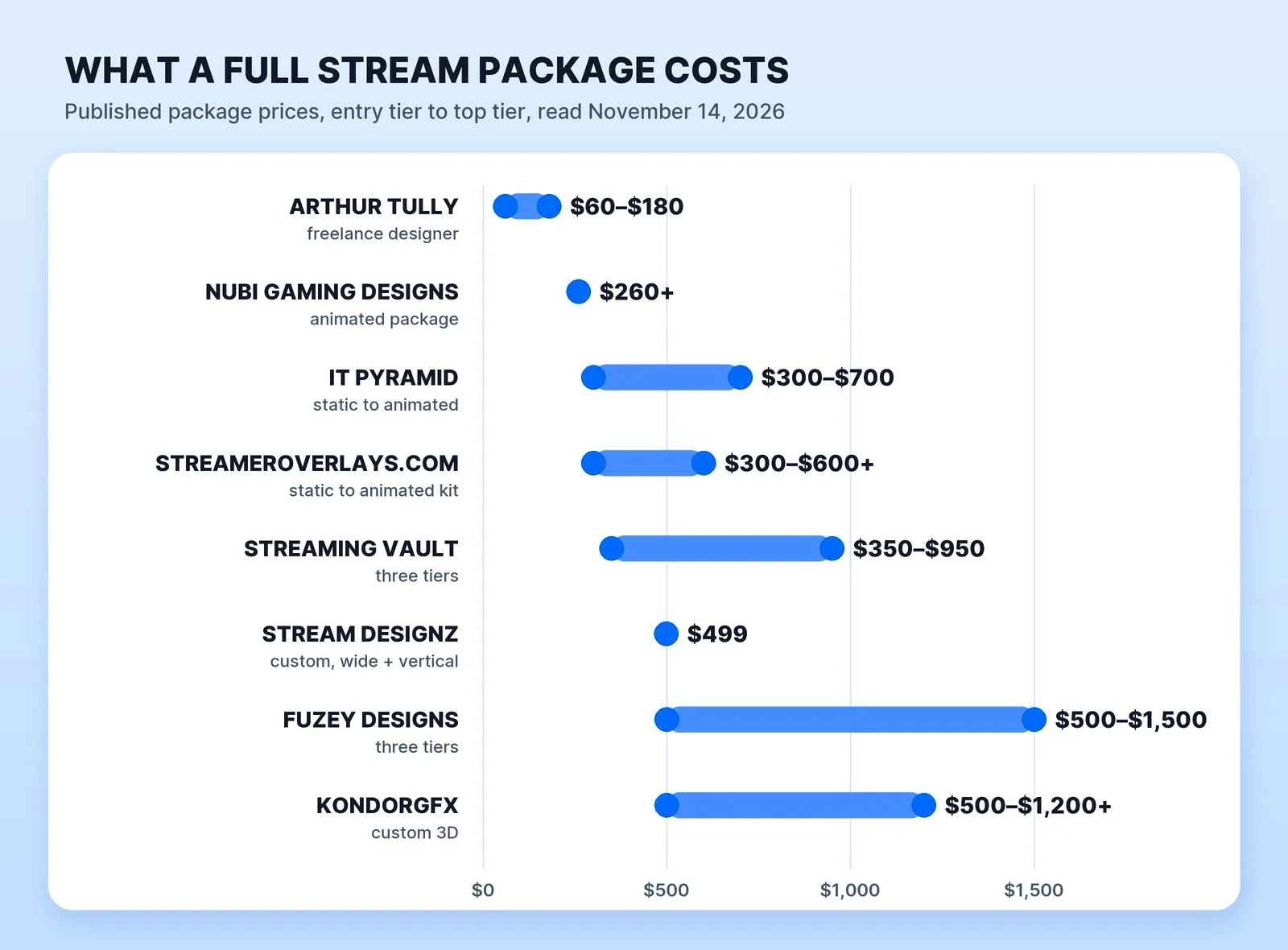
Animation can nearly double the price. IT Pyramid charges $300 for its static package and $500 once the screens, alerts and facecam move; StreamerOverlays.com's static kit starts at $300 and its animated kit at $600. KondorGFX notes that its final price "depends on style, complexity, and animation details."
What Each Piece Costs on Its Own
You don't have to buy the whole set. If you already have a logo and screens, buy only what's missing.
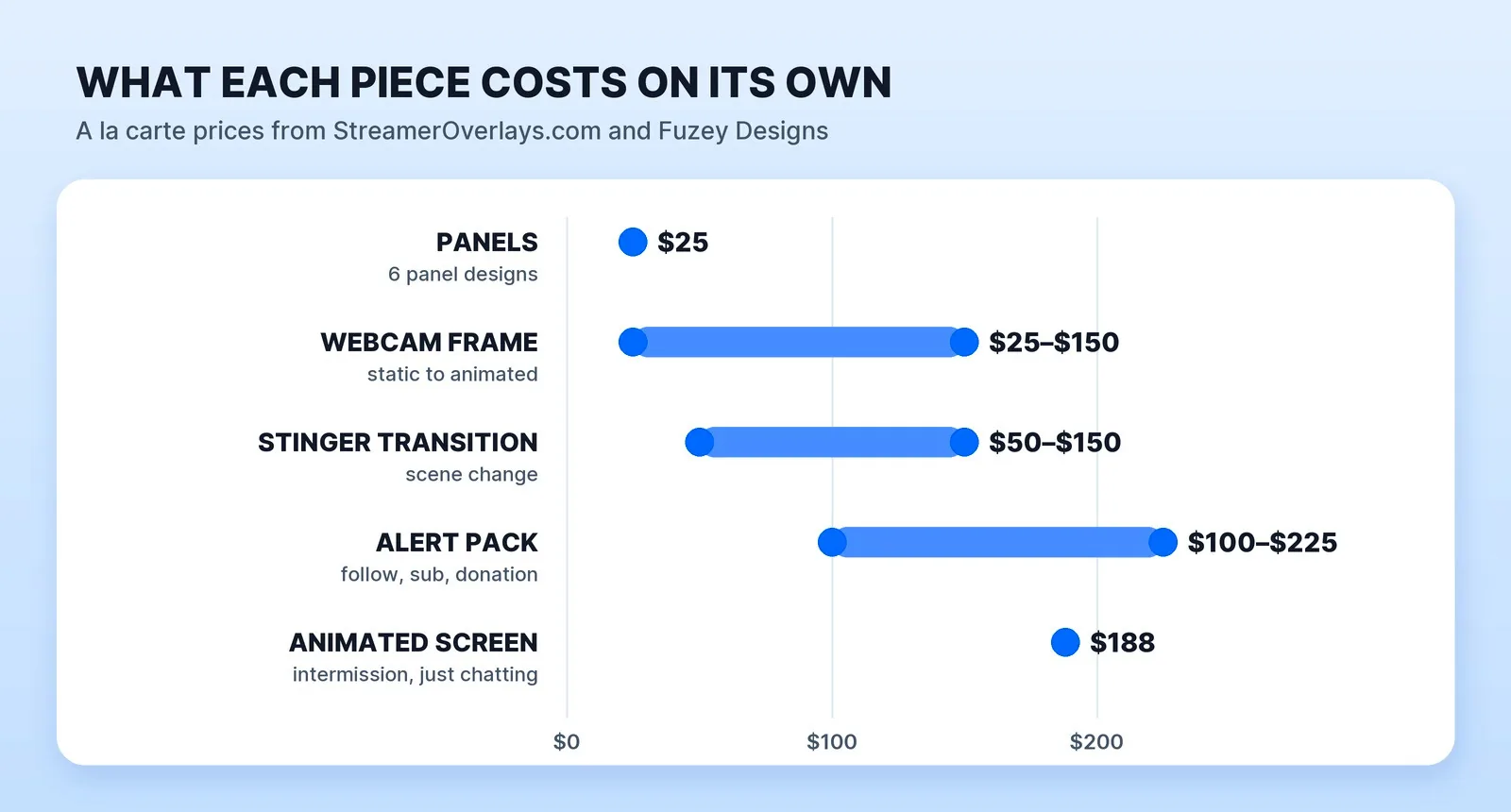
- Webcam frame: $25 static or $55 animated at StreamerOverlays.com; $150 for an animated overlay at Fuzey Designs, or $113 inside one of its packs.
- Alerts: StreamerOverlays.com's alert kit starts at $100 for four alerts plus an animated webcam frame or bar; Fuzey's alert pack is $225.
- Stinger transition: $50 to $150 and up at StreamerOverlays.com, $150 at Fuzey.
- Screens: Fuzey charges $150 for a static offline screen and $188 for an animated one.
- Panels: $25 for six panel designs at StreamerOverlays.com.
Template or Custom?
A template is the cheaper start. Streamlabs Ultra's page lists "thousands of designs from professional designers" with matching alert and widget themes, alongside multistreaming and other features, for $15.75 a month and up. The trade-off is that a library design isn't yours: any other subscriber can pick the same one, and it won't carry your logo or colours unless you edit it.
Custom work buys a look built around your brand, and files you keep. StreamerOverlays.com includes source files with its kits, and Arthur Tully's $180 tier includes the .PSD and .AEP files, so you can change colours or text later without paying again.
Wondering what the rest of your channel branding costs? See what Twitch emotes cost, and how to set up a multi-cam OBS stream the overlay will sit on.
Before You Order a Stream Overlay
- List the scenes you actually use: starting soon, be right back, ending, just chatting, gameplay.
- Decide static or animated. Animation can nearly double the price.
- Ask for the right file types: WebM or APNG with transparency for animated overlays, MP4 for full-screen scenes, PNG for panels.
- Name your software and platforms. Stream Designz builds for OBS Studio, Streamlabs and XSplit, and for Twitch, YouTube, Kick and TikTok.
- Ask for vertical versions if you also go live on TikTok.
- Get source files if you'll want to change colours or text yourself.
- Put turnaround and revisions in writing. Streaming Vault quotes 7 to 10 days for its first tier and 30 days for its $950 tier.
Who Designs It at Mark Studios
Mark designs animated overlays, emotes, badges and channel graphics for streamers, and the same studio edits your streams into VODs, highlights and Shorts. See what we make for gaming creators and streamers, and how we turn a livestream into VODs and highlights.
Mark Studios has delivered 8,000+ orders, with 4,500+ reviews, a 4.9★ rating and Top Rated status on Fiverr; whoever designs your overlay, send the scene list and your logo first so the quote covers everything.
The Bottom Line
A custom Twitch overlay costs about $60 to $1,500 for a full package and $25 to $225 per piece, while Streamlabs Ultra's themes start at $15.75 a month. Animation can nearly double the price, so decide which scenes need to move, ask for WebM files and source files, and buy only the pieces you're missing.


