Livestream & Webinar Editing

Stream and webinar recordings turned into videos people watch after the fact: the archive trimmed and chaptered, a highlight cut for YouTube, and clips for social from the moments that landed live.

  • Top Rated on Fiverr
  • 4.9 average rating
  • 8,000+ orders
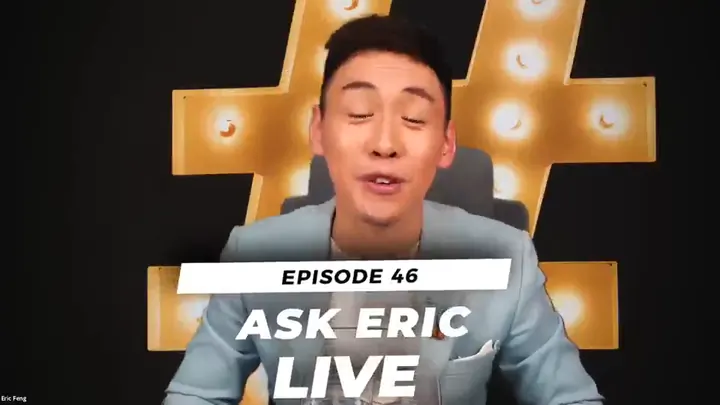
Still from the Ask Eric Live live show, episode 46 we edited
Ask Eric Live Live show, episode 46 · from our portfolio
What's included

What's included in Mark Studios livestream & webinar editing?

Mark Studios edits livestream and webinar recordings after they air. Send the local recording, or download the platform replay before it expires, and get back a trimmed, chaptered replay, a 5–15 minute highlight video for YouTube, and short captioned clips for social. Mark Santos does the edit himself, from stream VOD to YouTube cut. Standard turnaround is 5–7 business days, with rush available. To start, price the recording and the outputs you want in the instant quote. If your alerts and overlays ran on StreamElements, see what streamers need to do about its shutdown before the configs are gone.

Waiting-room minutes, setup talk, technical drops and the silent outro removed
Camera, screen-share and slide feeds synced and switched when recorded separately
A highlight video of the best 5–15 minutes, built to make sense without the chat
Vertical and square clips for LinkedIn, YouTube Shorts, TikTok and Reels
Captions corrected by hand and burned in; SRT/VTT files are a paid add-on
A chapter list for the replay on YouTube or a webinar landing page
Intro, outro and speaker name lower thirds
One template for a weekly show or webinar series, reused every episode

Replays don't stay up forever: Twitch keeps past broadcasts for 14 days for Affiliates and 60 for Partners, Facebook and TikTok keep live replays for 30 days, and YouTube archives a stream automatically only if it runs under 12 hours. Sources in our livestream video statistics. Churches stream too: 69% of U.S. congregations offered online or virtual worship in fall 2025, by the Hartford Institute for Religion Research's count (church live streaming statistics).

The process

How does editing a livestream or webinar recording work?

Get the recording to Mark

Local file first · Before the replay expires

Send the local recording from your streaming software or webinar platform, plus each camera's file if they were recorded separately. If all you have is the platform replay, download it before the window in the note above closes. A two-hour 1080p recording is a big file, so share it as a drive link.

2 Step 02

Pick the outputs, fix the price

Replay, highlight, clips · No hourly billing

Say which outputs you want: a trimmed replay, a highlight video, a set of clips, or all three. The price is fixed from the recording's length and those outputs in the instant quote, before any editing starts. There's no hourly billing.

3 Step 03

First pass through the stream

Dead air out · Moments marked

The first pass strips the waiting room, the setup, technical drops and off-topic stretches, then marks the moments worth keeping: a demo that worked, a sharp audience question, a quotable answer. The highlight and clips are cut from those marks, and the replay gets its chapter list.

4 Step 04

Your notes

3 rounds · 24–72h per round · Timestamped

Stream notes are usually about what's missing or what shouldn't be public: keep the answer at 1:12:40, cut the part where a viewer's full name was read out. Leave each one at its timestamp in the review tool; 3 rounds are included and each turns around in 24–72 hours.

5 Step 05

Replay, highlight and clips delivered

16:9 + vertical · Burned-in captions · Chapter list

You get the replay and the highlight as 16:9 MP4s, the clips in vertical or square, caption files for the replay page if you ordered them, and a chapter list to paste into the description. Standard turnaround is 5–7 business days from a complete recording, and rush is available.

Why Mark Studios

Why hire Mark Studios for livestream & webinar editing?

8,000+Projects delivered
4,500+Reviews
100M+Views generated
99%On-time delivery

Built for viewers who weren't there live

Live viewers came for you; replay viewers come for a topic and leave if it doesn't arrive. Twitch said in 2014 that Highlights got nine times the views of full past broadcasts. The edit is made for that second audience: chapters, a highlight, and clips that make sense without the chat.

Live shows and webinars in the portfolio

The samples above are real recordings: episode 46 of Ask Eric Live, an interview at the University of Hawaii, a webinar for Mark Bryce, two recorded video calls for Instacart for CMOs and Sapien, and a livestream from The Opinionated Idiot. Each shows a long session cut into something people finish.

A replay packaged for YouTube

Mark has edited for his own YouTube channel since 2011 and grew it past 200K subscribers. A stream he edits becomes more than an untouched archive with an auto-picked frame: it gets a highlight worth a title of its own, and chapters that let a viewer jump to the part they came for.

“This is the fourth time I have worked with Mark, and every time he has succeeded in leaving me truly satisfied.”
moshe_weizman · Fiverr review
FAQ

Frequently asked questions

It depends on the recording's length and what you want from it. A trimmed, chaptered replay is the lightest job; a highlight video takes more selection, and each social clip adds captions and reframing. Separate camera or screen feeds add sync work. You get a fixed price from the instant quote before any editing starts, and the pricing page explains how monthly plans and one-off quotes work.

Yes. A two-hour stream usually holds 5–15 minutes worth keeping: the demo, the reveal, the best audience questions and the lines chat reacted to. Those are cut into one highlight with a short intro, so it works for someone who never saw the stream, and the full replay stays up for anyone who wants all of it.

Our guide to live streaming production setup puts a single-camera stream at about 30 minutes to go live once the kit is in place; multi-camera shows add switching, audio routing and a test stream. That's the live side. Mark Studios' part starts when the stream ends: send the recording and the edit comes back in 5–7 business days.

Usually both. Trimming the archive in place in YouTube Studio keeps its URL, views and comments, but Studio's editor only takes videos under six hours, and since June 2025 a saved trim can't be reverted. The highlight then goes up as its own video with its own title and thumbnail. Livestream to VOD walks through the order.

The webinar is first split into its sections: the intro, each teaching point, the Q&A. Clips come from moments that make sense with no slide context: a clear tip, a number, a sharp answer to an audience question. Each one is cut short, captioned and sized for where it's going, such as the LinkedIn feed or YouTube Shorts.

Yes. If your software recorded each camera and the screen as separate files, they're synced and switched in the edit, so the replay cuts to the slides while you present and back to you for questions. If you only have the program feed, the mix viewers saw live, the edit works from that and tidies the layout where it can.

Yes. Clips get burned-in captions for muted viewing; an SRT or VTT file for the replay and highlight, for YouTube or your webinar replay page, is a paid add-on. Names, product terms and jargon are corrected by hand rather than left as automatic transcription errors.

Yes. The first episode sets the template: intro, lower thirds, caption style, how long the highlight runs and which clip formats you post. Every week after that follows it, so you send the recording and any moments you want kept, and turnaround stays the standard 5–7 business days.

Send what you have, including any backup recordings. A frozen camera can often be covered by cutting to another angle or the screen share, a dead microphone replaced from a backup track, and a dropped connection trimmed so the replay doesn't sit on a frozen frame. You'll hear at scoping what can and can't be saved.

Start your livestream & webinar editing project

Send the recording's length and what you want from it: a clean replay, a highlight, clips, or all three. Mark scopes the edit, usually within 1 business day.

Live captions run faster than produced ones: in our caption reading-speed study, 24.2% of captions in the median NASA live broadcast passed 20 characters a second, against 16.4% in its produced videos.

Not a fit if you need the stream produced live, with cameras switched and graphics run during the broadcast. Mark’s part starts when the stream ends.

Prefer to talk first? Book a free 15-minute call with Mark.

  • Founder-led US company
  • NDAs by default
  • Stripe & PayPal payments
  • Top Rated on Fiverr