

The Short Answer: How to Hire a YouTube Channel Manager
To hire a YouTube channel manager, first write down which jobs you're handing over and whether the edit is one of them. Then shortlist three candidates who have run channels like yours, check their past work inside YouTube Studio rather than in screenshots, and pay your favourite for a one-month trial with a written scorecard. Give them a role on your channel, never your password.
What channel management costs by route (Fiverr gigs, Upwork freelancers, management-only plans, agencies) is in our separate guide to YouTube channel management cost. This guide covers choosing the person and setting up the work so you stay in control of the channel.
Step 1: Write Down What You're Handing Over
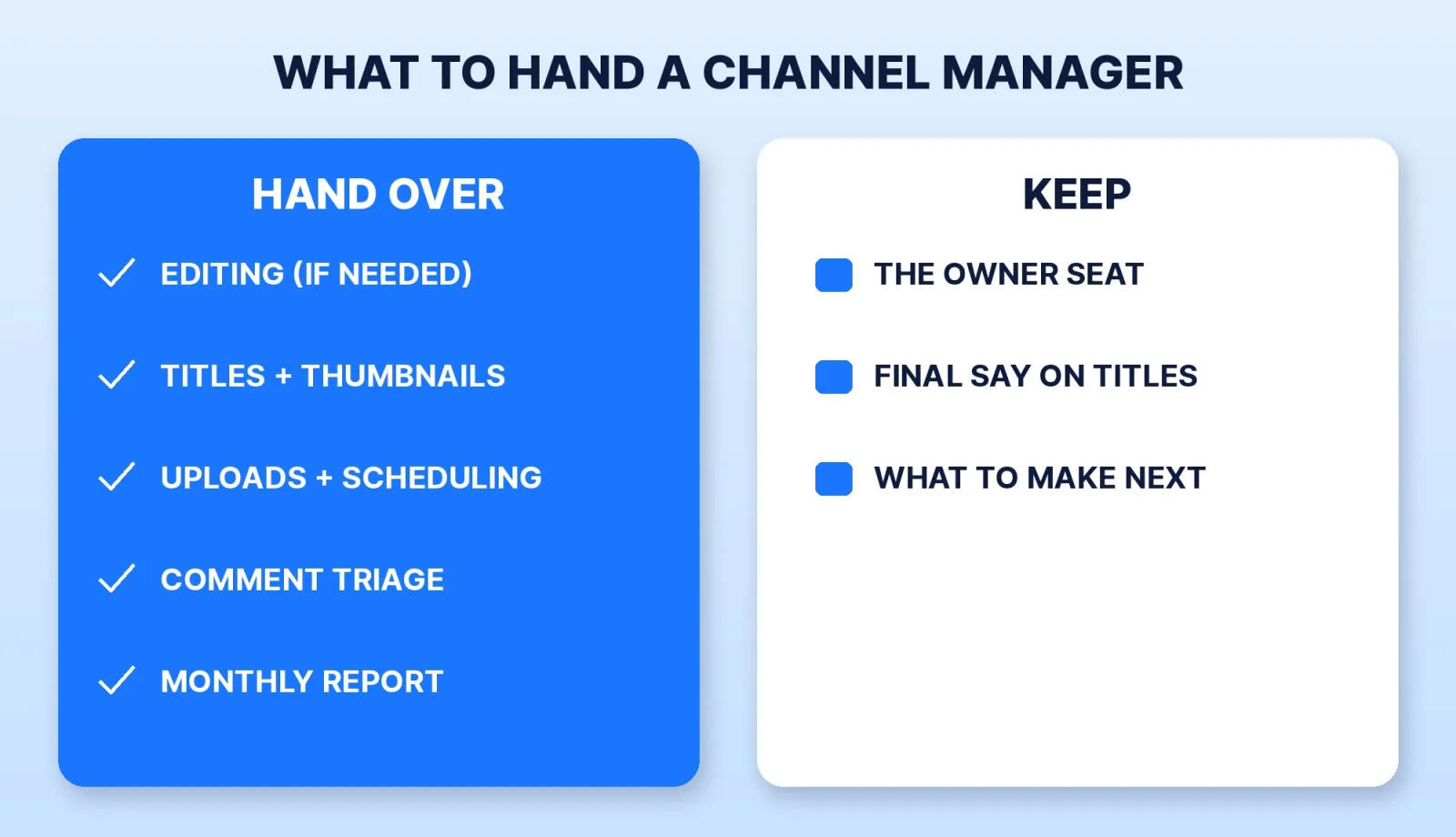
"Channel manager" means different jobs to different people. Some only upload and write titles. Some run the whole channel, edit included. Before you post a job or message anyone, list the jobs and tick the ones that leave your desk:
| Job | Usually handed over | Usually kept |
|---|---|---|
| Editing | If you don't already have an editor | If an editor already sends finished files |
| Titles, descriptions, chapters, thumbnails | Yes | Final say on the title |
| Uploads, scheduling, playlists, end screens | Yes | — |
| Comments | First-pass triage and spam | Replies to your most engaged viewers |
| Analytics | A monthly report with a written read | What to make next |
| Channel access | — | The Owner seat |
Our guide to channel management for growing brands explains each of those jobs and the rule behind the split: anything with a checklist can go, anything that needs your judgement about your audience stays. Write the ticked list into your first message. Every candidate then quotes the same job, so an uploader and a full-service agency stop looking comparable.
Step 2: Shortlist Three
There are four places to look:
- A freelance marketplace (Fiverr, Upwork). You see reviews and delivery history. Check that past buyers hired them for management, not a one-off upload or a thumbnail.
- A management service or agency. You get a process and cover when someone is away. Ask who will actually run your channel each week, and whether you can talk to them. Our list of YouTube channel management services compares the main options.
- A creator whose channel runs smoothly. Ask who handles their uploads. Referrals from people with a channel like yours are the fastest shortlist.
- An in-house hire. Makes sense once the workload fills a full week. Our in-house editor comparison shows what a salaried seat costs once tools and downtime are included.
Our guide on how to find a video editor has more on shortlisting.
Step 3: Check Their Past Channels in YouTube Studio
Screenshots of growth are easy to crop, so ask each finalist for two channels they run now and what exactly they do on each. Then ask the channel owner to confirm it, or ask the candidate to share their screen inside YouTube Studio for that channel and walk you through one month of uploads.
Listen for three things:
- What they changed and why. A good manager can point at a title or thumbnail they rewrote and say what happened to click-through rate after. Our guide to the YouTube analytics KPIs that matter lists the numbers worth asking about.
- How they report. Ask to see a monthly report they sent a client, with the client's name removed. A dashboard with no written read is data, not management.
- What they ask you. The candidates worth hiring ask about your audience, your upload calendar and who approves titles before they talk about growth.
The red flag that ends the conversation: any promise of views or subscribers, or any "promotion" package. YouTube's fake engagement policy says that if you hire someone to promote your channel, "their decisions may impact your channel", and that methods breaking the policy can lead to content removal or a channel takedown, "whether it's an action taken by you or someone you've hired." Bought views put the risk on your channel, not theirs.
Step 4: Run a Paid Trial Month With a Scorecard
Pay your top candidate for one month on real work before you sign anything longer. Agree on a scorecard on day one, so the end of the month is a yes or no rather than a feeling:
- Every scheduled video went out on time, with title, description, chapters, thumbnail, playlist and end screen done.
- Titles and thumbnails were sent for approval before publishing, in the format you asked for.
- Comments were triaged to the rule you agreed (for example, within 24 hours of an upload).
- One written report arrived that tells you what to change next month, not just what happened.
- Nothing broke: no wrong video set public, no setting changed without asking.
One month is too short to judge growth, but long enough to judge reliability.
Step 5: Give Them a Role, Never Your Password
YouTube's channel permissions let you invite a manager by email and choose what they can do. Google's own page says that granting permissions "is safer than sharing your password". The roles differ in ways that matter for a new hire:
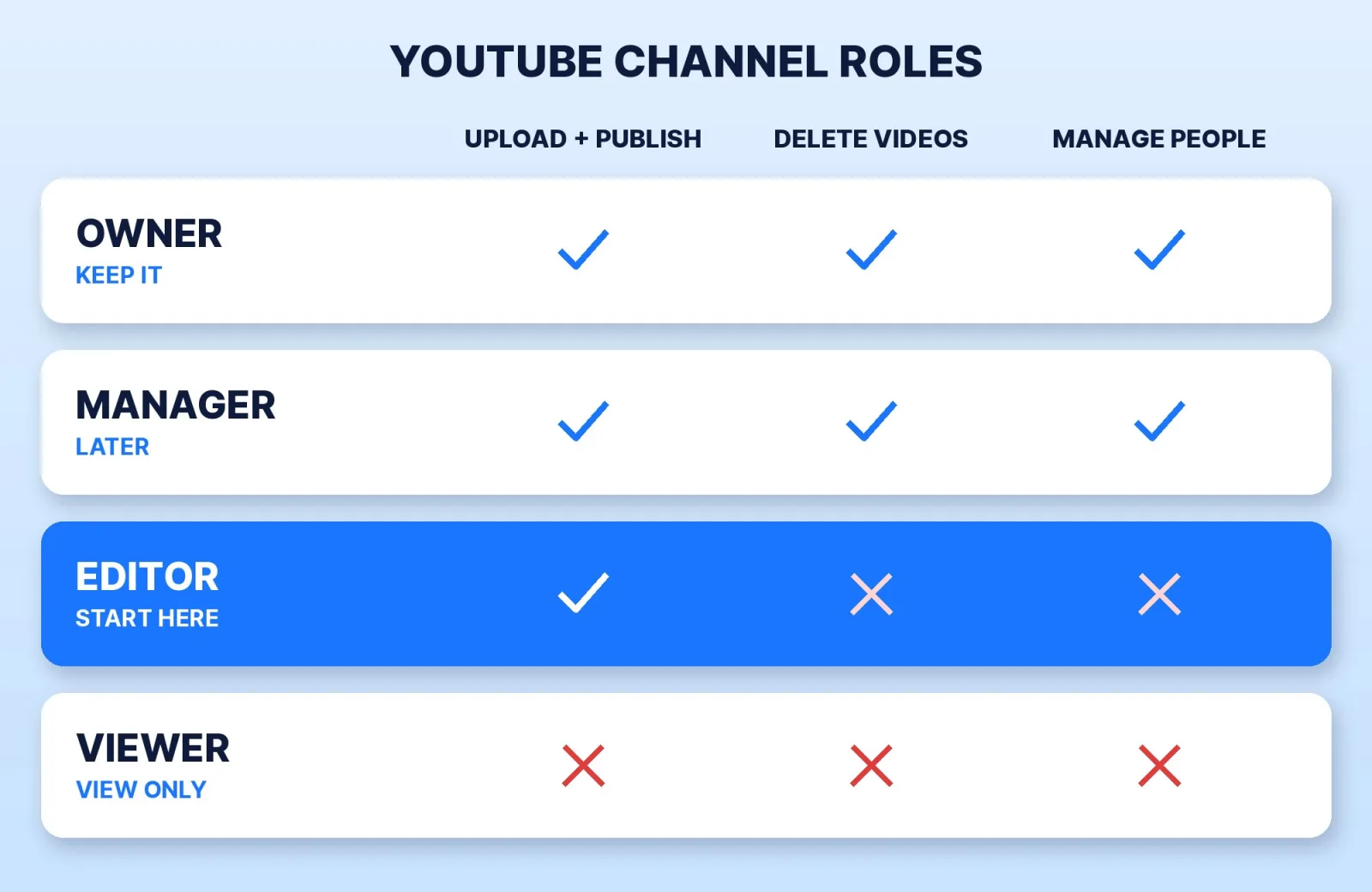
- Keep the Owner seat. The Owner "can't transfer ownership to other users" under channel permissions, so it stays with you.
- Start a new manager on Editor. An Editor can upload, publish and edit, but can't delete published content, manage permissions or enter into contracts. If revenue figures should stay private, Editor (Limited) does the same job without revenue data.
- Move to Manager only when you need it. A Manager can delete content and add or remove other people, so save it for someone who has earned that trust.
If your channel is on a Brand Account, YouTube's Brand Account help page recommends channel permissions over Brand Account roles and warns against sharing passwords. Turn on 2-Step Verification on the Owner's Google Account before you invite anyone. Our guide to YouTube channel permissions and Brand Accounts walks through the setup.
Step 6: Put Six Things in Writing
Before the trial turns into a monthly contract, agree on:
- The scope. The ticked list from step 1, with the monthly number of long-form videos and Shorts.
- Approvals. Which decisions need your yes before publishing (titles, thumbnails, anything sponsored).
- Reporting. What arrives, how often, and on which day.
- Who owns what they make. Thumbnails, templates and written copy belong to the person who made them unless you agree otherwise. Under the U.S. Copyright Office's work-made-for-hire rules, commissioned work from a freelancer counts as yours from the start only in nine listed categories and only with a written agreement both of you sign. Thumbnails and channel copy don't clearly fit those categories, so ask for a written transfer of copyright instead, and have a lawyer read a large contract.
- Source files. Thumbnail project files, templates, and a shared folder you own, so the next person doesn't start from zero.
- Notice and offboarding. How much notice either side gives, and that you remove their role on the last day. Our guide on what to do when your video editor disappears covers the same continuity risk, and our guide on how to pay a video editor covers deposits and payment terms that work for a manager too.
Where Mark Studios Fits
Mark Studios runs YouTube channel management with the edit included: thumbnails, titles, descriptions and chapters, uploads, comment triage and a monthly report, with every video reviewed by Mark. We work inside YouTube's rules, never buy views or subscribers, and ask for a channel role, not a password. If you run a company channel yourself, see our video for founders page. Mark Studios has completed 8,000+ orders with 4,500+ reviews, 99% on time, with work behind 100M+ views, and is Top Rated on Fiverr with a 4.9★ rating. Whoever you hire, judge them on a paid trial month against a written scorecard.
The Bottom Line
Write down which jobs you're handing over, shortlist three people who run channels like yours, and check their work inside YouTube Studio rather than in screenshots. Pay for one trial month against a written scorecard, give the new manager an Editor role while you keep the Owner seat, and get scope, approvals, copyright and offboarding in writing before you sign anything longer.


