

How to Make a Gaming Montage: The Short Answer
To make a gaming montage, record your plays at 60 fps or higher with an instant-replay tool, pick your strongest moments, choose a song you're allowed to use, cut each play so its hit lands on a beat, slow down into the biggest hits, then export a 16:9 master plus vertical cuts. The free version of DaVinci Resolve handles the whole edit.
Most montages that fall flat don't fail on effects. They fail on two decisions made before the edit starts: clips recorded at a frame rate too low to slow down, and a song the uploader has no right to use. YouTube's help page on copyright claims is blunt about the second one: a Short longer than one minute with an active claim is blocked, whatever policy the rights holder chose.
The effects themselves (speed ramps, impact zooms, shake, color) have their own table on our gaming montage editing page. This post is the workflow around them, in the order we run it.
1. Record Clips You Can Actually Slow Down
Montage footage comes from a replay buffer, not a full-session recording. NVIDIA's ShadowPlay Instant Replay saves the last 30 seconds of gameplay, and its manual recording goes up to 4K HDR at 120 fps. OBS has a Replay Buffer that does the same job, and its recording output guide recommends recording to MKV, because an MKV file isn't corrupted when a recording stops without a clean shutdown. Remux to MP4 afterwards from OBS's File menu.
Then choose your frame rate by the slow motion you want. A slowed clip only contains the frames you recorded. Drop a 60 fps clip to 25% speed and you're showing 15 real frames per second, which stutters next to the 60 fps clips around it. Record at 120 fps and a 50% ramp stays at a clean 60.
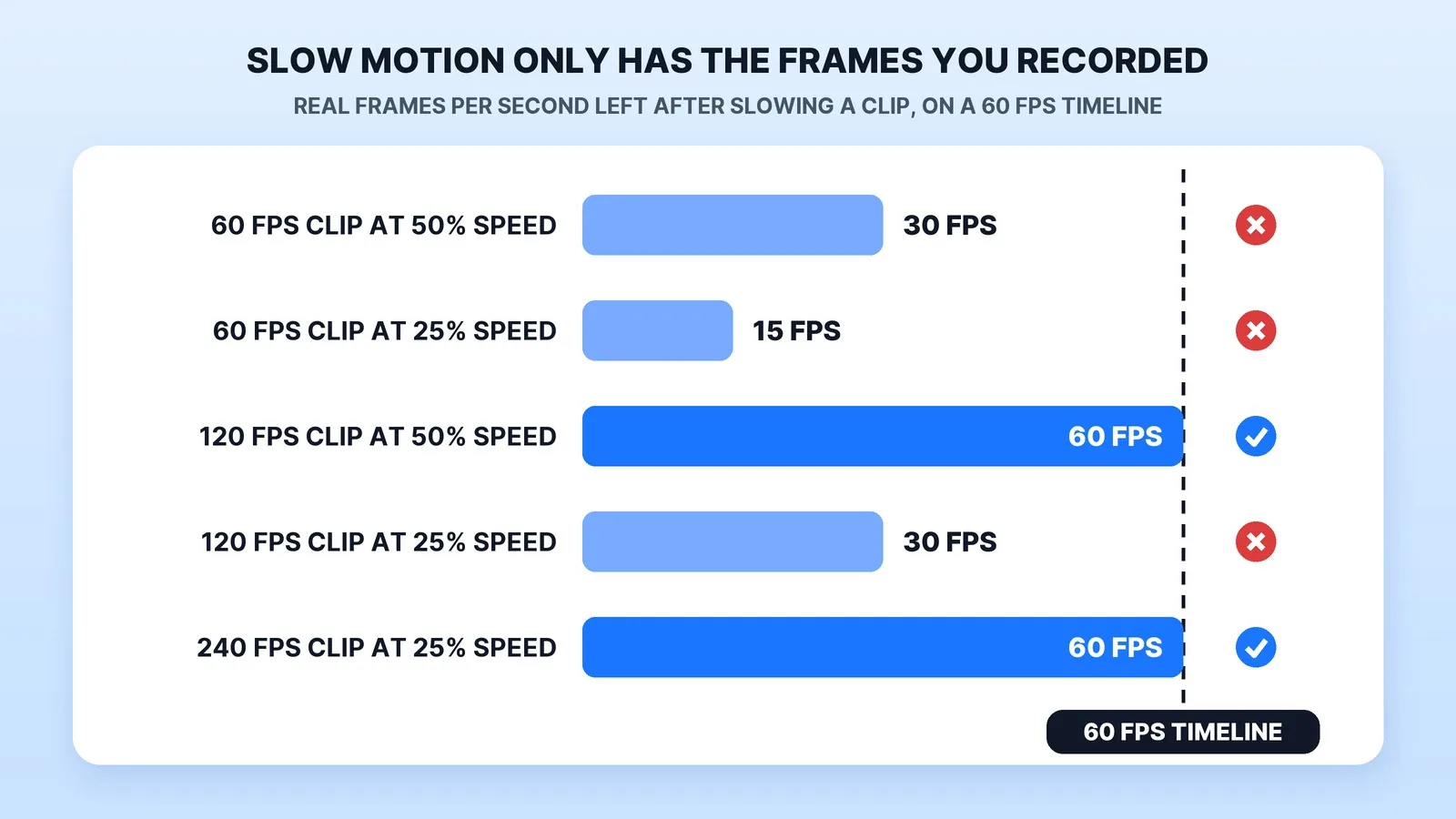
If the play is already recorded at 60, frame interpolation can draw the missing in-between frames. In DaVinci Resolve that's Speed Warp, which comes with the paid Studio version, listed at $295 and on sale for $236 when we checked on October 23; the free version edits up to 60 fps in Ultra HD. Generated frames are guesses, and they tend to warp on crosshairs, HUD text and fast flicks. Record high when you can, and upload at the frame rate you recorded, as YouTube's encoding guide asks.
2. Pick the Plays and Lay Them Out on the Song
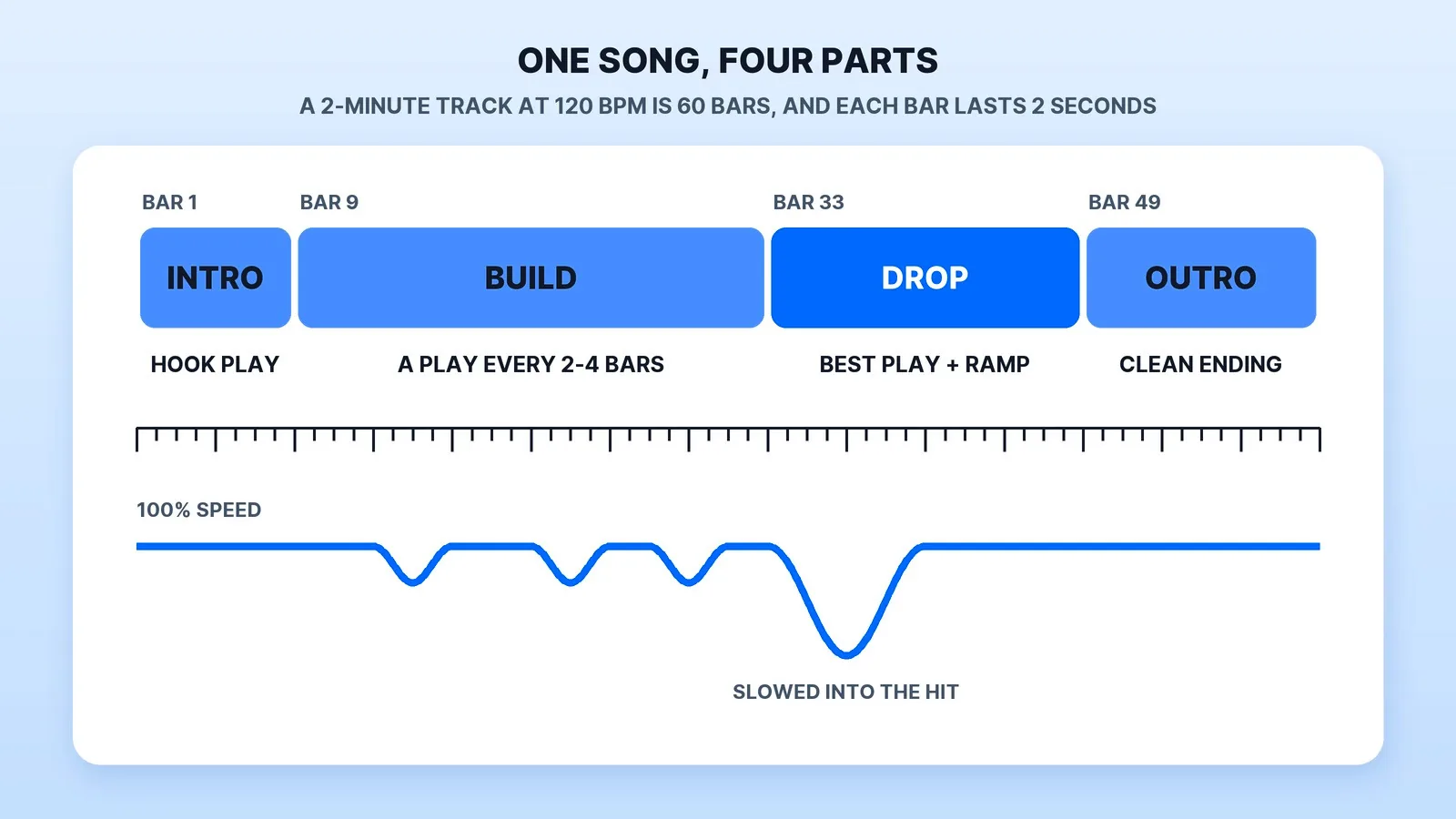
Work out the song in bars before you choose clips. At 120 beats per minute a bar of 4/4 lasts two seconds, so a two-minute track is 60 bars. Give each play two to four bars (four to eight seconds), and the 24-bar build in the layout below holds 6 to 12 plays.
The order matters more than the count:
- Open on your second-best play. Viewers who leave in the first seconds never reach the drop, so don't spend the opening on a warm-up.
- Escalate through the build. Each play a little harder or cleaner than the one before.
- Save the best play for the drop, where the song gives it the most room.
- End on something that resolves, a round win or a final kill, not a fade over a menu.
Cut the dead air before anything else: loadouts, walking, menus and the seconds after a play that only you find interesting.
3. Use a Song You're Allowed to Use
Music is the step people skip and the one that costs them the video. Content ID matches songs automatically, and the rights holder decides whether a claimed video is blocked, monetized with ads (the revenue goes to the claimant, sometimes shared with you) or only tracked, and it can choose differently by country. Vertical cuts are stricter: a Short between one and three minutes with an active claim is blocked.
| Music source | Will it get claimed? | Can you monetize? | Credit needed? |
|---|---|---|---|
| A chart song you have no license for | Expect a Content ID claim | Only the claimant can run ads, sometimes sharing revenue | A credit line doesn't license it |
| YouTube Audio Library | No: tracks downloaded there aren't claimed through Content ID | Yes, in the YouTube Partner Program | Only for Creative Commons tracks |
| NCS (NoCopyrightSounds) | No, for independent creators who follow its policy | Yes, under its usage policy | Yes: artist and song in the description |
The footage needs permission too. Microsoft's Game Content Usage Rules, for example, let you post videos of its games on YouTube or Twitch and earn from those sites' ad programs, but they cover only games Microsoft owns (Minecraft has separate guidelines), so check the publisher of every game you use. The long versions are in our YouTube music licensing guide and our guide to Content ID, copyright strikes and fair use.
4. Cut to the Beat, Then Add Effects
- Mark the beats first. Play the song on the timeline and tap the marker key on each downbeat. In both Premiere Pro and DaVinci Resolve that key is M.
- Put the hit on the marker. Line up the frame where the kill, hit marker or goal lands with a beat, then trim the lead-in backwards from there. Cutting forward from the start of a clip is how hits end up a few frames late.
- Ramp into the hit, snap out on the beat. Slow down a few frames before the impact and return to full speed on the next beat, so the slow part feels earned.
- Let the game audio through. Dip the music under the key moment so the shot or the callout is heard, then bring it back.
- Add effects only where they help. An impact zoom on a kill feed that's unreadable at phone size helps. A flash on every cut buries the play. The effects table on our gaming page covers when each one earns its place.
The Pre-Upload Checklist
- Every hit lands on a beat, checked at full speed and again at half speed.
- The kill feed and crosshair are readable at phone size.
- The song's source and its credit line are in the description.
- If you monetize, every game's publisher allows monetized videos.
- The master is exported at the frame rate you recorded. Our YouTube export settings guide has the full spec.
- Vertical cuts keep the action and the kill feed inside the 9:16 frame, and any cut between one and three minutes uses music with no claim on it.
When Handing It Off Makes Sense, and What It Costs
Once you know the steps, the edit is the quick part. The slow part is reviewing footage, and for streamers that means finding the plays in a four-hour VOD: here's how to turn a stream VOD into highlights, and the multi-cam OBS streaming setup that gives you cleaner footage to cut.
Freelance montage prices are low at the entry end. On October 23, 2026, Fiverr listed 1,553 gaming montage services, and the 24 gigs on the first results page had starting prices between $5 and $750, with a median of $15. A starting price buys a gig's smallest package, so compare the length, revisions and extras each package includes. Our freelance marketplace comparison covers how the platforms differ for buyers, and the short-form editing cost guide prices vertical cuts on their own.
Some Fiverr links on this page are affiliate links: Mark Studios may earn a commission if you buy through them, at no cost to you.
Gaming videos came up in 23 of 698 first messages from buyers in our inbox. Mark Studios has completed 8,000+ orders and 10,000+ projects for 4,500+ clients, with a 4.9★ average rating and 100M+ views on client videos. For gaming creators we cut montages, stream highlights and Shorts to your track: you send clips or the full VOD, standard turnaround is 5–7 days with expedited delivery available, and the instant quote prices most projects in about two minutes.
The Bottom Line
A good gaming montage is mostly decided before the edit: record at a frame rate you can slow down, and use a song you're allowed to use. After that it's discipline. Put every hit on a beat, save the best play for the drop, and add effects only where the viewer can still see the play.


