

What Is a Talking Head Video?
A talking head video is a video in which one person speaks to the viewer, framed from about the chest up, so their face and voice carry the message. Many YouTube explainers, online course lessons, founder updates and coaching videos are talking heads. The term comes from television: Cambridge Dictionary defines a talking head as "someone who appears on a television news or discussion show".
The format has a split reputation. In 2005, eyetracking tests led Jakob Nielsen of Nielsen Norman Group to write that "a talking head is boring, even for 24 seconds." Nine years later, a study of 6.9 million viewing sessions on edX found that videos cutting between the instructor's talking head and the slides were more engaging than slides alone. Both are right. The difference is mostly the edit.
What a Talking Head Video Looks Like: 6 Common Formats
A talking head is filmed in one of two setups. In direct address, the speaker looks into the lens and talks to you. In an interview, they look at someone sitting just beside the camera, so it reads as a conversation you're overhearing.
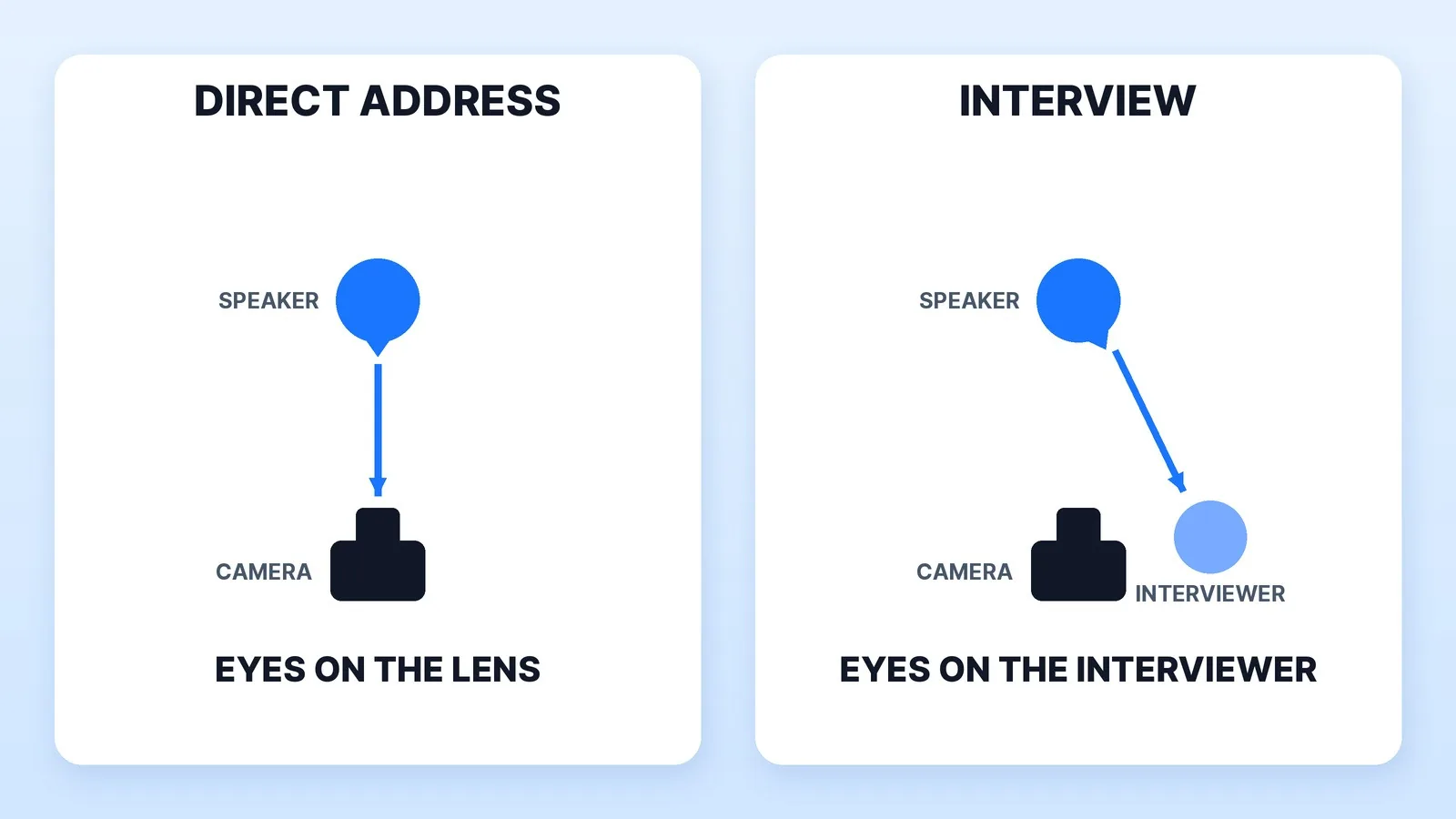
| Format | Setup | Where you see it |
|---|---|---|
| YouTube to-camera | Direct address | Explainers, commentary, reviews |
| Course lesson | Direct address, cut with slides or screen | Online courses, training |
| Founder or CEO message | Direct address | Launches, company updates, LinkedIn |
| Vertical to-camera clip | Direct address, often on a phone | Reels, TikTok, Shorts, UGC ads |
| Interview | Eyeline off the lens | Documentaries, testimonials, case studies |
| Podcast video | Eyeline off the lens, one angle per person | Video podcasts and their clips |
The setup decides more than the look. A to-camera video is usually scripted or bullet-pointed and recorded in takes, so the edit removes retakes. An interview is unscripted, so the edit finds the answer inside a long reply. Our guide to how much raw footage a 10-minute video needs puts planning ratios on both.
What the Research Says Makes One Work
Three findings recur:
- Close and personal beats expensive. In the edX study, MIT's 6.00x instructor was filmed in a tight frame at his office desk, often looking straight into the camera. Harvard's PH207x was filmed in a multi-million dollar TV studio, with the instructor behind a podium. Students engaged more with the 6.00x videos, and the authors' advice was to "try filming in an informal setting."
- The picture has to change. When Nielsen Norman Group revisited the format in 2017, it concluded that "even a talking-head video can keep people engaged," and that "the single most important technique for keeping visual interest is to frequently change the visual": a new expression, a new position or a new camera angle.
- Shorter holds better. In the edX data, median engagement time was at most 6 minutes however long the video ran, and the authors recommend course videos shorter than 6 minutes.
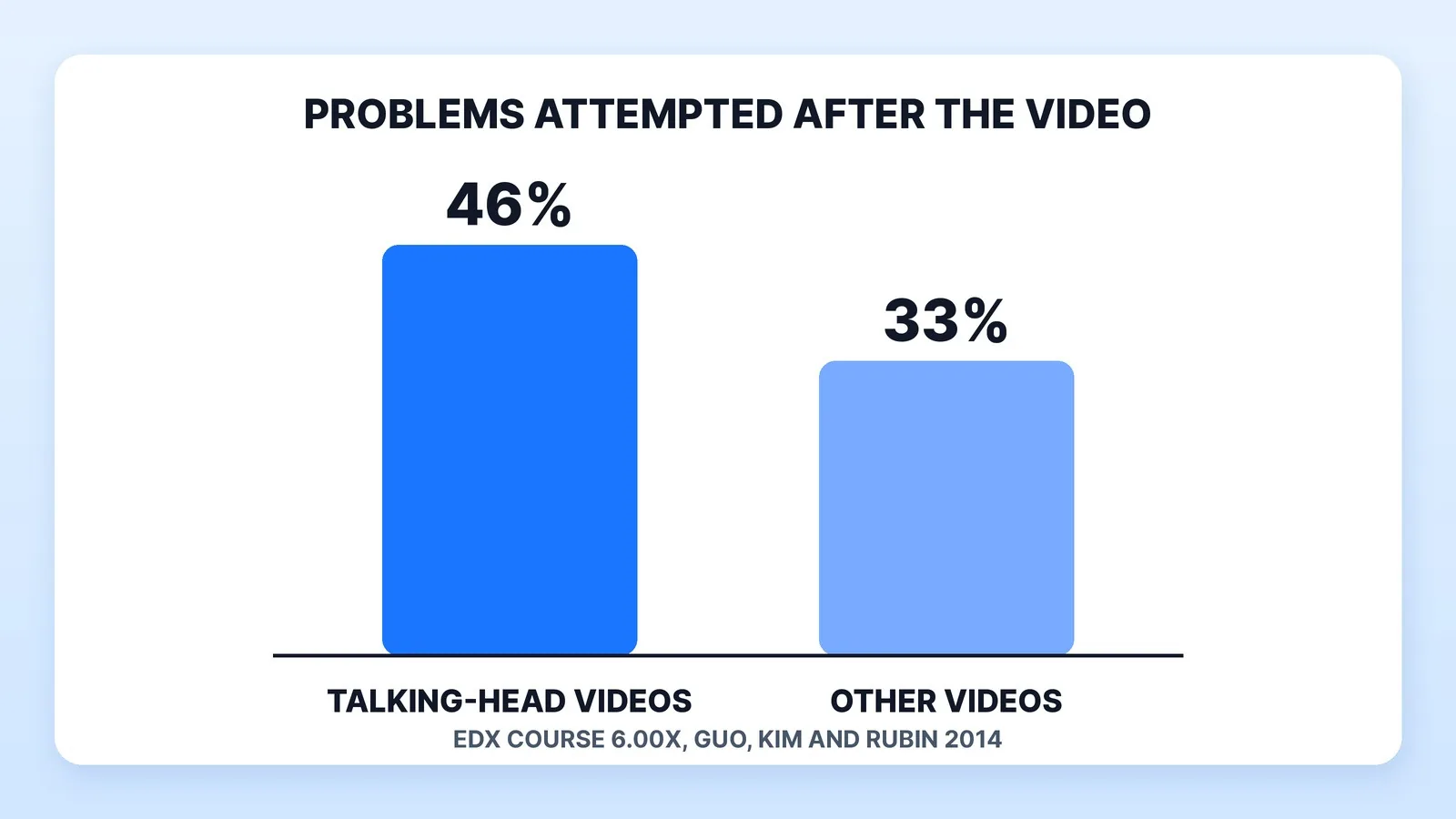
The 6.00x talking-head videos weren't one long shot. They had been edited to alternate between the instructor's face and the slides or code. It didn't hold everywhere: in PH207x, students attempted 33% of problems either way. Treat it as direction, not a benchmark for your niche.
What the Edit Has to Add: The 6-Pass Checklist
A raw talking head is one shot of one person. Here is what turns it into a video people finish, in the order an editor usually works:
- Cut the dead air. Pauses, retakes, false starts and repeated points come out. The jump cuts this leaves are normal for the format.
- Change the frame. A punch-in (a tighter crop of the same shot) or a second camera angle at points of emphasis, which also hides a cut.
- Show what you're describing. B-roll, screen recordings or photos go over the voice when the words describe something visible. Descript's b-roll guide says it keeps viewers engaged "when your talking head starts to wear thin."
- Put the key points on screen. Names in lower thirds, numbers, steps and the one line you want remembered.
- Caption it. Burned-in captions for social feeds, a caption file for YouTube. Our guide to burned-in vs closed captions covers which wins where.
- Fix the sound. A talking head is mostly voice, so the audio gets as much attention as the picture: level the voice, cut hum and room noise, keep any music under the words.
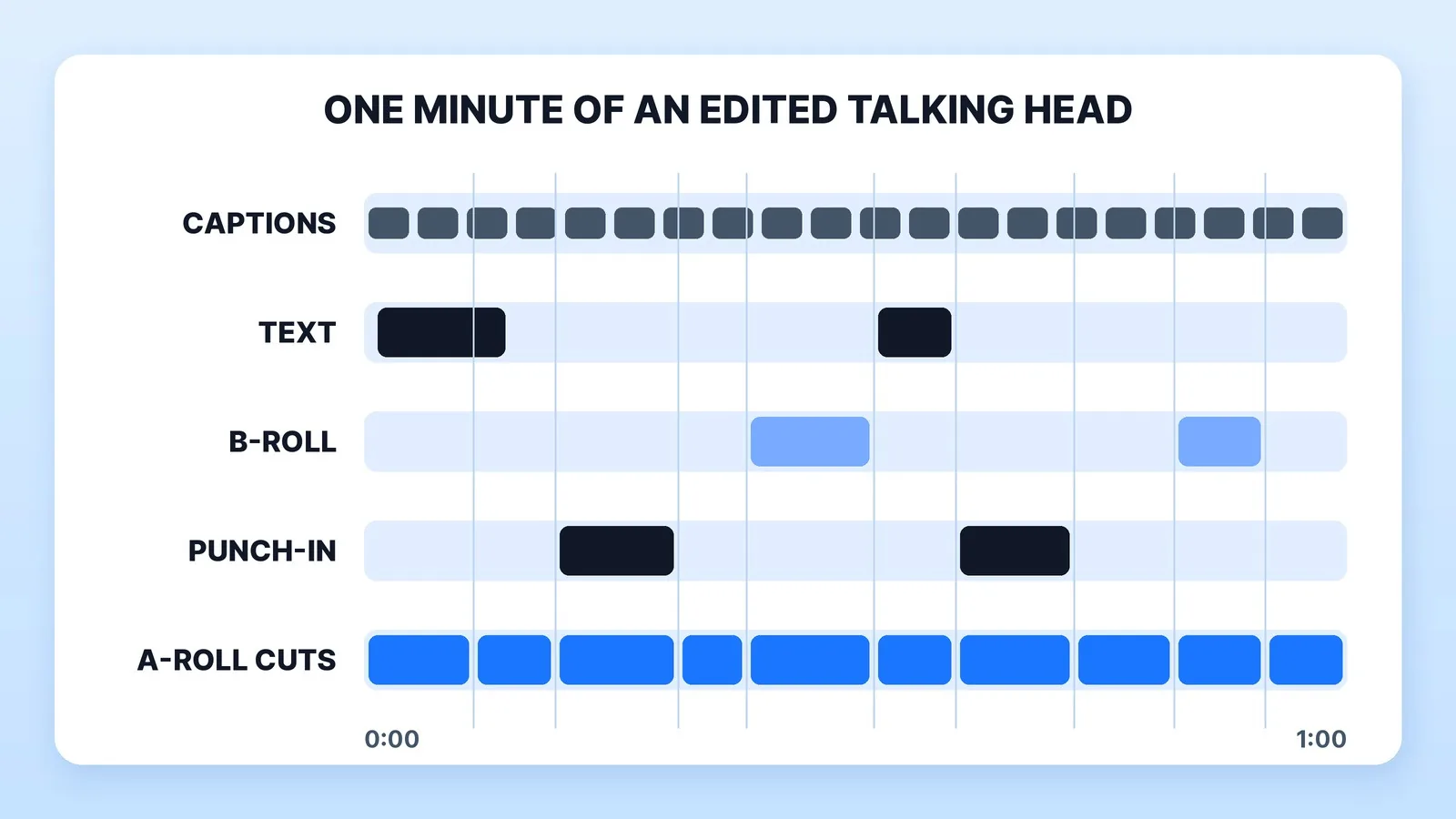
How heavy each pass goes is a style choice. A clean talking head stays light, while a creator-style edit adds graphics and sound effects. Our guide to video editing styles names eight of them, so you can point to one in a brief.
Filmed or AI Avatar?
AI avatar tools can generate a presenter reading a script, and some will clone your own face and voice. If you publish on YouTube, its rules on AI-generated content require you to disclose realistic content that "makes a real person appear to say or do something they didn't do." An avatar reading words its real-life model never recorded sits close to that line, so disclose it.
For internal training updates or a lesson in another language, an avatar can save a shoot. When the person on screen is what the viewer is buying (a coach, a founder, a doctor), film the person.
When to Hand the Edit Off
Filming a talking head is the short part. Cutting the takes, building the b-roll and captioning every upload is where the hours go, and it repeats each week. It's worth handing off when uploads slip because the edit isn't done, when you're a course creator with a library of lessons to cut in one style, or when you're a coach or founder whose hour on camera is worth more than an hour in the timeline. In our study of what buyers ask before hiring a video editor, 42% of 698 first messages already described raw footage the buyer had.
Talking-head video editing at Mark Studios runs the six passes above, from your raw takes to exports with burned-in captions (a separate SRT or VTT caption file is a paid add-on), and Mark reviews every edit. Our YouTube video editing cost guide lists market rates for talking-head edits, and our list of the best talking head video editing services compares 13 options. If you're weighing a marketplace freelancer against a studio, our comparison of Fiverr, Upwork and an agency puts the fees side by side. If you'd rather not film it yourself, Mark films founder and staff interviews on location in Palm Beach County.
Mark Studios has completed 8,000+ orders with 4,500+ reviews, 99% on time, with work behind 100M+ views, and is Top Rated on Fiverr with a 4.9★ rating. Whoever edits yours, send one reference video and say which of the six passes you want.
The Bottom Line
A talking head video is one person speaking to camera, chest-up, and it does better than its reputation when it's close, personal and cut with what the speaker describes. The format isn't what bores viewers; one unchanging shot is. Cut the dead air, change the picture, and put the key points on screen.


