

The Short Answer: Raw Minutes by Format
Plan on roughly 20 to 50 minutes of raw footage for a scripted 10-minute talking-head video and two to four hours for a 10-minute vlog. Those are planning estimates, and the number behind them is the shooting ratio: minutes recorded for each finished minute. One per-video editing service, Replayed, sizes its flat tier for a final cut of about 10 minutes at 16 to 35 minutes of unedited footage, which works out to roughly 1.6:1 to 3.5:1.
Documentaries and features run far higher. Hoop Dreams turned about 250 hours of footage into a film 2 hours 51 minutes long, roughly 88:1 by our arithmetic, and shooting on video rather than film was part of how a planned 30-minute short got there (Sundance Institute). Mad Max: Fury Road was cut from more than 470 hours of location footage into a 120-minute film, more than 235:1 (Avid).
A creator's ratio sits between those. Under-shoot and the edit has no room to breathe; over-shoot and the quote and the turnaround rise with the footage.
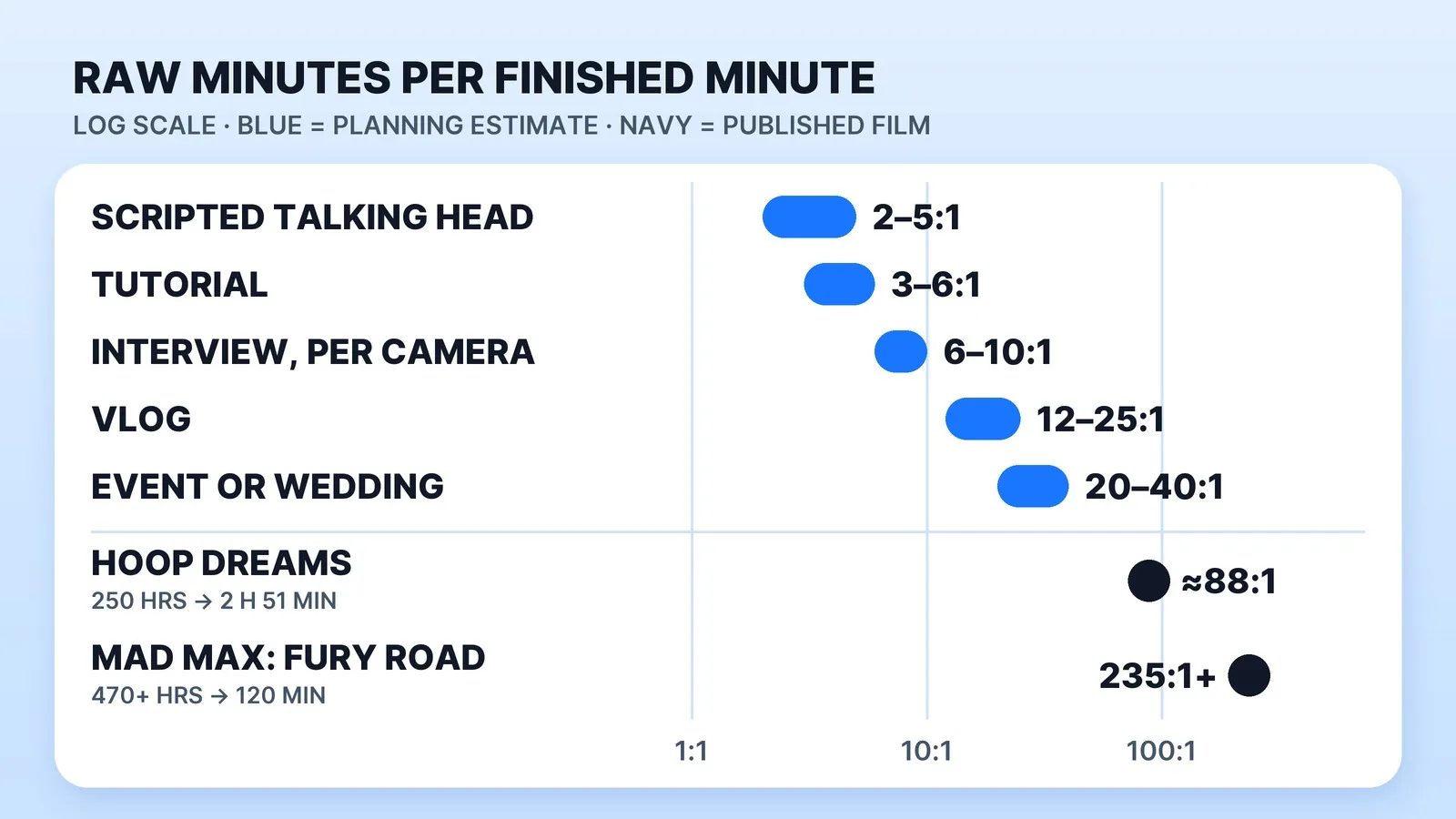
| Format | Planning ratio (estimate) | Raw footage for 10 finished minutes |
|---|---|---|
| Scripted talking head (teleprompter or memorised) | 2:1–5:1 | 20–50 min |
| Tutorial / screen share with a camera | 3:1–6:1 | 30–60 min |
| Interview cut down to 10 minutes | 6:1–10:1 | 1–1.7 hr, per camera |
| Vlog / day-in-the-life | 12:1–25:1 | 2–4 hr |
| Event or wedding coverage | 20:1–40:1 | 3.3–6.7 hr |
| Documentary | 50:1–100:1+ | 8–17+ hr |
These ranges are planning estimates, not measured data: the low end assumes the video was decided before the camera rolled, the high end assumes it wasn't. Two things push a shoot toward the bottom of the table: how little of the video is scripted, and how many cameras run at once. A three-camera interview at 8:1 is not 80 minutes of footage for a 10-minute cut. It is 80 minutes per camera, four hours in total, all of which has to be synced. Multi-camera video podcasts feel this most; our page on podcast video editing covers how those episodes get cut.
Why Your Ratio Is Higher Than You Think
The card usually holds more than the takes you remember. Four habits add footage nobody planned:
- Roll-up and roll-down. Recording before you're ready and stopping well after you finish adds seconds to every clip. At 10 to 20 extra seconds a clip, 60 clips carry 10 to 20 minutes of nothing.
- Take stacking. By the fifth take of a line, the line itself is often the problem, so the extra takes add review time rather than options.
- Insurance b-roll. Footage shot because it might be useful, with no line it belongs to, is the easiest material for an edit to leave out.
- Cameras left rolling. A second angle running through a 90-minute conversation produces 90 minutes of footage, however little of it is used.
All four are planning problems, fixable before the camera turns on.
What the Footage Costs Before Anyone Edits It
Storage depends on the codec far more than on the camera. Sony's α7C, for example, records 4K (3840×2160) at about 100 Mbps or about 60 Mbps. At 100 Mbps that is 750 MB a minute and 45 GB an hour; at 60 Mbps, 27 GB an hour (our arithmetic). The same hour of UHD at 30 fps runs 265 GB in ProRes 422, 398 GB in ProRes 422 HQ and 895 GB in ProRes 4444 XQ on Apple's own data-rate table, and Apple says ProRes files from an iPhone are up to 30 times larger than HEVC files.
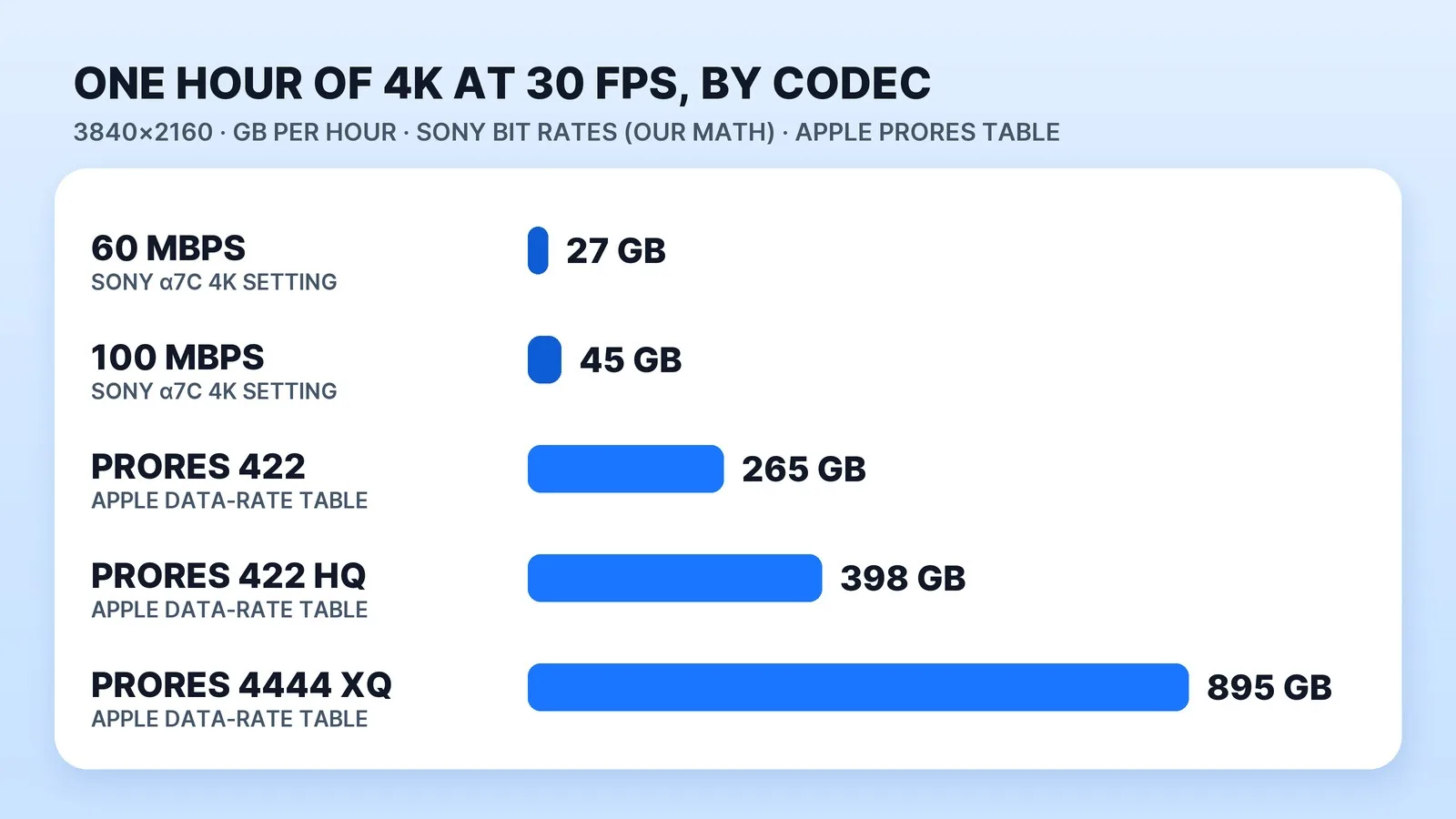
Now run your ratio against those numbers. A 128 GB card holds about 2 hours 50 minutes at 100 Mbps. An event film shot at 40:1 means 400 raw minutes for 10 finished ones: about 300 GB at 100 Mbps, or about 2.7 TB in ProRes 422 HQ. Our video file size calculator does the same sum for your own bitrate and length, and our guide to sending large video files to an editor covers getting that much footage to someone else.
Editors handle volume like this with proxies. Adobe describes them as low-resolution copies of your high-resolution video files, used during the edit to improve performance. Proxies speed up the edit; they don't shrink the shoot. The originals still have to be stored, sent and backed up, which our guide to video file management sets up.
Why Overshooting Costs You Editing Time
The ratio sets the edit, not just the storage bill. Tasty Edits puts editing at 30 to 60 minutes per finished minute on average, and notes that sifting through 10 hours of raw footage takes much more time and money. Cyber Film School's rules of thumb budget an hour per finished minute each for the rough cut, the fine cut and the sound, and warn that on fiction films a shooting ratio above 10:1 starts putting pressure on those rules. Its advice to editors: ask for an estimate of the shooting ratio before taking a project on. Our video editing time calculator collects more published ratios by format.
Doubling the raw footage doesn't double the creative work. It doubles the reviewing, the part that produces nothing on screen, and per-video prices often follow footage length. Replayed's Senior tier charges $349 for 16 to 35 minutes of unedited footage and $559 for 36 to 60 minutes, and our video editing price research shows how other per-video services price by footage length or video type.
Mark Studios is Top Rated on Fiverr with a 4.9★ rating, 8,000+ orders and 99% on time, and its order sheet records the raw footage on each line. From January 2023 to September 2026 the median line recorded 5 minutes of raw footage and only 3.6% recorded more than 30 minutes (outsourcing benchmarks). Five minutes is also the smallest allowance on the studio's marketplace listings, so many of those lines mean five minutes or less. Hour-long shoots are the exception, and they are where a pre-shoot plan saves the most review time. We broke down the hours behind an edit in the real hours behind a 10-minute video, and the market rates are in how much a YouTube video editor costs.
The Pre-Shoot Coverage Gate
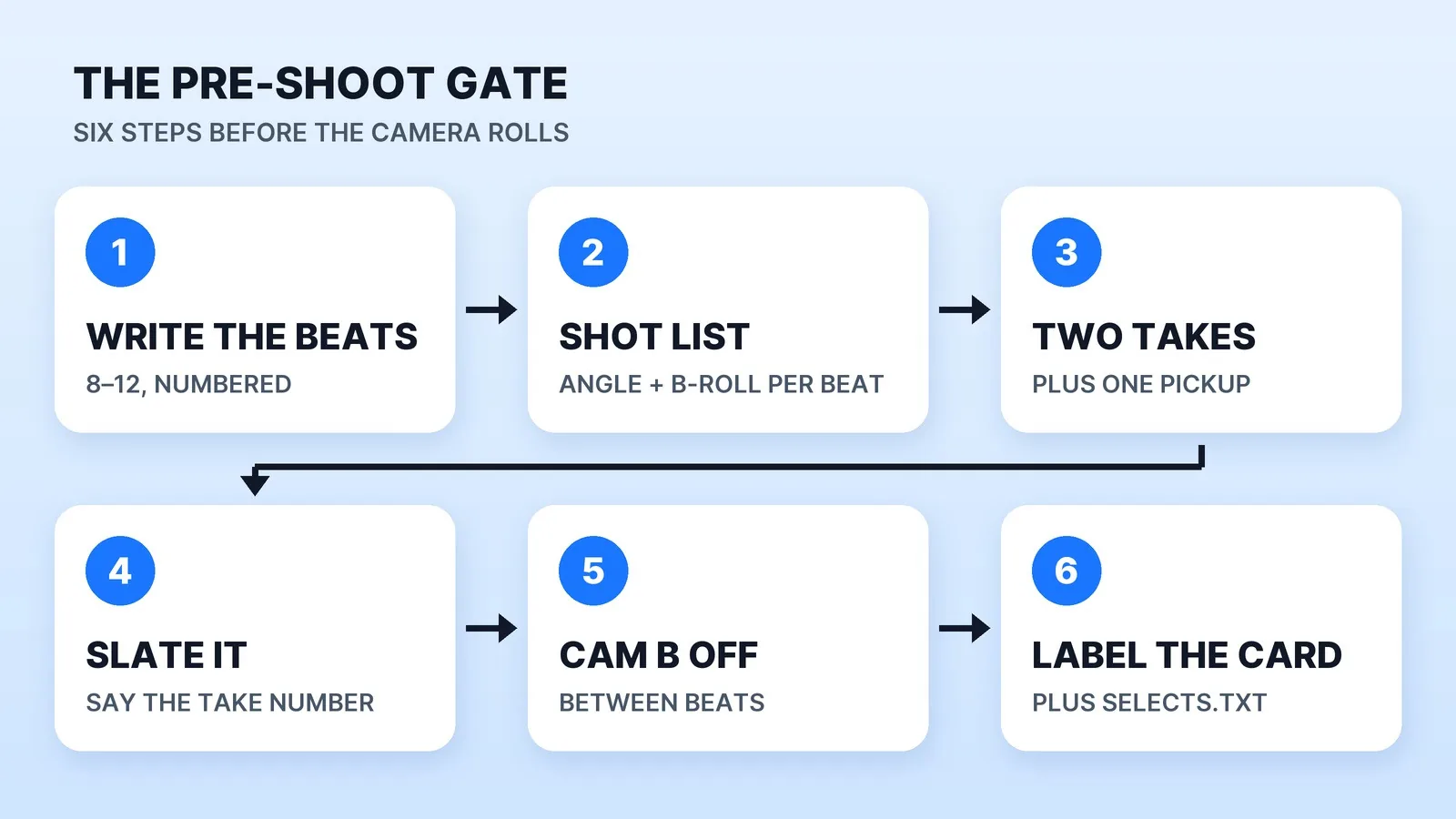
Run this before the camera turns on. It is six lines, and each one targets a habit from the list above.
- Write the beats. Not a word-for-word script: a numbered list of the 8 to 12 things the video says. Anything you shoot that serves no numbered beat is insurance footage. If you do script every word, our script length calculator turns a word count into minutes.
- Turn the beats into a shot list. Each beat gets its angle and its b-roll, and nothing else. Keep it on your phone or on paper on set.
- Cap takes at two, plus one pickup. If a line needs a fourth, rewrite the line.
- Slate every take. Say the take number out loud, or clap once. It gives the editor a sync point and a take log at no cost.
- Stop the second camera between beats, unless the conversation can't be repeated. Continuous coverage is a documentary choice with a documentary ratio.
- Label and offload before the card leaves your hands, with one scheme for every project:
2026-10-28_channel-name_video-slug/
  01_CAM-A/          A-cam, full takes, in order
  02_CAM-B/          B-cam / second angle
  03_BROLL/          named by beat: broll_beat-04_desk.mp4
  04_AUDIO/          recorder files + take log
  05_ASSETS/         logos, lower-third copy, reference links
  SELECTS.txt        beat number -> file name -> timecode of the good take
The SELECTS.txt file takes minutes to write and turns a pile of media into a list of decisions. As Fury Road's post-production supervisor told Avid, "If you can't find footage easily, you simply cannot edit it." The selects file pairs with how to brief a video editor: the brief says what the video is, the selects file says where the pieces are.
Don't trim the raw files down to your selects before sending. Send everything and point at the good takes: an editor who only sees the takes you liked can't fix a fluffed line with a word from take one. In Palm Beach County, Mark Studios can also film the shoot on location and edit it in-house.
The Bottom Line
Plan on 20 to 50 minutes of raw footage for a scripted 10-minute video, two to four hours for a vlog, and more per camera for anything unscripted. Check what that volume costs in storage and review hours before the shoot: your ratio is set by how much you decide in advance, and it is the cheapest part of the pipeline to fix.


