

What Is Retention Editing?
Retention editing is YouTube editing built to keep viewers watching to the end. A retention editor rebuilds the opening so it pays off the title within seconds, cuts every pause and tangent, moves the strongest material earlier and changes the picture wherever attention would dip. The work is judged against your audience retention report, not only against the footage.
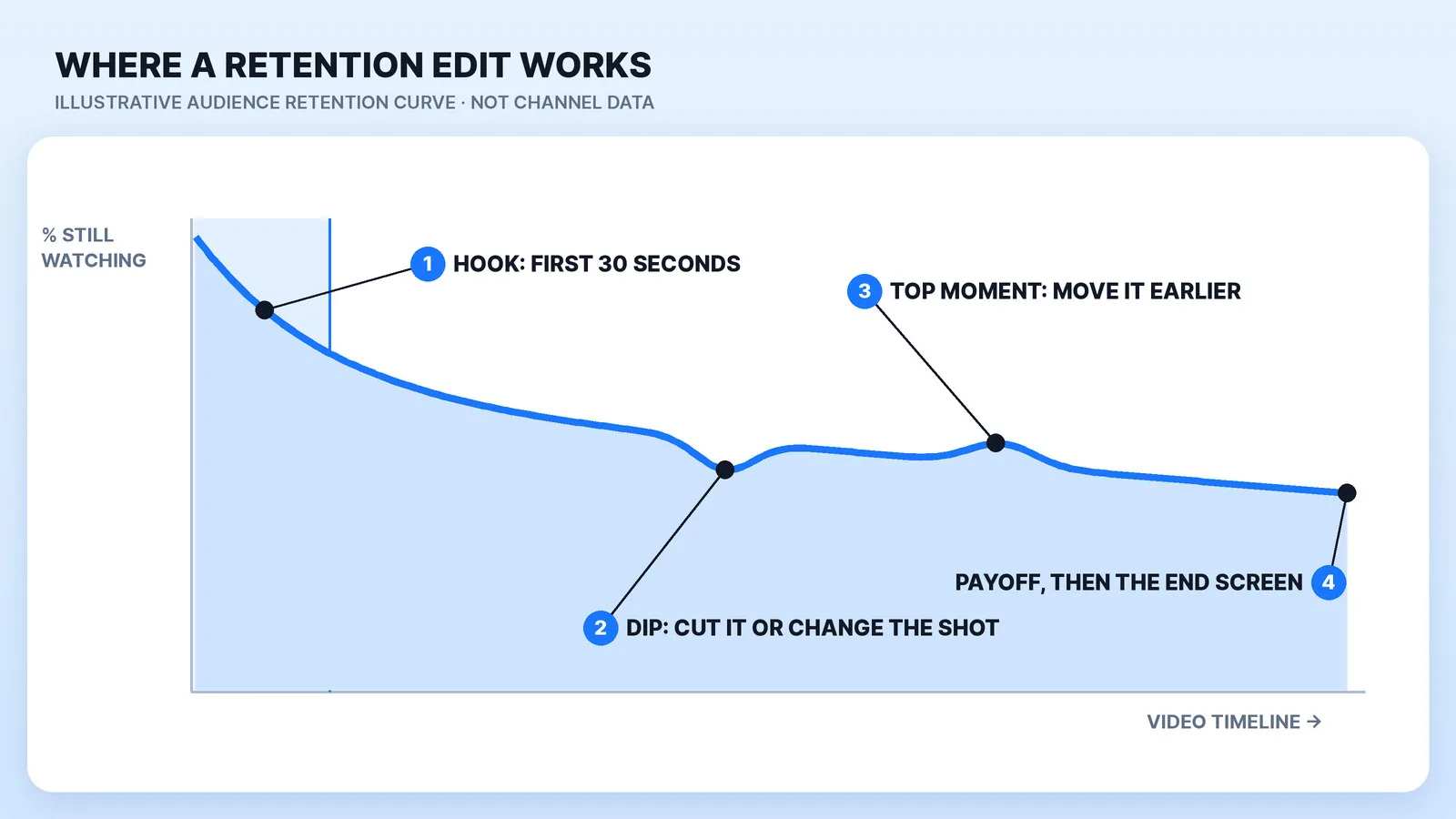
That report is the difference between a retention edit and a clean one. YouTube Studio shows, for each video, the share of viewers still watching after the first 30 seconds, the dips where people skipped or left, and the "top moments" almost nobody left. A standard edit makes the footage tidy. A retention edit uses that graph as the brief.
What a Retention Editor Changes
Five changes, in the order they show up on the graph:
- The hook. The first 30 seconds are recut to confirm what the title and thumbnail promised and to set up the payoff. YouTube's own advice for a weak intro is to check that the title and thumbnail match the video and to "modify the first 30 seconds." The words come from the script, and our guide to hooks and cold opens covers them; the edit decides what's on screen while they're said.
- The order. If your best moment arrives at minute eight, a retention editor moves it, or a piece of it, forward. YouTube's report suggests the same thing when top moments come late, because "audience sizes typically decrease over the length of the video."
- Pacing cuts. Pauses, retakes, repeated points and setup the viewer doesn't need come out. This is where most of the hours go, and it's the craft in our guide to pacing and editing rhythm.
- Pattern changes. B-roll, a punch-in, a graphic, a sound effect or a second angle wherever one shot would otherwise run long.
- The payoff and the exit. The promised answer lands before viewers give up, and the ending hands them to the next video instead of a long goodbye.
How YouTube Measures It, and Why Tricks Backfire
YouTube's key moments report reads the curve for you. A flat line means viewers watched that stretch start to finish, and a gradual decline is normal: "Videos on YouTube generally taper off." Intro is the percentage still watching after 30 seconds. Dips are moments viewers skipped or quit. Spikes are moments rewatched or shared, though YouTube notes a spike can also mean a section wasn't clear. Typical retention compares the video with your 10 latest videos of similar length. The data takes 1–2 days to process, and key moments only appear on videos at least 60 seconds long with 100 or more views.
Why it matters for reach: in 2021 YouTube's VP of Engineering, Cristos Goodrow, wrote that when the company first added watch time to recommendations, views dropped 20% straight away, and that it now measures "valued watchtime": time spent on videos viewers rate four or five stars in surveys. YouTube's How YouTube Works page still lists satisfaction surveys among the signals behind recommendations.
So the target is a viewer who stays and is glad they did. Sound effects on every line, zooms with no reason and a hook that promises more than the video delivers can hold someone for a minute and still read as an amateur edit. Put that in the brief.
What Retention Editing Costs Next to a Standard Edit
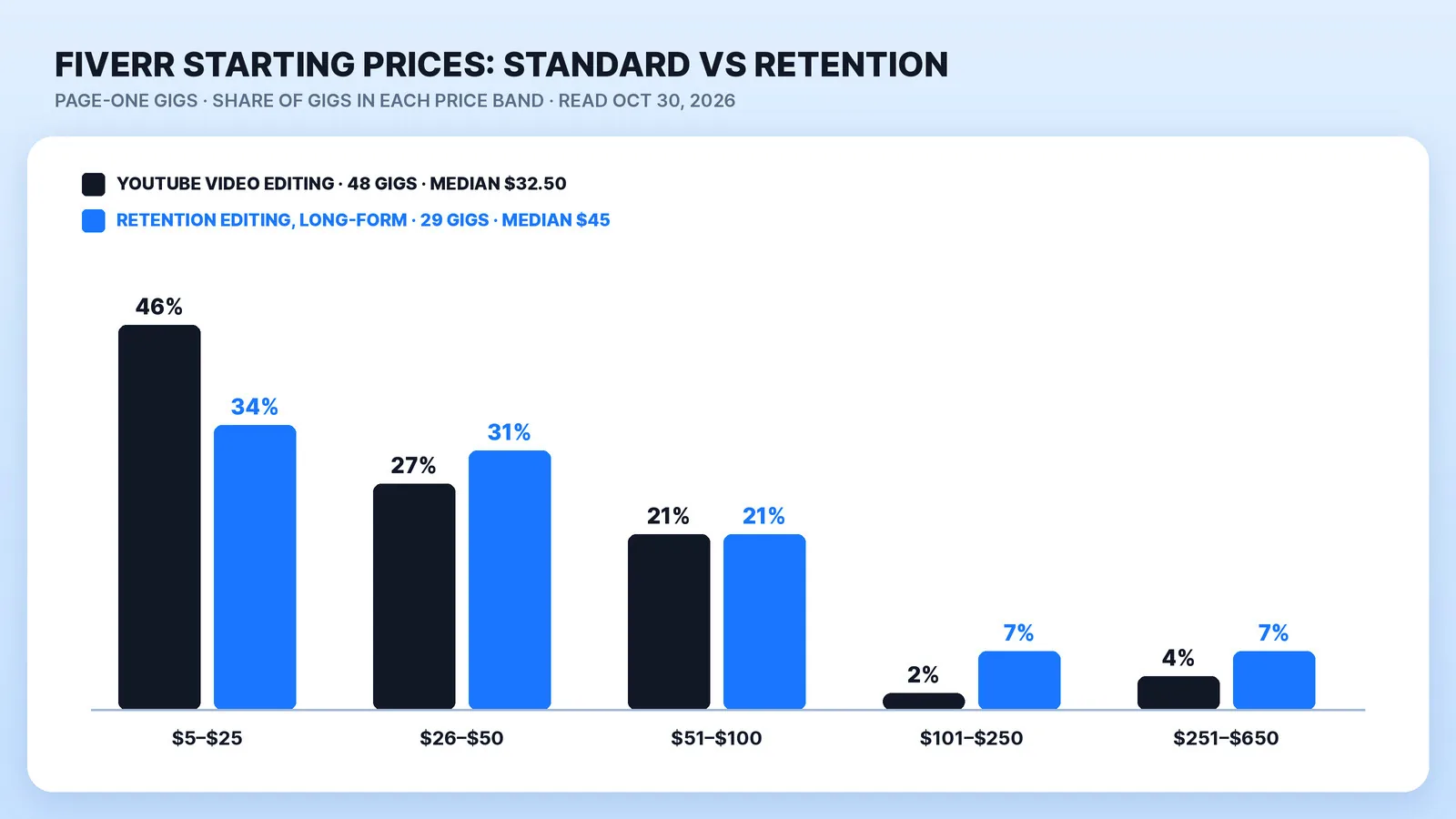
On Fiverr, the label adds a little at the low end. We read the first page of Fiverr's retention editing gigs and of its YouTube video editing search (49,000+ services) on October 30, 2026:
Some Fiverr links on this page are affiliate links: Mark Studios may earn a commission if you buy through them, at no cost to you.
| Fiverr page one, Oct 30, 2026 | Gigs | Starting prices | Median |
|---|---|---|---|
| YouTube video editing | 48 | $5–$315 | $32.50 |
| Retention editing, long-form YouTube | 29 | $5–$650 | $45 |
| Retention editing, Shorts, Reels and TikTok | 16 | $5–$100 | $15 |
Three more gigs on the retention page edit a brand video, an online course and SaaS demos. A starting price is the seller's smallest package, often one short video with one revision, and "high retention" in a gig title is a label, not a test anyone passed.
Above the marketplace, established freelancers and agencies quote retention work per video, and motion graphics are what push the price up. Our YouTube video editing cost guide lays out those per-video and monthly prices. Whoever you hire, ask what the quote covers: a rebuilt hook, reordering and motion graphics, or only tighter cuts.
When Retention Editing Is Worth Paying For
It earns its cost when:
- Viewers came for information and leave when it drags. Explainers, commentary, lists, documentary-style videos and money topics. On finance channels, a viewer who loses the thread at minute three doesn't come back for minute nine.
- Your graph shows a pattern. The intro figure sits below your typical band, or viewers leave at the same kind of section every time: the long setup, the sponsor read, the recap.
- You already get the click. YouTube's impressions report shows how impressions turned into views and watch time. If people click and leave, editing is the fix. If nobody clicks, start with the title and thumbnail.
It earns less when:
- Viewers jump to the step they need. In a tutorial, a dip is often a skip to the answer, and chapters help more than b-roll.
- The slow parts are the point. A long podcast, a calm vlog or a personality channel can lose its tone under constant pattern changes.
How to Brief and Check a Retention Editor: 6 Steps
- Send the graphs. Screenshots of the audience retention report for your last 3–5 videos, with the intro figure and the biggest dip marked.
- Name the promise. Write down the title, the thumbnail idea and the one payoff the viewer is waiting for. Our video editing brief template has a field for each.
- Send one reference with timestamps. The 30 seconds whose pace you want, not a whole channel. In our study of what buyers ask before hiring a video editor, 55% of 698 first messages already included a link or a "like this" reference; how a reference gets matched is its own page.
- Set the dose. Say what's off-limits: no sound effect on every line, keep the pause before a punchline, no meme zooms.
- Review the first 30 seconds first. Approve the hook before the full cut, then give notes with timestamps, as in our guide to revision notes that actually get fixed.
- Judge it on like-for-like videos. After the 1–2 days of processing, compare the intro figure and typical retention on your next five uploads with your last five of similar length, and leave out videos under 100 views.
Where Mark Studios Fits
YouTube video editing at Mark Studios is cut around the retention graph: the hook rebuilt so the payoff is promised early, retakes and tangents out, graphics and b-roll where the talking slows, and Shorts cut from the same upload. Mark has edited for his own channel since 2011 and grew it past 200,000 subscribers.
Mark Studios has delivered 8,000+ orders for 4,500+ clients, holds a 4.9★ average and Top Rated status on Fiverr, delivers 99% on time and has edited work behind 100M+ views. In the same buyer study, 23% of the 698 first messages framed the project as growth, views or retention. If you're weighing a marketplace freelancer against a studio, our comparison of Fiverr, Upwork and an agency puts the fees side by side.
The Bottom Line
Retention editing is a standard edit with a target: the audience retention graph. Pay for it when your videos carry information people stay for and your graph shows where they leave. Brief it with the graph, approve the first 30 seconds before the rest, and judge it on your next five like-for-like uploads.


