Instagram Reels safe zone template
A transparent 1080 × 1920 overlay of the Instagram Reels safe zone, from Meta's own margins plus the button column we measured in the app. Lay it over your edit, then check a finished frame below.
- Free, no sign-up
- Your file stays on your device
- Specs checked October 10, 2026
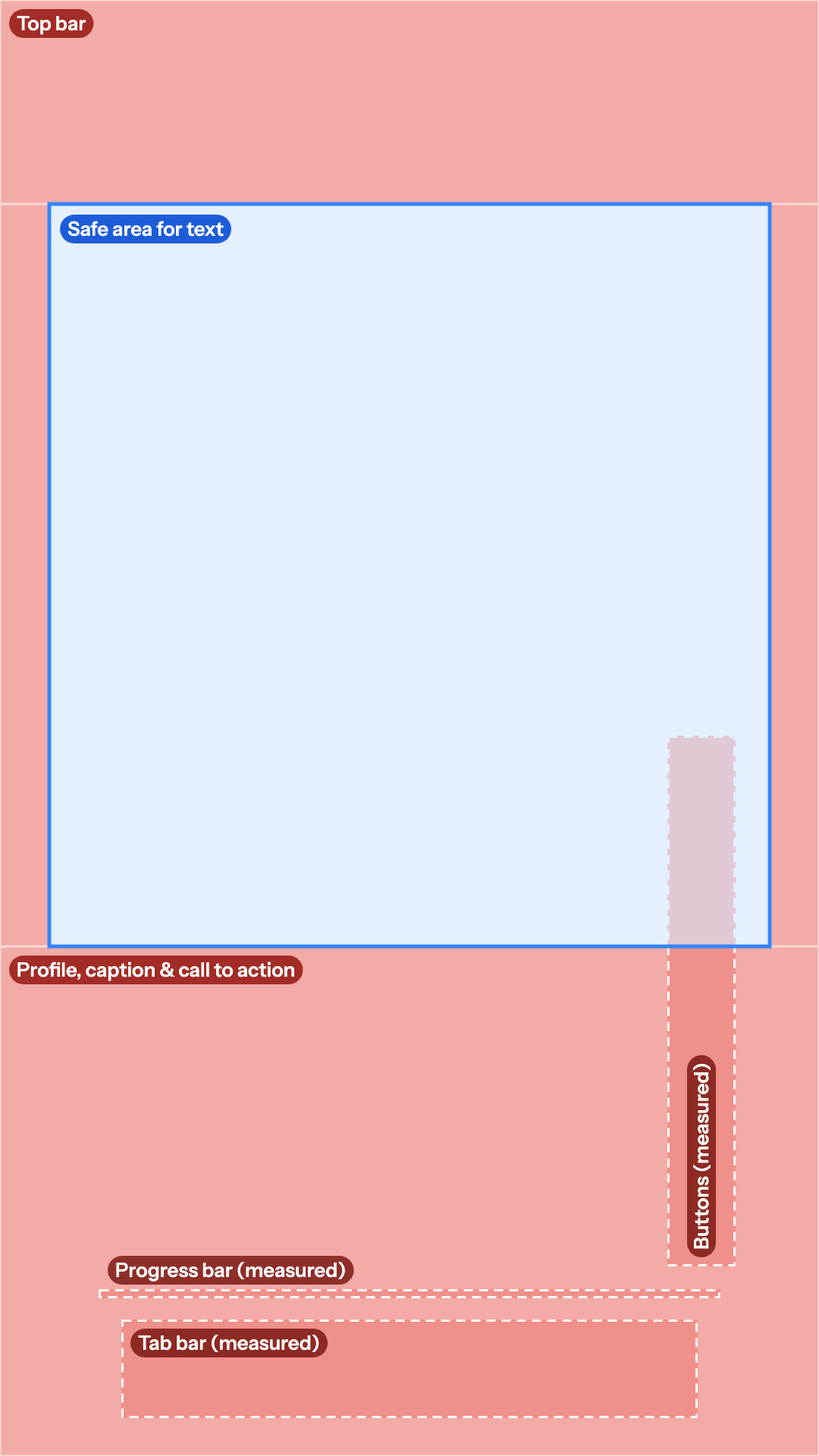
Free Instagram Reels safe zone overlay
A 1080 × 1920 PNG with a transparent background, so your footage shows through while you edit.
- Meta's margins: 14% top, 35% bottom, 6% each side
- Buttons, progress bar and tab bar measured from the app, dashed
- Safe area for text outlined in blue
Other apps: TikTok · YouTube Shorts · Instagram Story · Facebook Reels · all four in one
Check a frame from your edit against it: drop a still or the finished video and the overlay is drawn on top.
Drop a 9:16 frame or video
Or paste an image with Ctrl+V or ⌘V. PNG, JPG, WebP, MP4, MOV or WebM. Your file stays on your device.
No file yet? Download the transparent Instagram Reels template (1080×1920 PNG).
Example: a Short Mark Studios edited. This is the 540-pixel still from our site, so it is smaller than a real 1080 × 1920 export.
0:00
Platform
Show
The PNG is drawn in your browser at your file's size. Overlay only is a 1080 × 1920 transparent template you can drop on an editing timeline.
Instagram Reels safe zone dimensions
| Platform | Top | Bottom | Left | Right | Safe area | Source |
|---|---|---|---|---|---|---|
| Instagram Reels | 14% (269 px) | 35% (672 px) | 6% (65 px) | 6% (65 px) | 950 × 979 px | Meta Ads Guide: Instagram Reels |
Meta's ads guide for Instagram Reels asks you to keep at least 14% of the top, 35% of the bottom and 6% of each side free of text, logos and other key elements. On a 1080 × 1920 frame that is 269 pixels at the top, 672 at the bottom and 65 on each side, which leaves a 950 × 979 pixel safe area: the blue box on this template.
Meta gives no number for the like, comment, repost and share buttons, so we measured them from the screenshots Instagram shows on the App Store: they sit 880 to 970 pixels across and 970 to 1,670 pixels down, which starts about 280 pixels above Meta's 35% line. The template draws them with a dashed outline, along with the progress bar and the tab bar we measured. Keep text in the lower half of the safe area left of about 880 pixels.
Facebook Reels uses the same percentages, with its buttons lower (1,130 to 1,870 pixels down by our measurement), so a Reel that clears Instagram's buttons clears Facebook's too. Facebook has its own page with its numbers and overlay: the Facebook Reels safe zone template. Making Stories? Meta gives them the same margins without the button column: the Instagram Story safe zone template. To check the file itself, use the Instagram Reels checker.
What we measured ourselves
| Platform | Element | Measured position | Screenshot |
|---|---|---|---|
| Instagram Reels | Like, comment, repost and share buttons, and the audio tile | 880–970 across, 970–1,670 down | Instagram on the App Store |
| Instagram Reels | Progress bar | 1,700–1,712 down | Instagram on the App Store |
| Instagram Reels | Tab bar, floating over the reel | 1,740–1,870 down | Instagram on the App Store |
How to use the template in your editor
The PNG is a guide, not part of your video: put it on the top track, place text and faces inside the blue box, then switch it off before you export.
- CapCut: on the desktop app, import the PNG, drag it onto a track above your video and stretch it to fill the 9:16 canvas. On the phone, tap Overlay, then Add overlay, pick the PNG and pinch it to fill the frame. Delete it before you export.
- Premiere Pro: drag it to the top video track, right-click it and choose Set to Frame Size. Turn off that track's eye icon before you export.
- DaVinci Resolve: drop it on a track above your footage; on a 1080 × 1920 timeline it already fits. Disable the track before you render.
- Final Cut Pro: connect it above the primary storyline, then select it and press V to disable it before you share.
- Canva: upload it to a 1080 × 1920 design, stretch it over the page and lock it while you work. Delete it before you download.
Editing at 720 × 1280 or in 4K? Scale the PNG to fill the frame and the margins stay in proportion.
Sources: Meta Ads Guide: Instagram Reels · screenshots measured: Instagram on the App Store. Read on October 10, 2026.
Embed this template
Teachers, bloggers and course creators can put this Instagram Reels safe zone template on their own page for free. Paste the code below into your page's HTML. It loads from markstudios.com, so it stays current when we update the numbers.
Questions, answered.
Anything else? Message Mark and you'll get a written reply within one business day.
What are the Instagram Reels safe zone dimensions?
Meta’s numbers are percentages: keep 14% of the top, 35% of the bottom and 6% of each side clear. On a 1080 × 1920 Reel that is 269, 672 and 65 pixels, leaving a 950 × 979 pixel safe area in the middle of the frame.
Where are the Instagram Reels buttons?
In the App Store screenshots we measured, the like, comment, repost and share buttons and the audio tile sit 880 to 970 pixels across and 970 to 1,670 pixels down on a 1080 × 1920 frame. They start about 280 pixels above Meta’s 35% line, so text that runs to the right edge in the lower half of the safe area can end up under the like button.
How do I use the Reels template in CapCut or Premiere Pro?
Put the PNG on a track above your video and fill the 9:16 frame with it (in Premiere Pro, right-click it and choose Set to Frame Size). Keep text inside the blue box and left of the dashed button column, then hide the overlay track or delete the clip before you export.
Is the Facebook Reels safe zone the same?
Meta gives Facebook Reels the same percentages: 14% at the top, 35% at the bottom and 6% on each side. Its buttons sit lower, 1,130 to 1,870 pixels down by our measurement, so a Reel that clears Instagram’s buttons clears Facebook’s too.
Why are the Reels numbers percentages?
That is how Meta’s ads guide gives them, so they scale with the frame: on a 1080 × 1920 export, 14% of the height is 269 pixels. Meta also warns that on screens taller than 9:16, key elements can end up too close to the edges, so leave a little extra room.
Rather have your Reels edited to fit?
Mark Studios edits Reels, TikToks and Shorts with captions placed inside each app’s safe zone, and you work directly with Mark.
- Founder-led US company
- NDAs by default
- Stripe & PayPal payments
- Top Rated on Fiverr