YouTube end screen template
A free transparent 1920 × 1080 PNG with two video boxes and a subscribe button at the sizes YouTube draws them, inside the area its end screens use. Lay it over the last 20 seconds of your edit, or move the boxes on your own frame below.
- Free, no sign-up
- Your file stays on your device
- Measured October 16, 2026
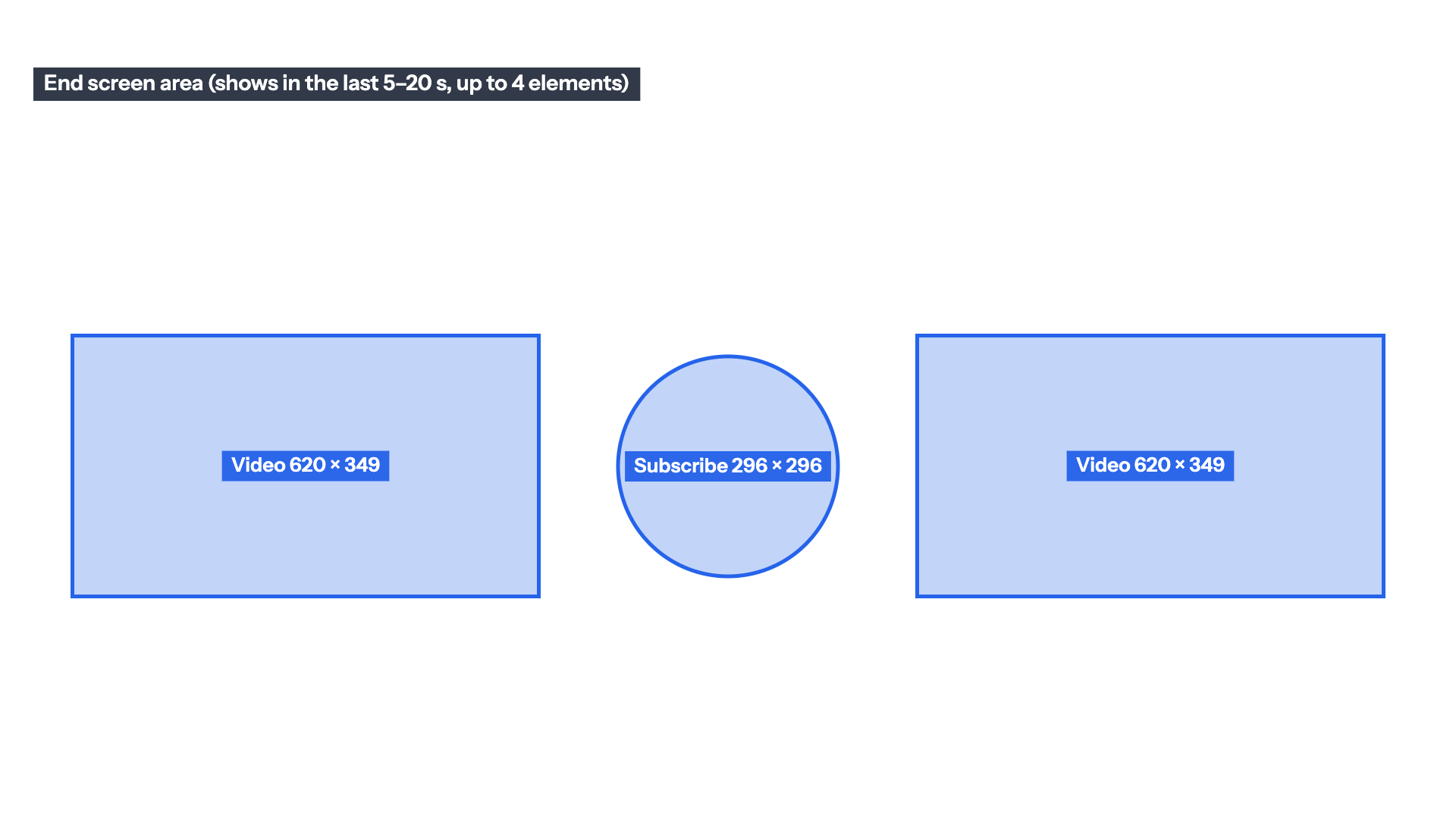
Free end screen template
A transparent PNG for the top track of your outro, hidden before you export.
- Two 620 × 349 video boxes and a 296 × 296 subscribe circle
- Inside the area every end screen element we measured used
- 1920 × 1080, transparent background
Need another layout? Build it on your own frame below, or in the end screen checker
Drop the last frame of your edit, or the video, to place up to four elements on it and download your own layout.
Drop the last frame or the video
Or paste an image with Ctrl+V or ⌘V. PNG, JPG, WebP, MP4, MOV or WebM. Your file stays on your device.
No video yet? Download the 1920 × 1080 end screen template (two videos and a subscribe button inside the area YouTube allows, PNG).
Example: the end of an outro Mark Studios designed, with YouTube's elements placed on its slots. This is the 540-pixel still from our site, so it is smaller than a real 1920 × 1080 export.
Measured element area
0:00
Elements
Up to four on a 16:9 video. Drag a box on the frame, or select it and use the arrow keys.
Checks
Without the frame, the PNG is a transparent template you can lay over the last 20 seconds of your edit.
End screen element sizes, measured
YouTube Help says end screens go in the last 5 to 20 seconds of a video at least 25 seconds long, with up to four elements on a 16:9 video, but it gives no pixel sizes. So we measured them: YouTube's player loads each end screen as data, with every element's position and width as a share of the frame. Across 155 elements on 77 public 16:9 videos from 16 channels, read on October 16, 2026, video boxes ran from 620 × 349 to 862 × 485 on a 1920 × 1080 frame, and subscribe, channel and link elements were all 296 × 296.
| Element | On a 1920 × 1080 frame | What we saw |
|---|---|---|
| Video | 620 × 349 to 862 × 485 | 93 measured: 67 at 620 × 349, the smallest, and 18 at 862 × 485, the largest |
| Playlist | 862 × 485 | Both we found. The checker gives playlists the video size range, since both are 16:9 boxes |
| Subscribe or channel | 296 × 296, drawn as a circle | All 33 we measured |
| Link | 296 × 296 | All 27 we measured |
| Furthest out | 44 px from the left and right, 141 px from the top, 164 px from the bottom | No element sat closer to an edge; the dashed outline in the checker |
This template lays out two 620 × 349 video boxes either side of a subscribe circle, all inside the dashed area no measured element went past: 44 pixels from the sides, 141 from the top and 164 from the bottom. Put it on the top track over the last 20 seconds, design the outro around the boxes, then hide it before you export and add the real elements in YouTube Studio on the same spots.
What YouTube says
| Rule | What YouTube says |
|---|---|
| End screen length | The last 5 to 20 seconds of the video |
| Elements | Up to 4 on a standard 16:9 video. Other aspect ratios may have a lower limit |
| Video length | At least 25 seconds |
| Element types | Video, playlist, subscribe, another channel, and a link to an outside website (YouTube Partner Program only) |
| Video or playlist picks | Your most recent upload, the best one for each viewer, or any public or unlisted video or playlist |
| Custom image | At least 300 × 300 pixels recommended |
| While it shows | Card teasers and video watermarks are hidden |
| Where it doesn’t show | Videos set as made for kids, the YouTube Music and YouTube Kids apps, mobile web (iPad excepted), Flash and 360 videos. Viewers can also hide end screens |
| Placement | Drag elements in Studio’s editor, with a grid, snap to grid and snap to element. No pixel sizes or margins are given |
Source: YouTube Help: Add end screens to videos, read on October 16, 2026. Element sizes and placement measured by Mark Studios on October 16, 2026.
Embed this template
Teachers, bloggers and course creators can put this YouTube end screen template on their own page for free. Paste the code below into your page's HTML. It loads from markstudios.com, so it stays current when we update the numbers.
Questions, answered.
Anything else? Message Mark and you'll get a written reply within one business day.
What size is the YouTube end screen template?
It is 1920 × 1080 pixels, the size of a 1080p video, with a transparent background. For a 4K edit, scale it to 3840 × 2160 and the boxes stay in proportion.
What size are YouTube end screen elements?
YouTube doesn’t publish them. In the 155 elements we measured on 1920 × 1080 frames, video and playlist boxes ran from 620 × 349 to 862 × 485 pixels, and subscribe, channel and link elements were 296 × 296; subscribe and channel elements show as circles.
How do I use the end screen template in Premiere Pro or CapCut?
Put the PNG on the top video track over the last 5 to 20 seconds and fill the frame with it (in Premiere Pro, right-click it and choose Set to Frame Size). Build the outro around the boxes, turn the template track off before you export, then add the real elements in YouTube Studio on the same spots.
How long is a YouTube end screen?
YouTube lets you add one to the last 5 to 20 seconds of a video that is at least 25 seconds long. Whatever sits under the boxes is covered while they show, so keep faces and text clear of them for that stretch.
Can I change the layout?
Yes. Drop the last frame of your edit, or the video, in the checker on this page, add up to four elements, drag them into place and download that layout as a PNG.
Rather have the outro made for you?
Custom outros timed for YouTube’s end screen and built from your logo and colors, and you work directly with Mark.
- Founder-led US company
- NDAs by default
- Stripe & PayPal payments
- Top Rated on Fiverr